24
A-S2000
A-S2000
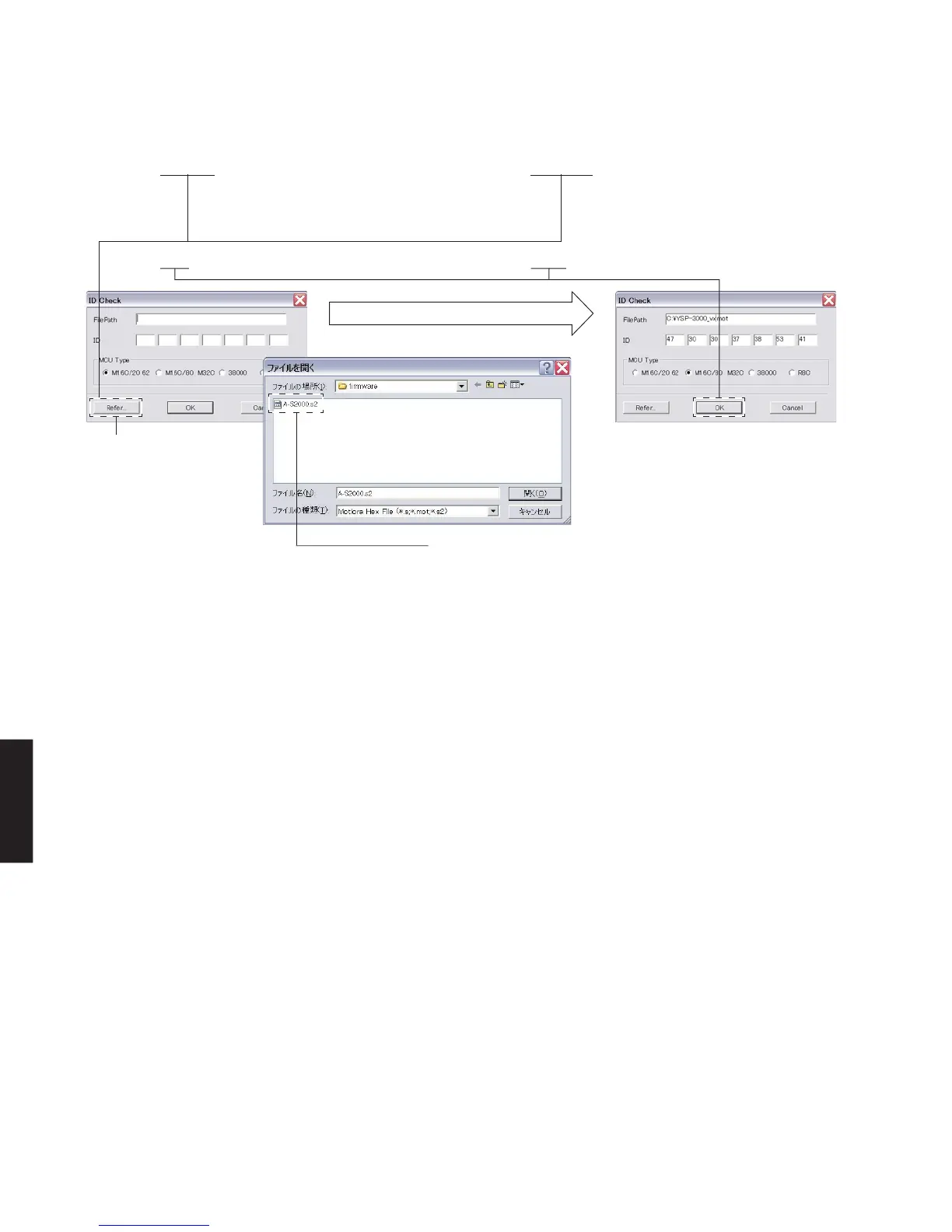
Fig. 4
13. “ID Check” is displayed. (Fig. 4)
Click [Refer...], and select “A-S2000.s2”. (Fig. 4)
* The ID code and MCU type are
loaded when the file is selected.
(Fig. 4)
Click [OK]. (Fig. 4)
13.IDCheckが表示されます。
[Refer...]をクリックし、A-S2000.s2を選択し
ます。(Fig.4)
※ ID、およびMCU Typeは書き込み
ファイル選択時、自動的に取り込ま
れます。(Fig.4)
[OK]をクリックします。(Fig.4)
When [Refer...] is clicked, the
open file screen is displayed.
[Refer...]をクリックすると
ファイルを開くが表示されま
す。
Select the firmware “A-S2000.s2”.
ファームウェアA-S2000.s2を選択します。


 To Next Page