25
A-S2000
A-S2000
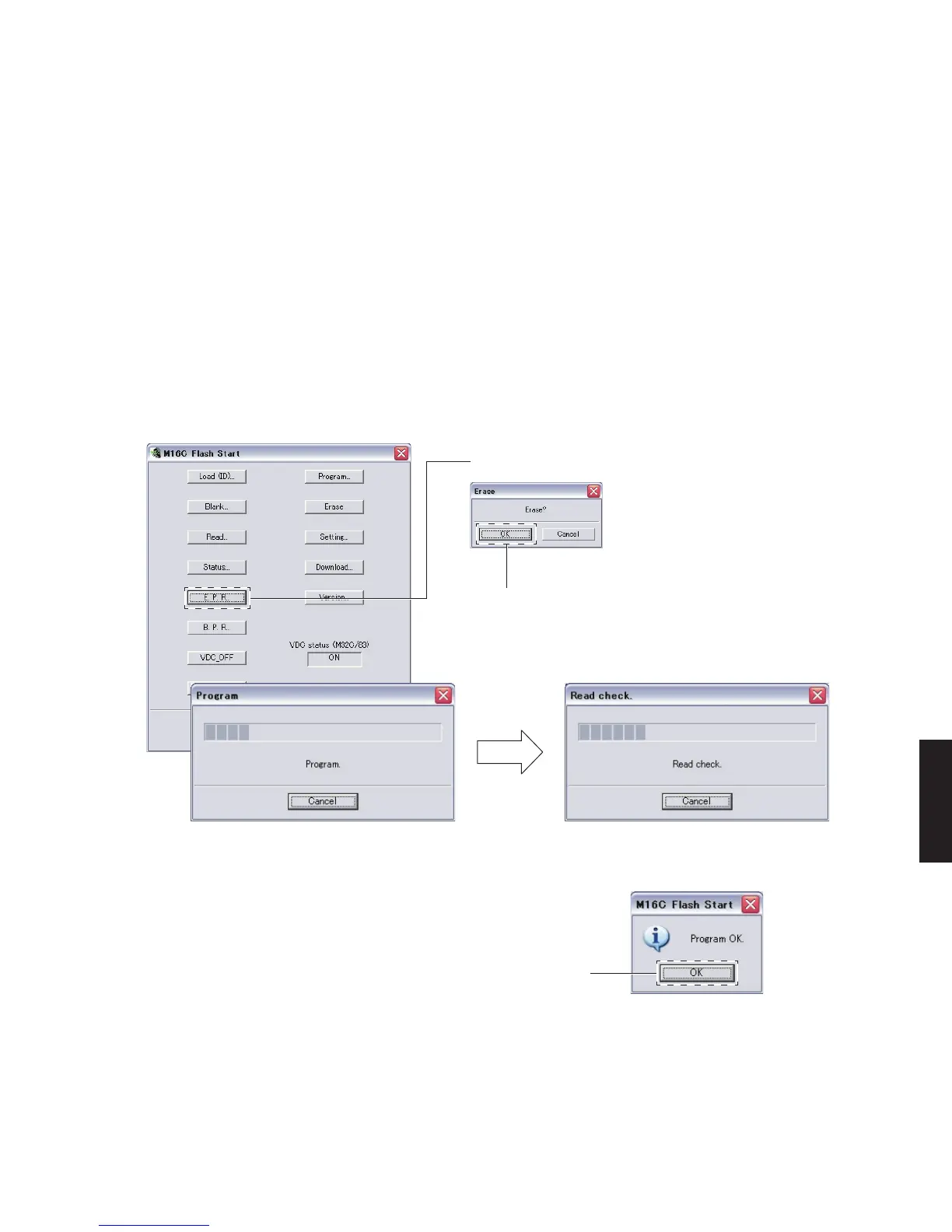
14.M16CFlashStartが表示されます。(Fig.5)
[E.P.R...]をクリックすると、EraseOK?が表
示されます。(Fig.5)
[OK]をクリックし、書き込みを開始します。
(Fig.5)
15. 書き込み完了後、ProgramOK.が表示されます。
(Fig.5)
[OK]をクリックします。(Fig.5)
16.POWERON/OFFスイッチをOFFにします。
17. 本機の電源コードをACコンセントから抜きます。
18.FlashSta.exeを終了します。
19. RS232Cクロスケーブル、RS232C変換アダプ
ター、カード電線を取り外します。
14. “M16C Flash Start” is displayed. (Fig. 5)
Click [E.P.R...], and “Erase OK?” is displayed.
(Fig. 5)
Click [OK] and start writing. (Fig. 5)
15. When writing is completed, “Program OK.” is dis-
played. (Fig. 5)
Click [OK]. (Fig. 5)
16. Set the “POWER ON/OFF” switch to the OFF po-
sition.
17. Disconnect the power cable of this unit from the
AC outlet.
18. End "FlashSta. exe."
19. Disconnect the RS232C cross cable, RS232C
conversion adapter and flexible flat cable.
Fig. 5
Collating / 照合中
When click [E.P.R...], “Erase OK?” is displayed.
[E.P.R...]をクリックすると、EraseOK?が表示されます。
When click [OK], writing is started.
[OK]をクリックすると、書き込みを開始します。
Writing / 書き込み中
Writing completed / 書き込み完了
Click [OK].
[OK]をクリックします。


 To Next Page