CL Editor Owner’s Manual
22
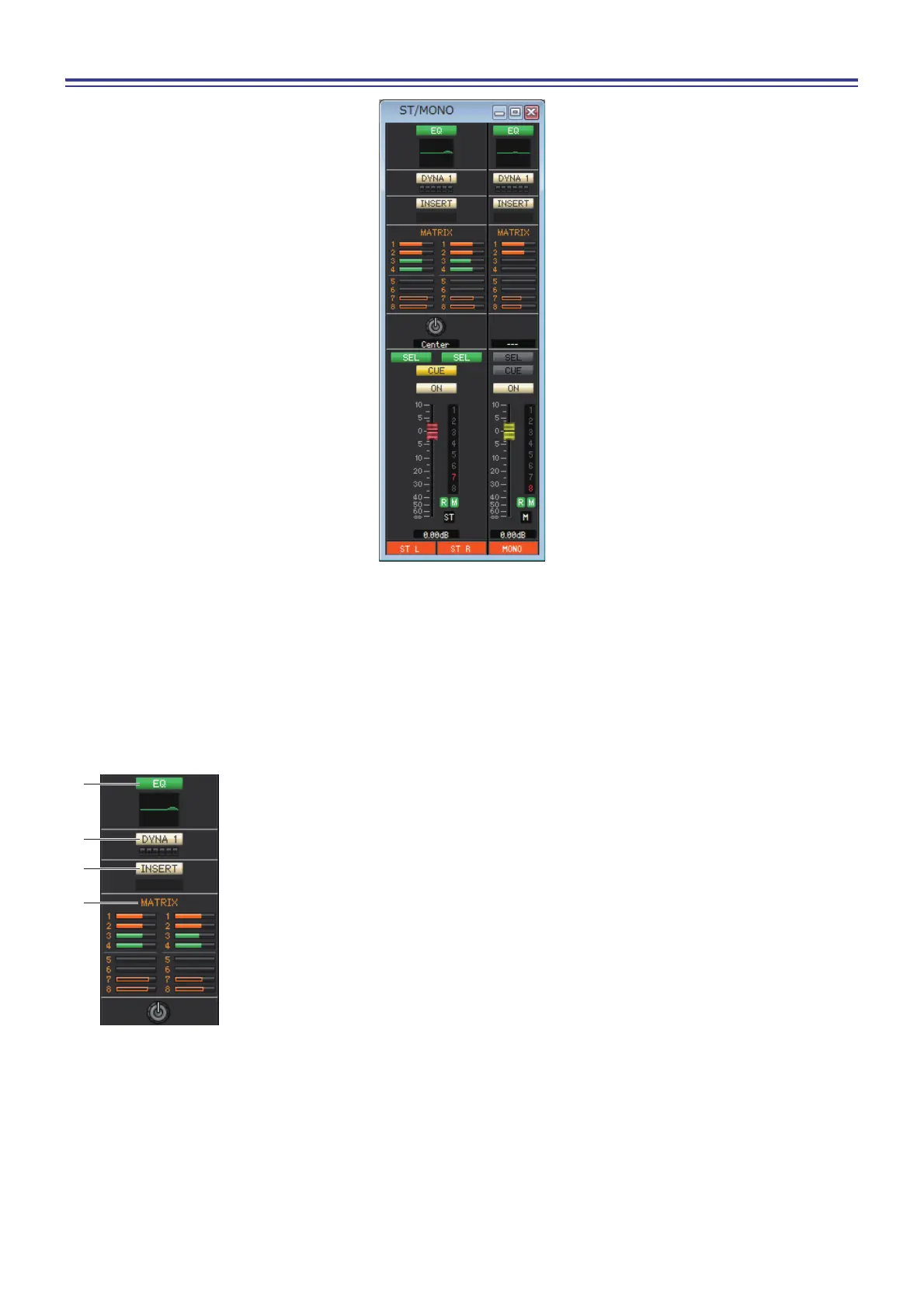
STEREO/MONO window
In this window you can view and edit the parameters of the STEREO and MONO channels. The parameters shown in the
window can be selected from the [View] menu or the menu that appears when you right-click (<control> key + click) in
the window.
You can access this window in the following ways.
• From the [Windows] menu, choose [Overview] and then choose “STEREO/MONO”
• Use the bank select keys in the Master window to turn on the [ST] button
1 EQ (Equalizer)
Switches the EQ on/off (the L/R settings are linked.) This is the same as the equalizer for
INPUT CH (➥ p.13.)
2 DYNA1 (Dynamics 1)
Switches the dynamics processor on/off. This is the same as the dynamics 2 for INPUT CH
(➥ p.13.)
3 INSERT
Enables/disables the insert-in. (The L/R settings are linked.)
4 MATRIX (MATRIX SEND)
Here you can view and edit the send levels of the signals sent from the STEREO/MONO
channel to MATRIX 1–8 bus. The method of operation and the meaning of the display are
the same as for MATRIX in the MIX window (➥ p.18.)



 To Next Page