CL Editor Owner’s Manual
34
8 TYPE
Drag the knob in the screen to select the HPF (High Pass Filter) or BPF (Band Pass Filter.)
9 Q
Adjust the Q level of the frequency range at which the key-in signal will activate the de-esser.
0 KEY IN SOURCE
The key-in signal is set to the SELF POST EQ.
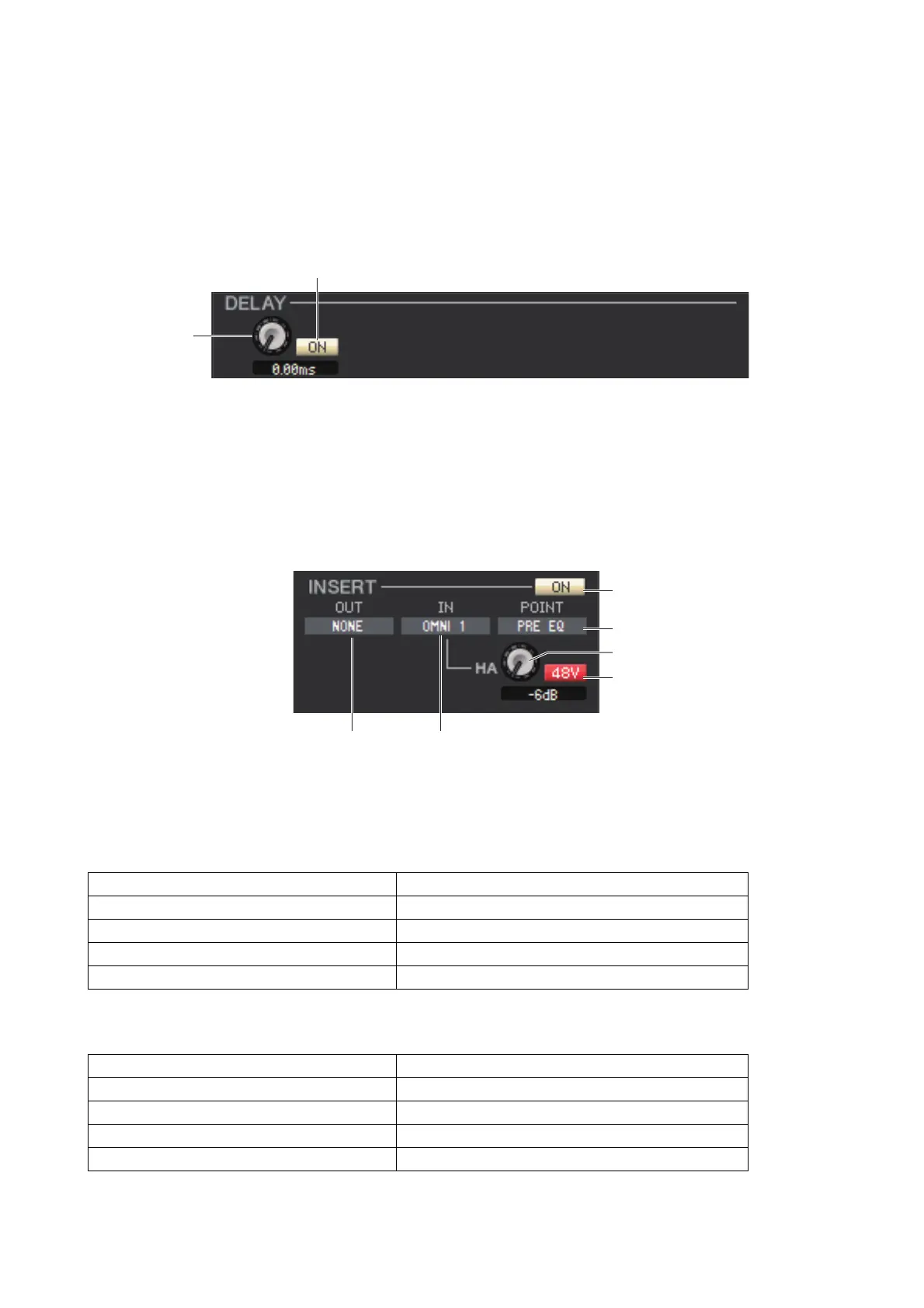
❏ DELAY
1 ON
Turns the delay on/off of the currently selected channel.
2 Delay time
Drag the knob in the screen to adjust the delay time of the currently selected channel.
❏ INSERT (except for ST IN channels)
1 ON
Enables/disables insert-in/out.
2 OUT (Insert out)
Click this to select the output port that will be assigned to insert-out, from the following choices.
3 IN (Insert in)
Click this to select the input port that will be assigned to insert-in, from the following choices.
4 POINT (Insert point)
Selects the position at which insert-in/out will be patched. Choose from PRE EQ, PRE FADER, or POST ON.
NONE No assignment
OMNI 1-OMNI 8 OMNI OUT jacks 1–8
SLOT1-1, SLOT1-2...SLOT3-15, SLOT3-16 Output channels of an I/O card installed in slots 1–3
FX1L(A), FX1R(B)...FX8L(A), FX8R(B) L/R inputs of EFFETC rack 1–8
PR1L(A), PR1R(B)...PR8L(A), PR8R(B) L/R inputs of PREMIUM rack 1–8
NONE No assignment
OMNI 1-OMNI 8 OMNI IN jacks 1–8
SLOT1-1, SLOT1-2...SLOT3-15, SLOT3-16 Input channels of an I/O card installed in slots 1–3
FX1L(A), FX1R(B)...FX8L(A), FX8R(B) L/R outputs of EFFETC rack 1–8
PR1L(A), PR1R(B)...PR8L(A), PR8R(B) L/R outputs of PREMIUM rack 1–8
1
2
1
4
5
6
23



 To Next Page