178 Chapter 17—Automix
DM2000—Owner’s Manual
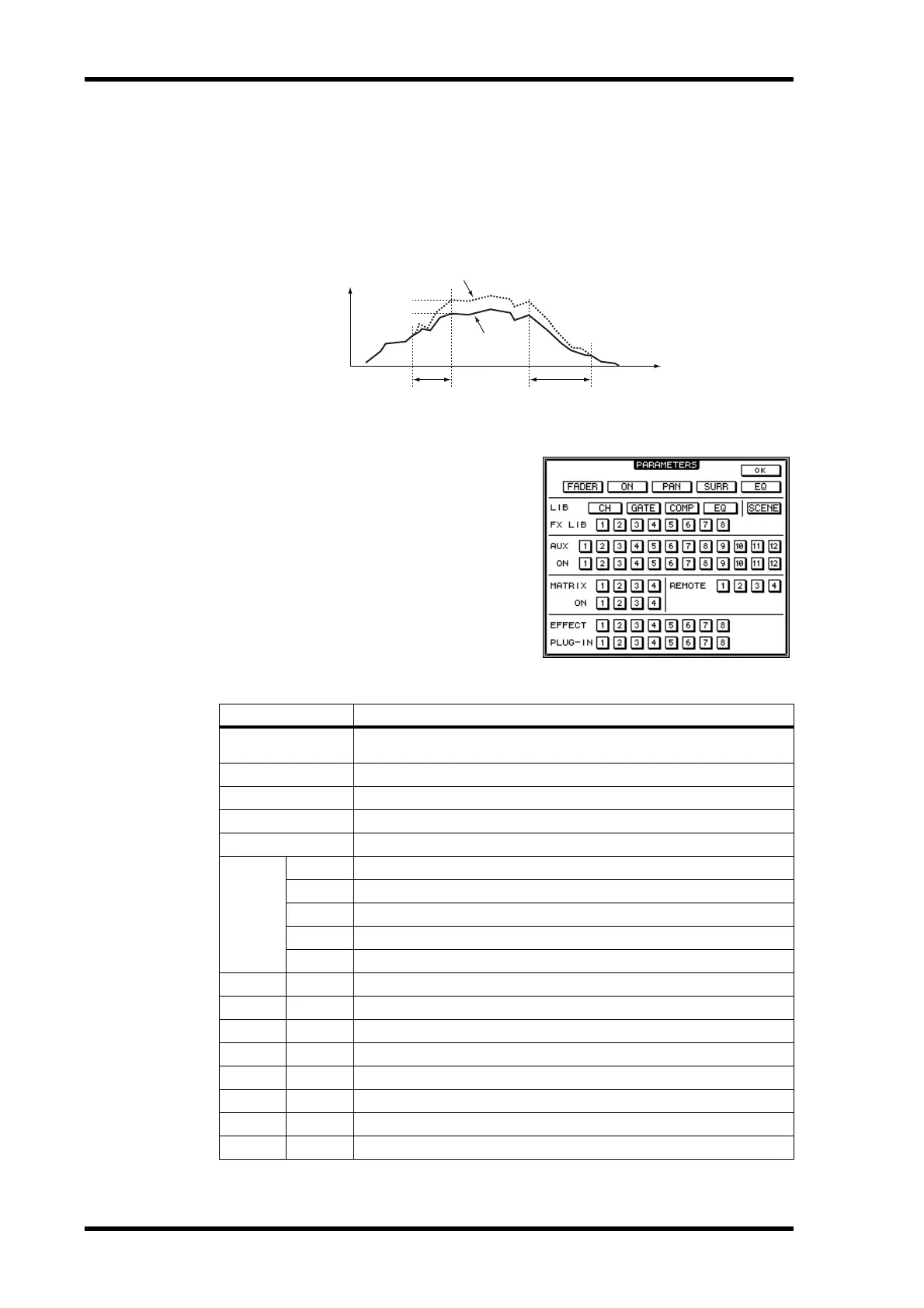
TRIM EDIT: These parameters are used to specify the TRIM IN and TRIM OUT times and
the trim level, which can be set in 0.5 dB steps. The TRIM IN parameter determines the
time in which the fader level must achieve the specified trim amount. The TIME SETTING
IN point determines the point at which trimming starts.
The TRIM OUT time determines the time from which the Fader level can start returning to
the previous level. The TIME SETTING OUT point determines the point at which trim-
ming ends.
PARAM: Pressing this button opens the
PARAMETERS window, which is used to
specify which parameters will be erased, cop-
ied, moved/merged, or trimmed. A parameter
is selected when its button appears high-
lighted. Multiple parameters can be specified.
You can select all parameters by double-click-
ing any parameter button. A confirmation
message appears and you can select one or all
parameters.
Button Events
FADER
Channel Fader events (Inputs Channels, Bus Out masters, Aux Send masters,
Matrix Send masters, and the Stereo Out)
ON
Channel Mute events
PAN
Input Channel pan events
SURR
Input Channel surround pan, LFE level, and DIV parameter events
EQ
Channel EQ events
LIB
CH
Channel library recall events
GATE
Gate library recall events
COMP
Comp library recall events
EQ
EQ library recall events
SCENE
Scene recall events
FX LIB 1–8
Effects library recall events of each internal effects processor
AUX 1–12
Level events of each Aux Send
ON 1–12
Mute events of each Aux Send
MATRIX 1–4
Level events of each Matrix Send
ON 1–4
Mute events of each Matrix Send
REMOTE 1–4
User Defined Remote Layer events
EFFECT 1–8
Parameter events for each internal effects processor
PLUG-IN 1–8
Parameter events for each Plug-In
TRIM IN
TRIM OUT
Time
Existing data
Tr im: –
x
dB
IN OUT
Tr immed data



 To Next Page