23
RX-V861/HTR-6080/DSP-AX861SE/DSP-AX861
RX-V861/HTR-6080/DSP-AX861SE/
DSP-AX861
Collating / 照合中
10.[E.P.R...]ボタンを押すと、EraseOK?が表示さ
れます。(Fig.4)
[OK]ボタンを押し、書き込みを開始します。(Fig.4)
11. 書き込み完了後、ProgramFinishedが表示されま
す。(Fig.4)
[OK]ボタンを押します。(Fig.4)
12. 本機の電源コードをACコンセントから抜きます。
13.FlashSta.exeを終了します。
14.RS232Cクロスケーブル、RS232C変換アダプ
ター、カード電線を取り外します。
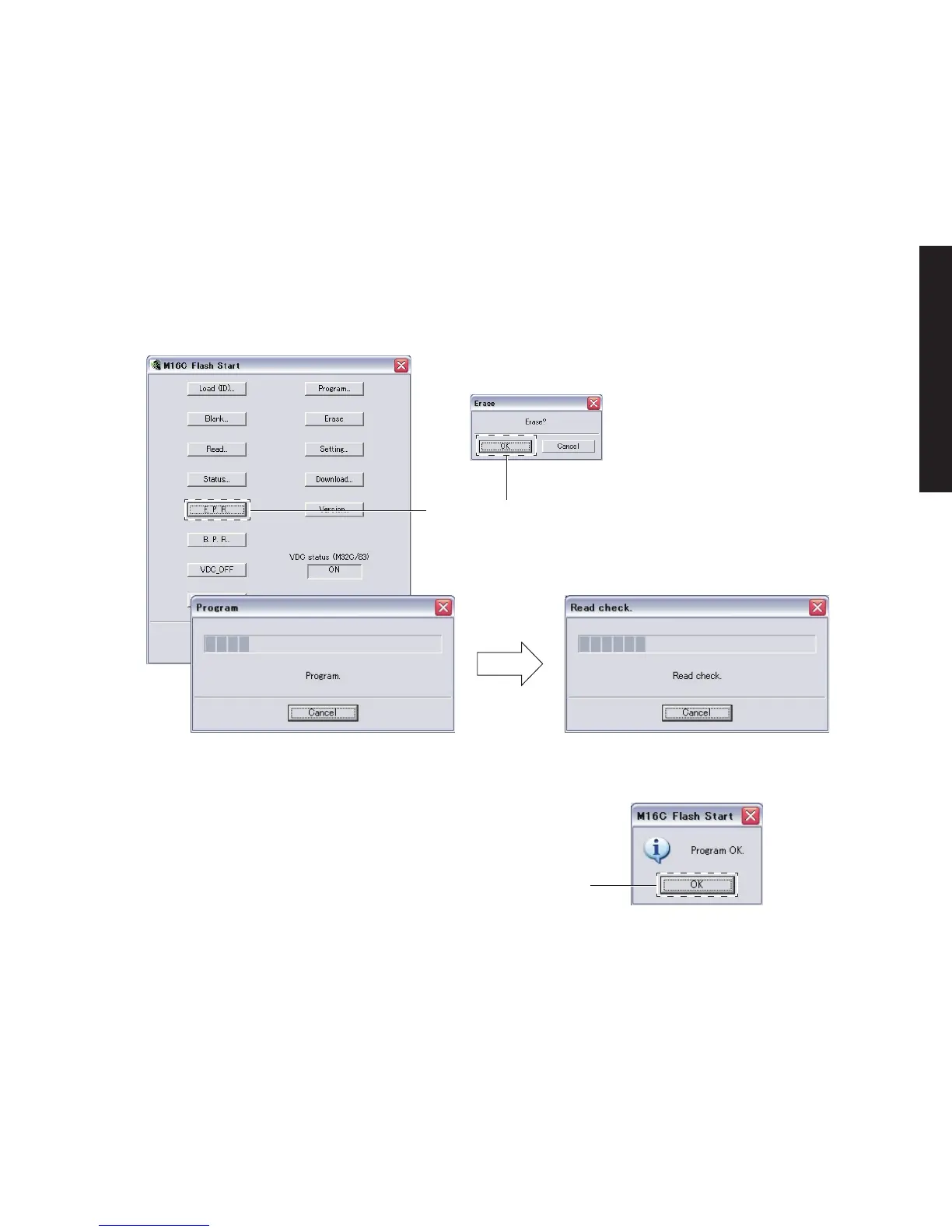
10. Press the [E.P.R...] button, and “Erase OK?” is
displayed. (Fig. 4)
Press the [OK] button and start writing. (Fig. 4)
11. When writing is completed, “Program Finished” is
displayed. (Fig. 4)
Press the [OK] button. (Fig. 4)
12. Disconnect the power cable of main unit from the
AC outlet.
13. End “FlashSta. exe.”
14. Disconnect the RS232C cross cable, RS232C con-
version adapter and flexible flat cable.
Fig. 4
When the [E.P.R...] button is pressed, “Erase OK?” is displayed.
[E.P.R...]ボタンを押すと、EraseOK?が表示されます。
When the [OK] button is pressed, writing is started.
[OK]ボタンを押すと、書き込みを開始します。
Writing / 書き込み中
Writing completed / 書き込み完了
[OK] button
[OK]ボタン
・ ファームウェアのバージョンおよびチェックサムの確
認
ダイアグメニューでファームウェアが正しく更新され
たことを確認します。
ダイアグメニューの詳細は「自己診断(ダイアグ)」を参
照してください。
• Confirmation of firmware version and checksum
Confirm the firmware is updated successfully with the
DIAG function.
For more information, refer to “SELF DIAGNOSIS
FUNCTION (DIAG)”.


 To Next Page
 Loading...