56 En
Configuring the DVD Player Settings (Setup Menu)
You can reset all options and your personal settings to the
initial factory settings, except your password for
“PARENTAL” and “DISC LOCK”.
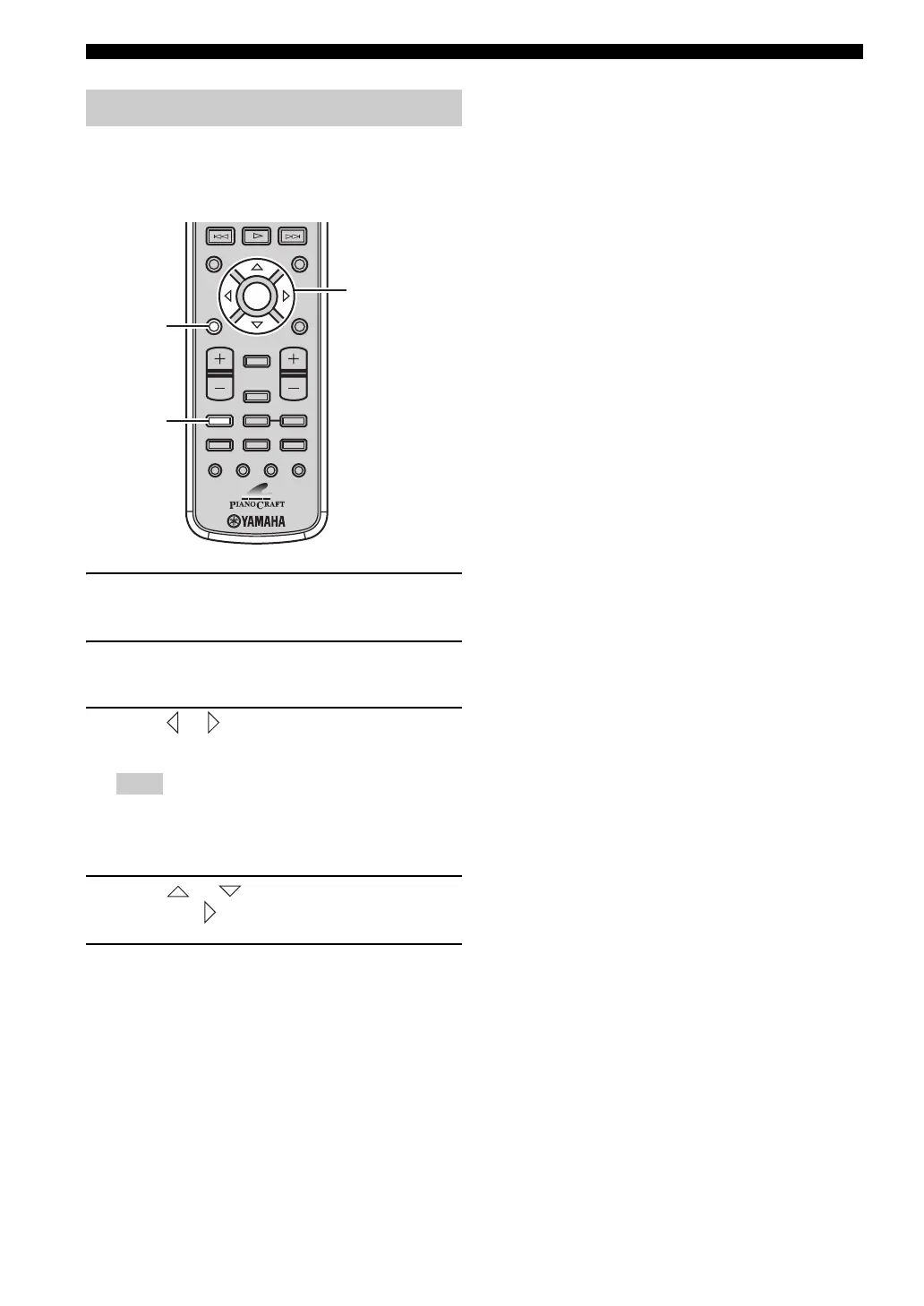
1 Press DVD/CD to set the remote control to
the DVD/CD mode.
2 Press SET UP.
The setup menu appears on the TV screen.
3 Press or to select “PREFERENCE
PAGE”.
“PREFERENCE PAGE” is available only when no disc is
loaded or the the DVD player is in the Stop mode (see
page 25).
4 Press or to select “DEFAULT”, and
then press to select “RESET”.
5 Press ENTER to reset the settings.
All DVD player settings (except password) are reset
to the initial factory settings.
Resetting the DVD player settings
Note
ON SCREEN MENU
PRESET
ENTER
A-E
DISPLAY
SLEEP
DVD/CD TUNER BAND
TAPE/MD
SUBTITLE ANGLE ZOOM AUDIO
AUX/TV DOCK
A-E
INFO.
SET UP
TV VOL VOLUME
TOP MENU
/RETURN
SET UP
Cursor keys,
ENTER
DVD/CD


 To Next Page