EasyManua.ls Logo

Yamaha RX21 - Setting Accent Levels

Yamaha RX21
59 pages
Print Icon
To Next Page IconTo Next Page
To Previous Page IconTo Previous Page
Loading...
Setting
Accent
Levels
When
you
record
a
pattern,
pressing
the
ACCENT
key
to
add
an
accent
to
a
beat
(no
need
to
press
an
instrument
key
at
the
same
time)
will
affect
ALL
instruments
sounding
on
that
beat,
according
to
their
individual
accent
levels.
For
instruments
which
are
not
to
be
accented,
simply
set
their
accent
level
to
zero.
The
accent
level
for
each
instrument
can
be
set
independently,
making
it
possible
to
set
the
most
natural
level
in
relation
to
the
instrument's
normal
level.
To
enter
the
accent
level
mode,
press
the
LEVEL
button
twice,
then
press
an
INST
button
while
holding
down
the
ACCENT
button.
The
LCD
will
read
"XXXX
AC
LEVEL=nn”
("XXXX"
being
the
instrument
and
“nn”
the
accent
level).
The
accent
level
can
then
be
adjusted
by
the
+1/YES
or
-1/NO
keys.
The
accent
level
range
is
the
same
as
the
instrument
level
range:
00-31.
The
accent
level
setting,
however,
is
added
to
the
instrument
level
setting
to
produce
the
actual
accent
level.
For
example,
if
the
instrument
level
is
set
at
15
and
the
accent
level
for
that
instrument
is
set
at
05,
then
the
actual
accent
level
will
be
20.
The
actual
accent
level
cannot
exceed
31,
so
if
the
instrument
level
of
an
instrument
is
set
to
the
maximum
31
setting,
no
accenting
of
notes
for
that
instrument
is
possible.
Once
the
accent
level
mode
is
active,
instruments
can
be
selected
and
adjusted
in
any
sequence.
Press
the
PATTERN
PLAY
button
to
exit
the
accent
level
mode.
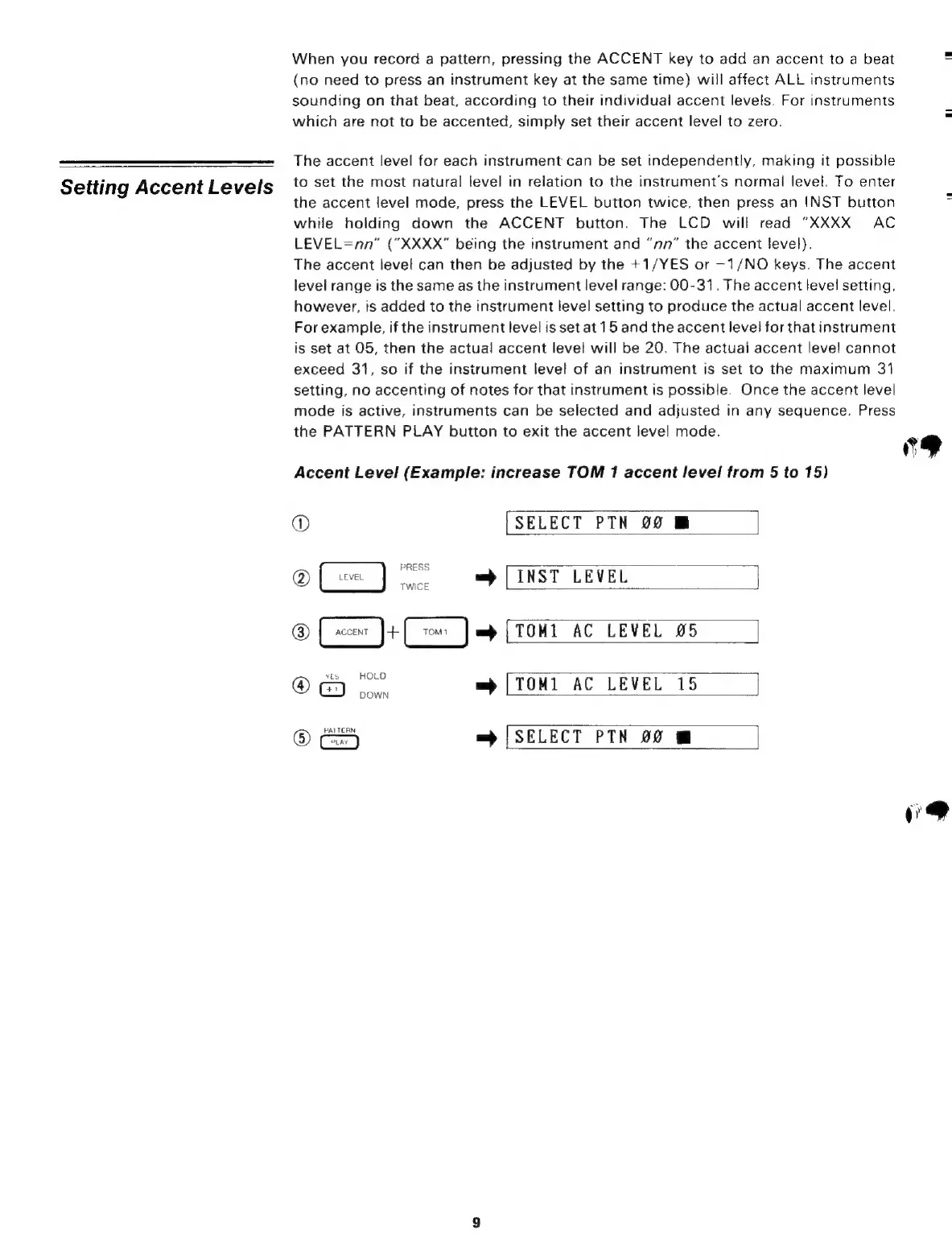
Accent
Level
(Example:
increase
TOM
1
accent
level
from
5
to
15)
@
[SELECT
РТН
00
@
(==
]
=p
[INST
LEVEL
&
[s
)-
C)
.
(тон
АС
LEVEL
25
@
б)
sow
m)
[ТОНІ
AC
LEVEL
15
@
=
[SELECT
РТН
00
I
|
"9

Related product manuals