EasyManua.ls Logo

Yamaha RX21 - The Delete Function

Yamaha RX21
59 pages
Print Icon
To Next Page IconTo Next Page
To Previous Page IconTo Previous Page
Loading...
The
Delete
Function
Repeats
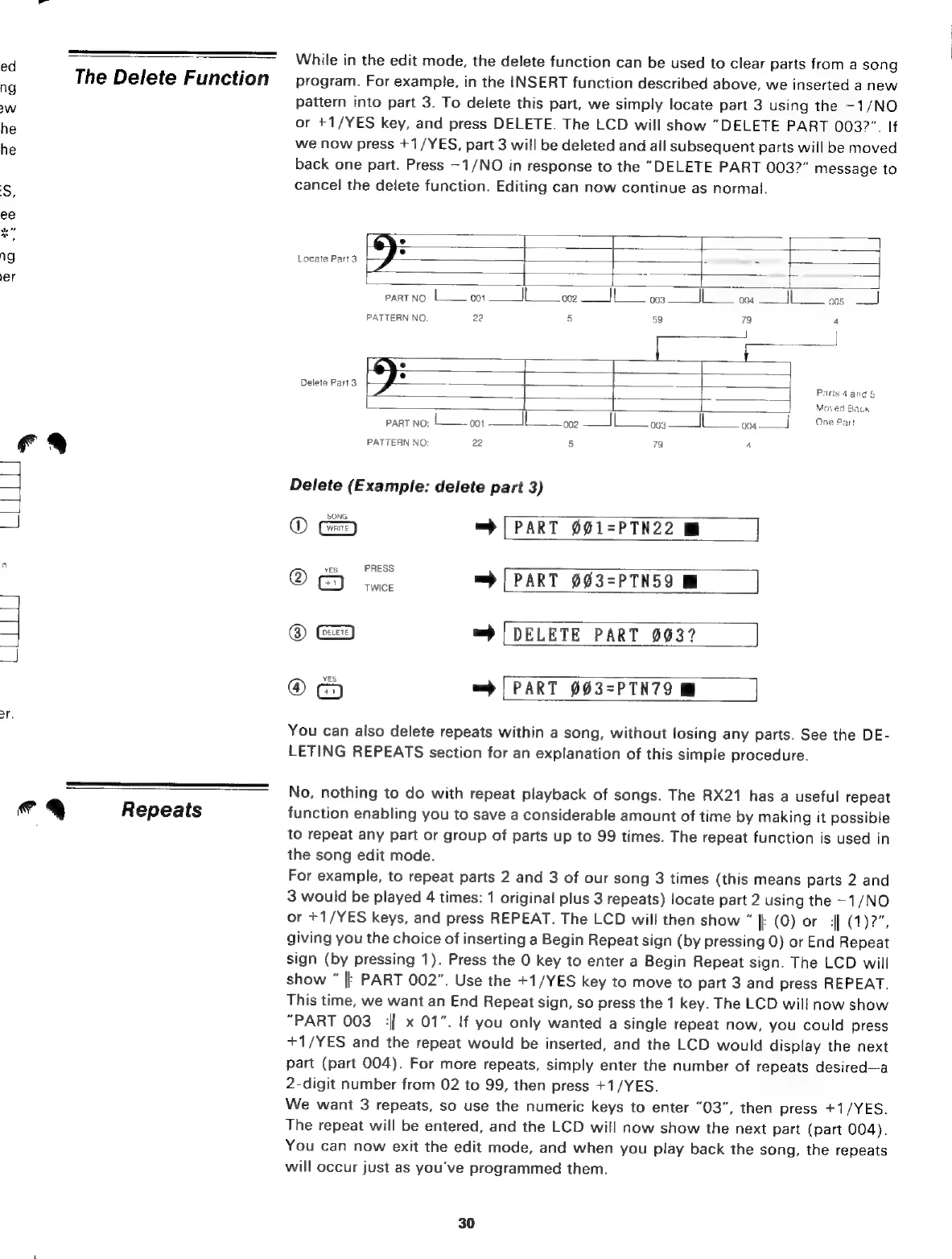
While
in
the
edit
mode,
the
delete
function
can
be
used
to
clear parts
from
a
song
program.
For
example,
in
the
INSERT
function
described
above,
we
inserted
а
new
pattern
into
part
3.
To
delete
this
part,
we
simply
locate
part
3
using
the
-1/NO
or
+1/YES
key,
and
press
DELETE.
The
LCD
will
show
"DELETE
PART
003?".
If
we
now
press
+1/YES,
part
3
will
be
deleted
and
all
subsequent
parts
will
be
moved
back
one
part.
Press
-1/NO
in
response
to
the
"DELETE
PART
003?"
message
to
cancel
the
delete
function.
Editing
can
now
continue
as
normal.
)
[rs
=
2
Locate
Part
3
:
-
-
|
4
е
|
а
PART
NO:
l
001
IL
002
|
003
004
|
005
PATTERN
NO:
22
s
59
79
4
°
Delete
Part
3
°
Т
elete
Part
-—
-
-
ar
_
Parts
4
and
5
Moved
Back
PART
no:
Í
001
||
002
|
003
004
One Рап
PATTERN
NO:
22
5
79
4
Delete
(Example:
delete
part
3)
@
=
[PART
001=РТМ22
Mi
|
YES
PRESS
@
Has
=
[PART
003=PTN59
@
=
DELETE
PART
003?
@ =
[PART
003=PTN79
You
can
also
delete
repeats
within
a
song,
without
losing
any
parts.
See
the
DE-
LETING
REPEATS
section
for
an
explanation
of
this
simple
procedure.
No,
nothing
to
do
with
repeat
playback
of
songs.
The
RX21
has
a
useful
repeat
function
enabling
you
to
save
a
considerable
amount
of
time
by
making
it
possible
to
repeat
any
part
or
group
of
parts
up
to
99
times.
The
repeat
function
is
used
in
the
song
edit
mode.
For
example,
to
repeat
parts
2
and
3
of
our
song
3
times
(this
means
parts
2
and
3
would
be
played
4
times:
1
original
plus
3
repeats)
locate
part
2
using
the
-1/NO
or
+1/YES
keys,
and
press
REPEAT.
The
LCD
will
then
show
|
(0)
ог
4|
(1)2",
giving
you
the
choice
of
inserting
a
Begin
Repeat
sign
(by
pressing
0)
or
End
Repeat
sign
(by
pressing
1).
Press
the
0
key
to
enter
a
Begin
Repeat
sign.
The
LCD
will
show
||
PART
002".
Use
the
+1/YES
key
to
move
to
part
3
and
press
REPEAT.
This
time,
we
want
an
End
Repeat
sign,
so
press
the
1
key.
The
LCD
will
now
show
“PART
003
:|
x
01".
If
you
only
wanted
a
single
repeat
now,
you
could
press
+1/YES
and
the
repeat
would
be
inserted,
and
the
LCD
would
display
the
next
part
(part
004).
For
more
repeats,
simply
enter
the
number
of
repeats
desired—a
2-digit
number
from
02
to
99,
then
press
+1/YES.
We
want
3
repeats,
so
use
the
numeric
keys
to
enter
"03",
then
press
+1/YES.
The
repeat
will
be
entered,
and
the
LCD
will
now
show
the
next
part
(part
004).
You
can
now
exit
the
edit
mode,
and
when
you
play
back
the
song,
the
repeats
will
occur
just
as
you've
programmed
them.
30

Related product manuals