EasyManua.ls Logo

Yamaha RX21 - The Insert Function

Yamaha RX21
59 pages
Print Icon
To Next Page IconTo Next Page
To Previous Page IconTo Previous Page
Loading...
Break
Patterns
or
hold-down-for-continuous-
movement
actions.
Also,
pressing
the
SONG
WRITE
key
while
in
this
mode
sends
you
back
to
the
beginning
of
the
song
instantly.
At
any
point
іп
the
song
you
can
replace
a
part
simply
by
entering
a
new
pattern
number.
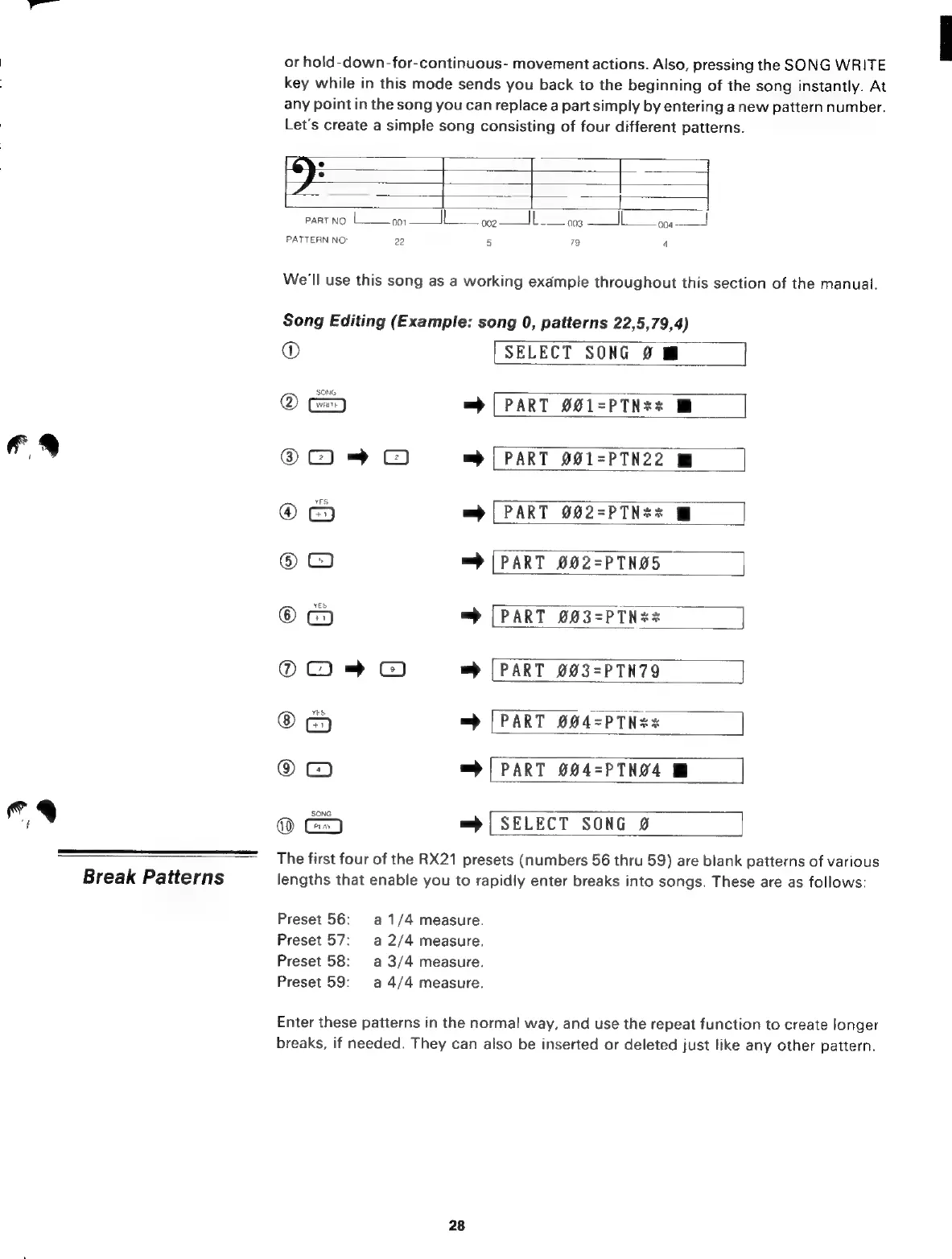
Let's
create
a
simple
song
consisting
of
four
different
patterns.
______
|
PART
NO.
|
001
||
002
IL.
o
004
PATTERN
NO:
22
5
79
4
We'll
use
this
song
as
a
working
example
throughout
this
section
of
the
manual.
Song
Editing
(Example:
song
0,
patterns
22,5,79,4)
®
[SELECT
SONG
2
@
=
[PART
£01-PTN**
@
~
=)
|
PART
021-PTN22
®
=
[PART
002-PTN**
@
С
=
[PART
002=PTN05
@
=
[PART
903-PTN**
|]
@
~
С)
wb
PART
003=PTN79
mp
[PART
004=PTNz*
9
C9
wb
[PART
004-PTN24
=
|
SELECT
SONG
0
The
first
four
of
the
RX21
presets
(numbers
56
thru
59)
are
blank
patterns
of
various
lengths
that
enable
you
to
rapidly
enter
breaks
into
songs.
These
are
as
follows:
Preset
56:
а
1/4
measure.
Preset
57:
a
2/4
measure.
Preset
58:
а
3/4
measure.
Preset
59:
a
4/4
measure.
Enter
these
patterns
in
the
normal
way,
and
use
the
repeat
function
to
create
longer
breaks,
if
needed.
They
can
also
be
inserted
or
deleted
just
like
any
other
pattern.
28

Related product manuals