EasyManua.ls Logo

Yamaha RX21 - Tempo Control; Real Time Pattern Programming

Yamaha RX21
59 pages
Print Icon
To Next Page IconTo Next Page
To Previous Page IconTo Previous Page
Loading...
Tempo
Control
Real
Time
Pattern
Programming
the
LCD,
and
the
RX21
will
switch
to
the
new
pattern
at
the
end
of
the
pattern
that
is
presently
playing
(i.e.
at
the
end
of
the
measure).
The
LCD
will
then
display
only
the
new
pattern
number.
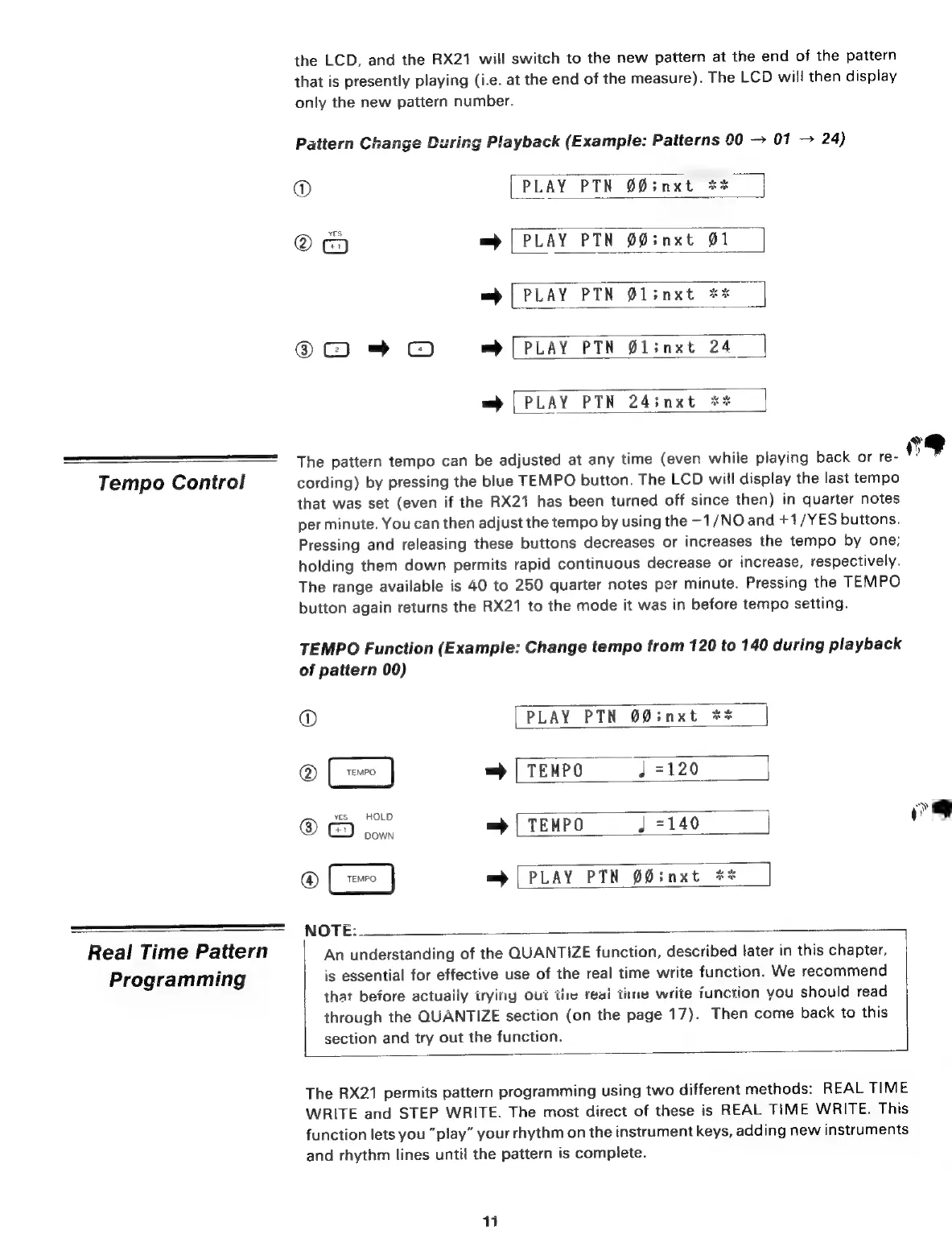
Pattern
Change
During
Playback
(Example:
Patterns
00
01
24)
@
[PLAY
РТМ
бб;пхЕ
**
©
=
|
PLAY
PTN
00;nxt
01
=
|
PLAY
PTN
0l;nxt
3t
$C)
=+
CJ
wb
|
PLAY
PTN
@linxt
24
se
ze
=
|
PLAY
PTN
24;
пхё
The
pattern
tempo
can
be
adjusted
at
any
time
(even
while
playing
back
or
re-
cording)
by
pressing
the
blue
TEMPO
button.
The
LCD
will
display
the
last
tempo
that
was
set
(even
if
the
RX21
has
been
turned
off
since
then)
in
quarter
notes
per
minute.
You
can
then
adjust
the
tempo
by
using
the
—1/NO
and
+1/YES
buttons.
Pressing
and
releasing
these
buttons
decreases
or
increases
the
tempo
by
one;
holding
them
down
permits
rapid
continuous
decrease
or
increase,
respectively.
The
range
available
is
40
to
250
quarter
notes
per
minute.
Pressing
the
TEMPO
button
again
returns
the
RX21
to
the
mode
it
was
in
before
tempo
setting.
TEMPO
Function
(Example:
Change
tempo
from
120
to
140
during
playback
of
pattern
00)
©
[PLAY
PTN
00;nxt
**
|
@
=)
|
TEMPO
J
=120
@
©)
ou.
=
|
TEMPO
J
=140
@
=>
[PLAY
РТА
00;nxt
*%
NOTE:
An
understanding
of
the
QUANTIZE
function,
described
later
in
this
chapter,
is
essential
for
effective
use
of
the
real
time
write
function.
We
recommend
that
before
actuaily
irying
Out
tiw
reai
tire
write
function
you
should
read
through
the
QUANTIZE
section
(on
the
page
17).
Then
come
back
to
this
section
and
try
out
the
function.
The
RX21
permits
pattern
programming
using
two
different
methods:
REAL
TIME
WRITE
and
STEP
WRITE.
The
most
direct
of
these
is
REAL
TIME
WRITE.
This
function
lets
you
“play”
your
rhythm
on
the
instrument
keys,
adding
new
instruments
and
rhythm
lines
until
the
pattern
is
complete.
11
ce
Ww
i
!
d

Related product manuals