EasyManua.ls Logo

Yamaha RX21 - MIDI Functions; MIDI Clock Input; MIDI Clock Output

Yamaha RX21
59 pages
Print Icon
To Next Page IconTo Next Page
To Previous Page IconTo Previous Page
Loading...
ее
MIDI
FUNCTIONS
_——ү—Є—Є——-—-—-—-—-—-—-—-——-—-—-——
The
RX21
features
MIDI
(Musical
Instrument
Digital
Interface)
IN
and
OUT
terminals
on
the
rear
panel
(see
the
CONNECTIONS
diagram
for
details).
This
means
that
your
RX21
can
control
or
be
controtled
by
other
MIDI
in-
struments,
so
that
it
functions
as
part
of
a
state-of-the-art
digital
music
system,
as
well
as
a
sophisticated
unit
in
its
own
right.
The
following
four
basic
MIDI
control
operations
are
available
(read
the
rest
of
this
chapter
for
details
of
these
operation
procedures).
1.
MIDI
CLOCK
INPUT.
The
RX21
can
be
synchronized
to
the
clock
of
an
external
MIDI
sequencer
or
music
computer
(such
as
the
Yamaha
QX-series
sequencers
or
CX5M
Music
Computer).
This
enables
you
to
add
realistic
digitally
generated
percussion
sounds
to
the
music
programmed
into
your
sequencer,
and
any
tempo
changes
will
be
followed
by
the
RX21.
For
this
operation,
set
the
RX21
clock
to
MIDI.
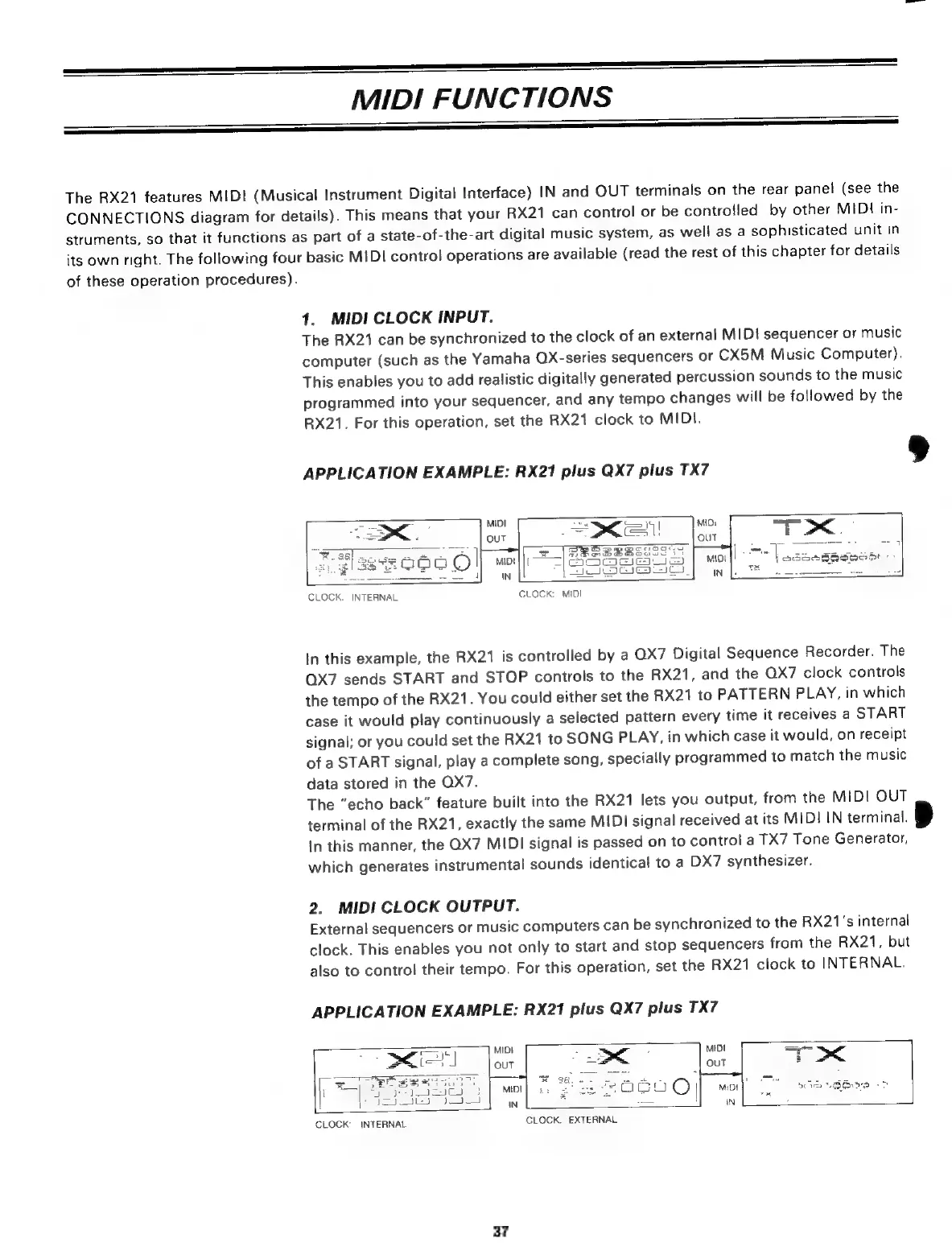
APPLICATION
EXAMPLE:
RX21
plus
QX7
plus
TX7
мо"
|
Soe
Best
i:
|
см.
њи
ы
Ы
CLOCK:
INTERNAL
CLOCK:
MIDI
In
this
example,
the
RX21
is
controlled
by
a
QX7
Digital
Sequence
Recorder.
The
QX7
sends
START
and
STOP
controls
to
the
RX21,
and
the
QX7
clock
controls
the
tempo
of
the
RX21.
You
could
either
set
the
RX21
to
PATTERN
PLAY,
in
which
case
it
would
play
continuously
a
selected
pattern
every
time
it
receives
a
START
signal;
or
you
could
set
the
RX21
to
SONG
PLAY,
in
which
case
it
would,
on
receipt
of
a
START
signal,
play
a
complete
song,
specially
programmed
to
match
the
music
data
stored
in
the
QX7.
The
“echo
back”
feature
built
into
the
RX21
lets
you
output,
from
the
MIDI
OUT
terminal
of
the
RX21,
exactly
the
same
MIDI
signal
received
at
its
MIDI
IN
terminal.
In
this
manner,
the
QX7
MIDI
signal
is
passed
on
to
control
a
TX7
Tone
Generator,
which
generates
instrumental
sounds
identical
to
a
DX7
synthesizer.
2.
MIDI
CLOCK
OUTPUT.
External
sequencers
or
music
computers
can
be
synchronized
to
the
RX21's
internal
clock.
This
enables
you
not
only
to
start
and
stop
sequencers
from
the
RX21,
but
also
to
control
their
tempo.
For
this
operation,
set
the
RX21
clock
to
INTERNAL.
APPLICATION
EXAMPLE:
RX21
plus
QX7
plus
TX7
š
=
MIDI
5
Е
MIDI
==
'
у
><
(=l
OUT
|
г
OUT
DC
Я
Өлү?
x
Ee
ђ
S
И
|
xo
E
Re
n5
CLOCK:
INTERNAL
CLOCK:
EXTERNAL
37

Related product manuals