EasyManua.ls Logo

Yamaha RX21 - Key Number Reception; MIDI Data Transmit

Yamaha RX21
59 pages
Print Icon
To Next Page IconTo Next Page
To Previous Page IconTo Previous Page
Loading...
Фо.
Q
2
S
1
[
t
———
in
this
example,
which
in
effect
has
the
same
sound
potential
as
the
previous
one,
the
RX21
controls
the
QX7
which
in
turn
controls
a
TX7.
It
outputs
STOP
and
START
signals,
and
the
MID!
Clock
signal,
which
will
control
the
tempo
of
the
QX7,
which
has
its
clock
set
to
EXTERNAL.
3.
KEY
NUMBER
RECEPTION.
The
RX21
instruments
can
be
sequenced
by
an
external
sequencer
or
music
computer,
or
played
by
an
external
synthesizer.
In
this
case,
patterns
are
not
used—the
instruments
are
"played"
by
the
external
instrument,
just
as
if
you
were
playing
on
the
instrument
buttons.
For
this
operation,
set
the
RX21
to
CHANNEL
INFORMATION
AVAILABLE
and
its
MIDI
Receive
Channel
to
the
same
number
as
the
MIDI
Transmit
Channel
of
the
external
MIDI
device.
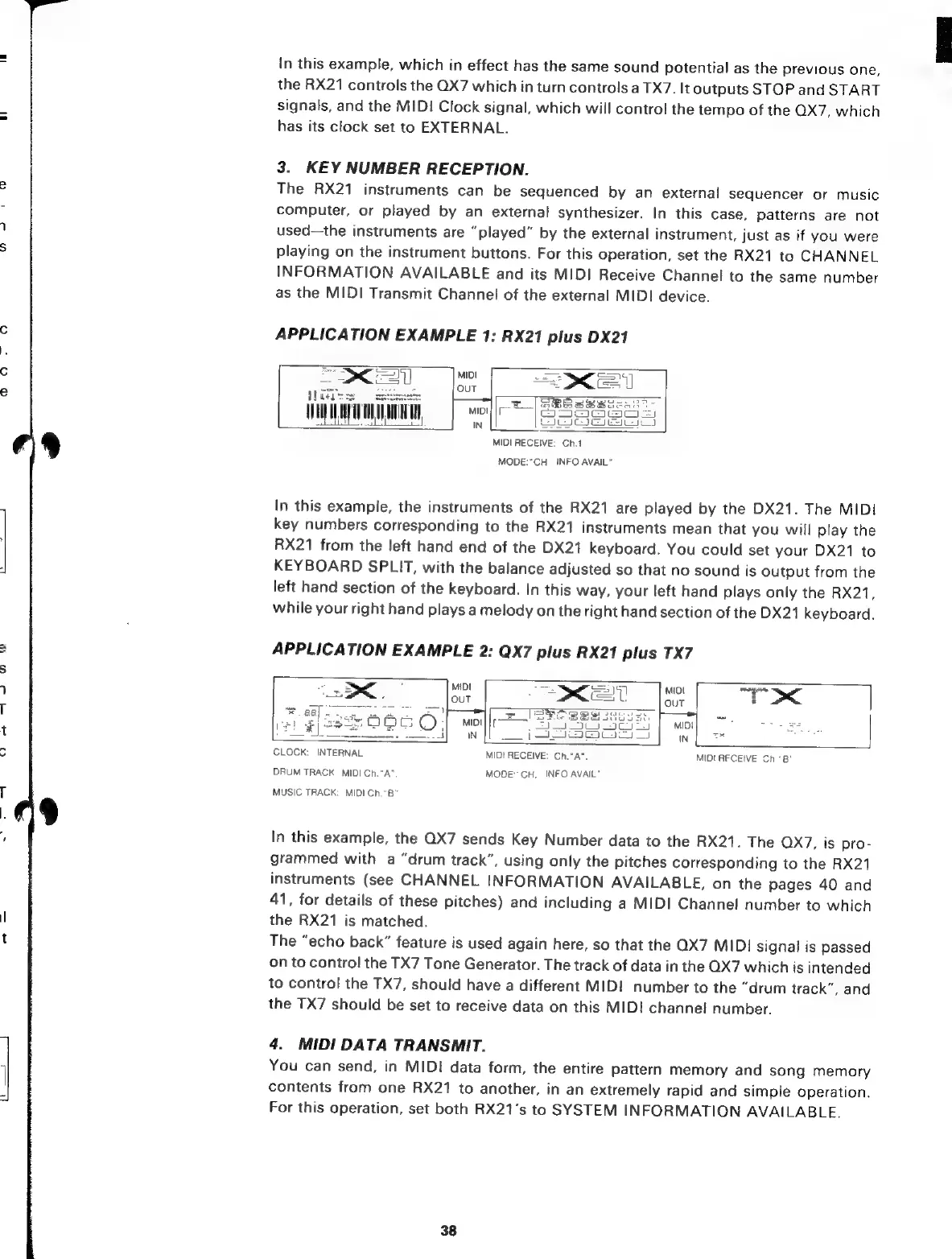
APPLICATION
EXAMPLE
1:
RX21
plus
DX21
MIDI
RECEIVE:
Ch.1
MODE:
"CH.
INFO
AVAIL”
In
this
example,
the
instruments
of
the
RX21
are
played
by
the
DX21.
The
MIDI
key
numbers
corresponding
to
the
RX21
instruments
mean
that
you
will
play
the
RX21
from
the
left
hand
end
of
the
DX21
keyboard.
You
could
set
your
DX21
to
KEYBOARD
SPLIT,
with
the
balance
adjusted
so
that
no
sound
is
output
from
the
left
hand
section
of
the
keyboard.
In
this
way,
your
left
hand
plays
only
the
RX21,
while
your
right
hand
plays
a
melody
on
the
right
hand
section
of
the
DX21
keyboard.
APPLICATION
EXAMPLE
2:
QX7
plus
RX21
plus
TX7
CLOCK:
INTERNAL
MIDI
RECEIVE:
Ch.“A”.
MIDURFCEIVE
Ch.*B'
DRUM
TRACK
MIDI
Ch."A
MODE:
CH.
INFO
AVAIL”
MUSIC
TRACK:
MIDI
Ch."
B
In
this
example,
the
QX7
sends
Key
Number
data
to
the
RX21.
The
QX7,
is
pro-
grammed
with
a
"drum
track",
using
only
the
pitches
corresponding
to
the
RX21
instruments
(see
CHANNEL
INFORMATION
AVAILABLE,
on
the
pages
40
and
41,
for
details
of
these
pitches)
and
including
a
MIDI
Channel
number
to
which
the
RX21
is
matched.
The
"echo
back”
feature
is
used
again
here,
so
that
the
QX7
MIDI
signal
is
passed
onto
control
the
TX7
Tone
Generator.
The
track
of
data
in
the
QX7
which
is
intended
to
control
the
TX7,
should
have
a
different
MIDI
number
to
the
"drum
track”,
and
the
TX7
should
be
set
to
receive
data
on
this
MID!
channel
number.
4.
MIDI
DATA
TRANSMIT.
You
can
send,
in
MIDI
data
form,
the
entire
pattern
memory
and
song
memory
contents
from
one
RX21
to
another,
in
an
extremely
rapid
and
simple
operation.
For
this
operation,
set
both
RX21's
to
SYSTEM
INFORMATION
AVAILABLE.
38

Related product manuals