EasyManua.ls Logo

Yamaha RX21 - Instrument Clear

Yamaha RX21
59 pages
Print Icon
To Next Page IconTo Next Page
To Previous Page IconTo Previous Page
Loading...
Instrument
Clear
First,
press
the
CLEAR
button
from
the
pattern
select
mode
(in
this
case,
the
pattern
number
selected
is
of
no
importance).
When
the
“CLEAR
PTN
pp
?"
display
appears,
simultaneously
press
the
CLEAR
and
PATTERN
PLAY
buttons.
The
LCD
will
Switch
to
"CLEAR
ALL
PTNS
?”.
If
you
decide
you
don't
want
to
clear
all
patterns,
press
the
—1/NO
button
to
cancel
the
clear
function.
If
you
want
to
clear
all
patterns,
press
the
+1/YES
key.
The
LCD
will
show
the
"ARE
YOU
SURE
?"
display,
to
give
you
a
second
chance
to
confirm
your
intention
to
clear
all
patterns.
Again,
If
you
decide
you
don't
want
to
clear
all
patterns,
press
the
—1/NO
button
to
cancel
the
clear
function.
If
you
are
sure
you
want
to
clear
all
patterns,
press
the
+1/YES
key.
The
LCD
will
show
the
"ALL
PTNS
CLEAR"
display,
followed
by
the
"SELECT
PTN
pp”
display.
The
"clear
all
patterns"
function
initializes
(zeros)
the
pattern
memory,
and
can
be
used
to
restore
normal
operation
should
an
operation
error
cause
the
RX21
software
to
malfunction.
It's
advisable
to
save
the
contents
of
the
pattern
memory
onto
a
cassette
tape
(see
the
CASSETTE
OPERATIONS
chapter)
to
prevent
loss
of
patterns
you
wish
to
keep.
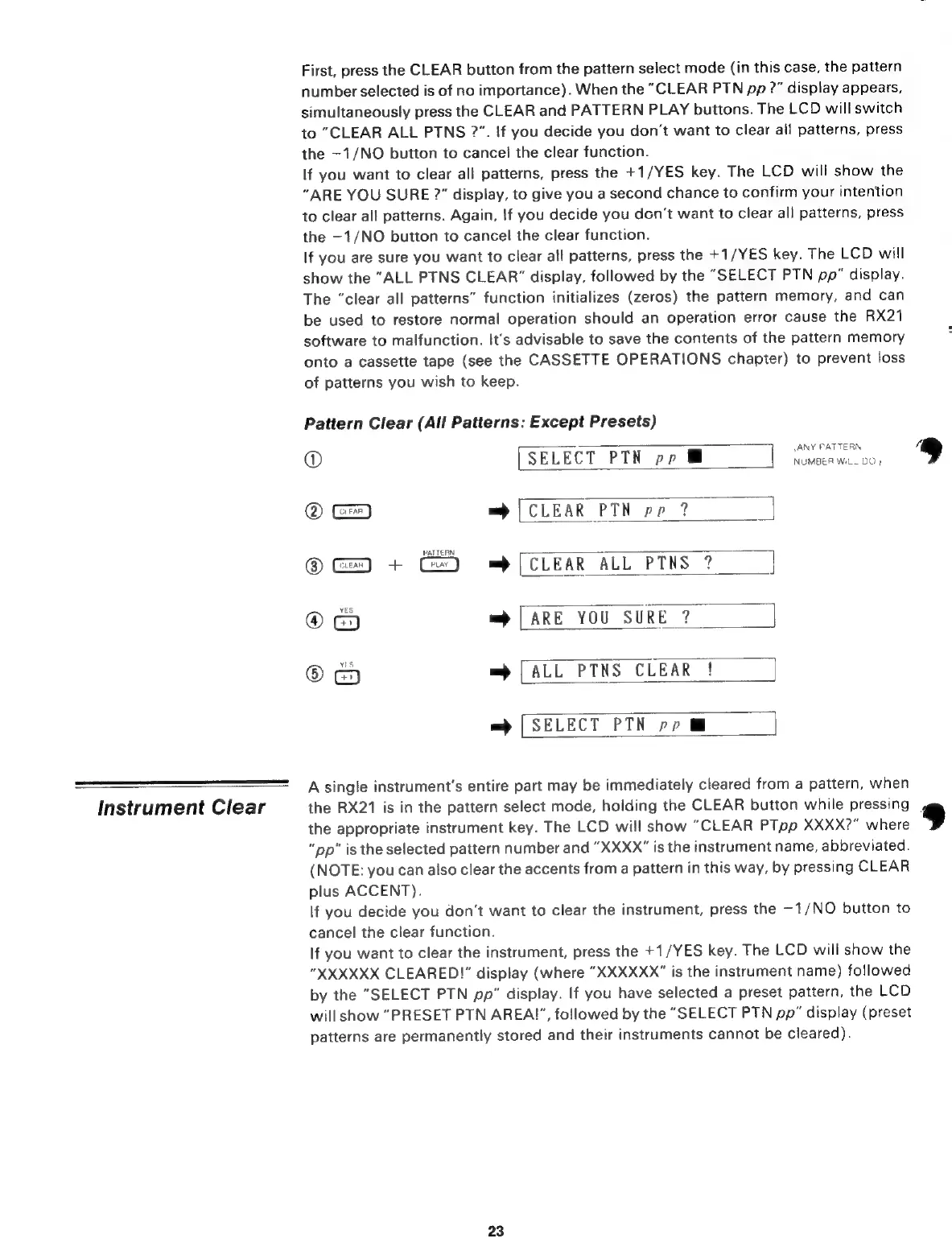
Pattern
Clear
(All
Patterns:
Except
Presets)
(АМУ
PATTERN
(D
[
SELECT
PTN
pp
B
NUMBER
WiLL
DO
)
©
=
[CLEAR
PTN
pp
?
PATTERN
@
G=
+
=>
[CLEAR
ALL
PTNS
?
@
=
[ARE
YOU
SURE
?
@
=
[ALL
PTNS
CLEAR
!
=
[SELECT
РТН
pp
M
A
single
instrument's
entire
part
may
be
immediately
cleared
from
a
pattern,
when
the
RX21
is
in
the
pattern
select
mode,
holding
the
CLEAR
button
while
pressing
the
appropriate
instrument
key.
The
LCD
will
show
“CLEAR
PTpp
XXXX?"
where
"pp"
is
the
selected
pattern
number
and
“XXXX”
is
the
instrument
name,
abbreviated.
(NOTE:
you
can
also
clear
the
accents
from
a
pattern
in
this
way,
by
pressing
CLEAR
plus
ACCENT).
If
you
decide
you
don't
want
to
clear
the
instrument,
press
the
-1/NO
button
to
cancel
the
clear
function.
If
you
want
to
clear
the
instrument,
press
the
*
1/YES
key.
The
LCD
will
show
the
"XXXXXX
CLEARED!”
display
(where
"ХХХХХХ"
is
the
instrument
name)
followed
by
the
"SELECT
PTN
pp"
display.
If
you
have
selected
a
preset
pattern,
the
LCD
will
show
“PRESET
РТМ
АВЕА!”,
followed
by
the
"SELECT
РТМ
pp”
display
(preset
patterns
are
permanently
stored
and
their
instruments
cannot
be
cleared).
23
®

Related product manuals