EasyManua.ls Logo

Yamaha RX21 - Pattern Clear

Yamaha RX21
59 pages
Print Icon
To Next Page IconTo Next Page
To Previous Page IconTo Previous Page
Loading...
с
%
Click
Level
Pattern
Clear
You
can
set
the
level
of
the
RX21's
click
track
(rhythm
guide
during
real
time
re-
cording)
before
or
during
recording.
Simply
press
the
LEVEL
key
twice,
then
the
BEAT
key.
You
can
now
set
the
click
track
level
using
the
—1/МО
and
+1/YES
keys.
The
available
click
level
range
is
00—31.
00
turns
off
the
click
track.
When
setting
the
level,
the
–1/№О
and
+1/YES
keys
can
be
pressed
for
single
unit
change,
or
held
down
for
rapid
continuous
change.
Note
that
the
Click
level
you
have
set
will
remain,
even
after
you
turn
the
RX21
power
off.
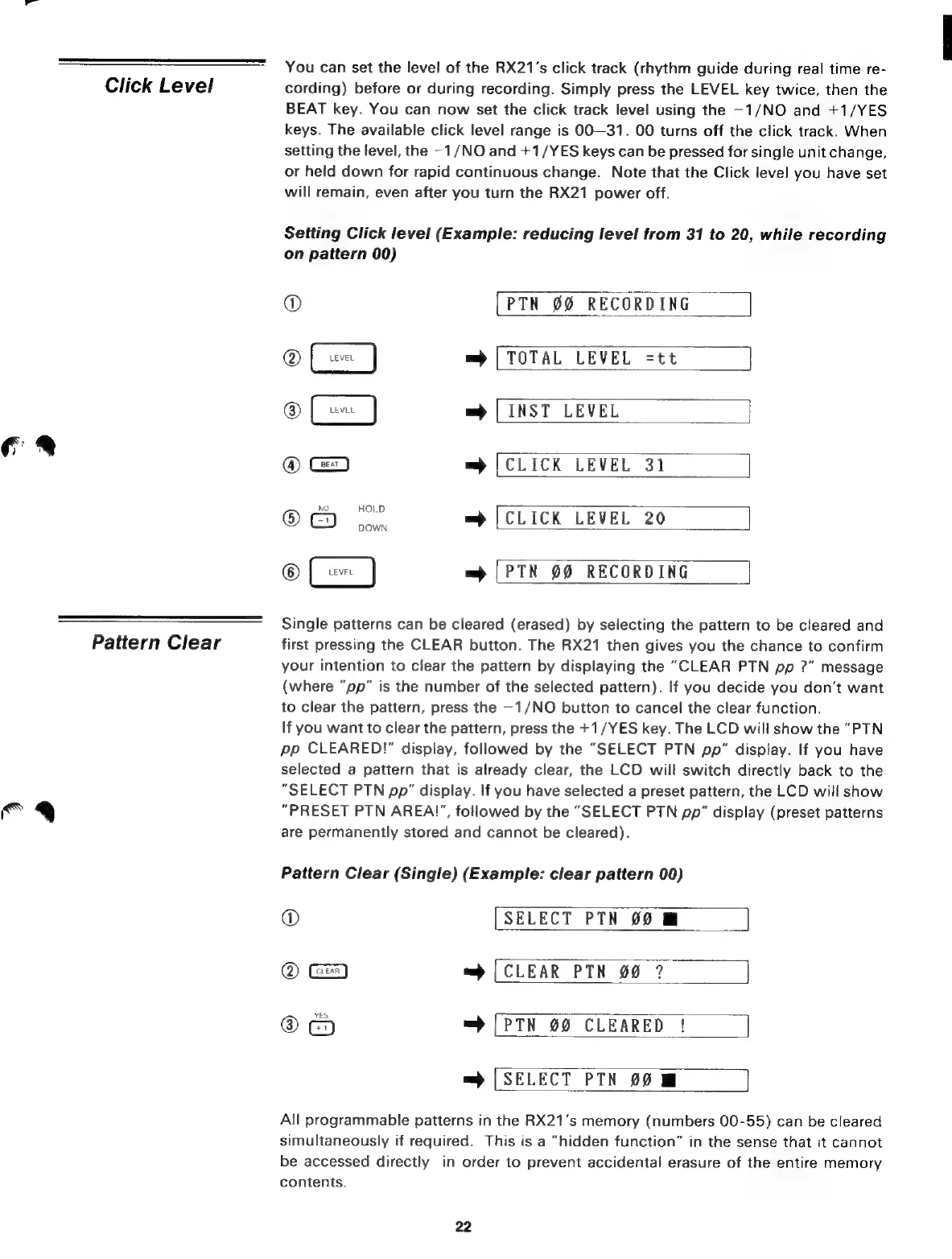
Setting
Click
level
(Example:
reducing
level
from
31
to
20,
while
recording
on
pattern
00)
Ф
[PTN
00
RECORDING
=)
|
TOTAL
LEVEL
=tt
m
|
INST
LEVEL
®
=
[CLICK
LEVEL
31
®
(СО
о
=
[CLICK
LEVEL
20
=m
|
PTN
00
RECORDING
Single
patterns
can
be
cleared
(erased)
by
selecting
the
pattern
to
be
cleared
and
first
pressing
the
CLEAR
button.
The
RX21
then
gives
you
the
chance
to
confirm
your
intention
to
clear
the
pattern
by
displaying
the
“CLEAR
PTN
pp
?”
message
(where
"pp"
is
the
number
of
the
selected
pattern).
If
you
decide
you
don't
want
to
clear
the
pattern,
press
the
—1/NO
button
to
cancel
the
clear
function.
If
you
want
to
clear
the
pattern,
press
the
+1/YES
key.
The
LCD
will
show
the
“PTN
pp
CLEARED!"
display,
followed
by
the
"SELECT
PTN
pp"
display.
If
you
have
selected
a
pattern
that
is
already
clear,
the
LCD
will
switch
directly
back
to
the
"SELECT
PTN
pp"
display.
If
you
have
selected
a
preset
pattern,
the
LCD
will
show
“PRESET
РТМ
AREA'',
followed
by
the
"SELECT
РТМ
pp"
display
(preset
patterns
are
permanently
stored
and
cannot
be
cleared).
Pattern
Clear
(Single)
(Example:
clear
pattern
00)
©
[SELECT
РТН
00
M
@
=)
[CLEAR
РТН
00
7
YES
@
=>
[РТК
00
CLEARED
|
=
[SELECT
РТМ
00
All
programmable
patterns
in
the
RX21's
memory
(numbers
00-55)
can
be
cleared
simultaneously
if
required.
This
is
a
“hidden
function”
in
the
sense
that
it
cannot
be
accessed
directly—in
order
to
prevent
accidental
erasure
of
the
entire
memory
contents.
22

Related product manuals