EasyManua.ls Logo

Yamaha RX21 - Page 22

Yamaha RX21
59 pages
Print Icon
To Next Page IconTo Next Page
To Previous Page IconTo Previous Page
Loading...
IMPORTANT:
If
you
switch
from
a
higher
quantize
rate
to
a
lower
one,
only
the
notes
occuring
on
the
new
beats
will
remain—all
other
notes
will
be
cleared.
For
example,
if
you
have
programmed
a
part
at
a
quantize
rate
of
1/32,
the
Beat
Exchange
function
will
switch
the
quantize
rate
to
1/16,
and
all
notes
which
originally
appeared
on
beats
2,
4,
6,
8
etc.
will
be
erased.
This
will
affect
all
instruments
simultaneously.
|
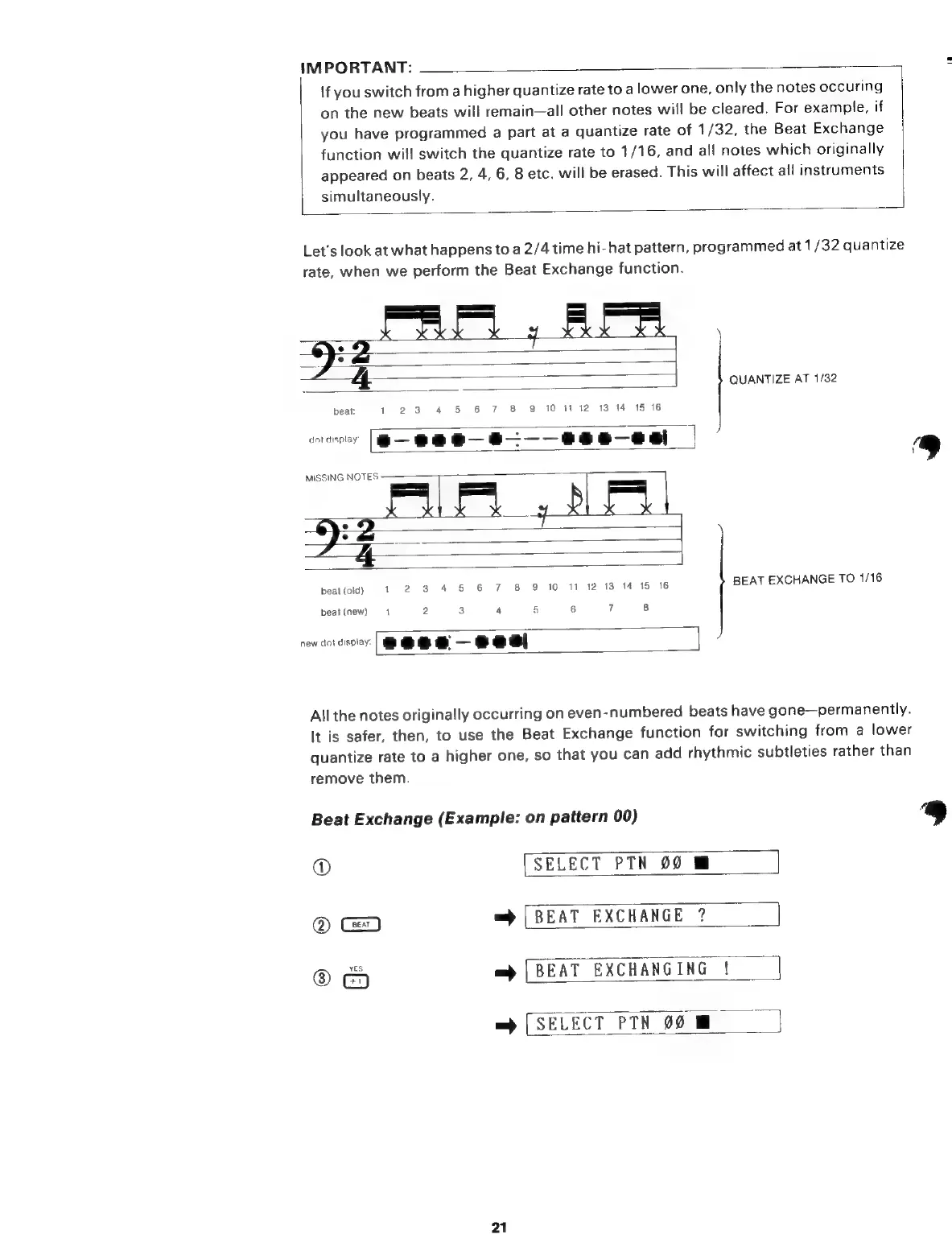
Let's
look
at
what
happens
to
a
2/4
time
hi-hat
pattern,
programmed
at
1/32
quantize
rate,
when
we
perform
the
Beat
Exchange
function.
QUANTIZE
AT
1/32
beat:
1
23
4
5
6
7
8 9
10
1112
13
14 15
16
dot
display
2—252—85———2852—2а
]
i
1
“==
MP
9:2
š
:
beat
(old)
1
2
3
4
5
6
7
8
9
10
11
12 13
14
15
16
BEAT
EXCHANGE
TO
1/16
beat
(new)
1
2
3
4
5
6
T
8
мт
J
new
dot
display
Allthe
notes
originally
occurring
on
even-numbered
beats
have
gone—permanently.
It
is
safer,
then,
to
use
the
Beat
Exchange
function
for
switching
from
a
lower
quantize
rate
to
a
higher
one,
so
that
you
can
add
rhythmic
subtleties
rather
than
remove
them.
Beat
Exchange
(Example:
on
pattern
00)
Ь
]
Ф
[SELECT
PTN
00
Q
=
[BEAT
EXCHANGE
?
e
=)
[BEAT
EXCHANGING
!
=
[SELECT
РТН
00
21

Related product manuals