EasyManua.ls Logo

Yamaha RX21 - The Delete Function

Yamaha RX21
59 pages
Print Icon
To Next Page IconTo Next Page
To Previous Page IconTo Previous Page
Loading...
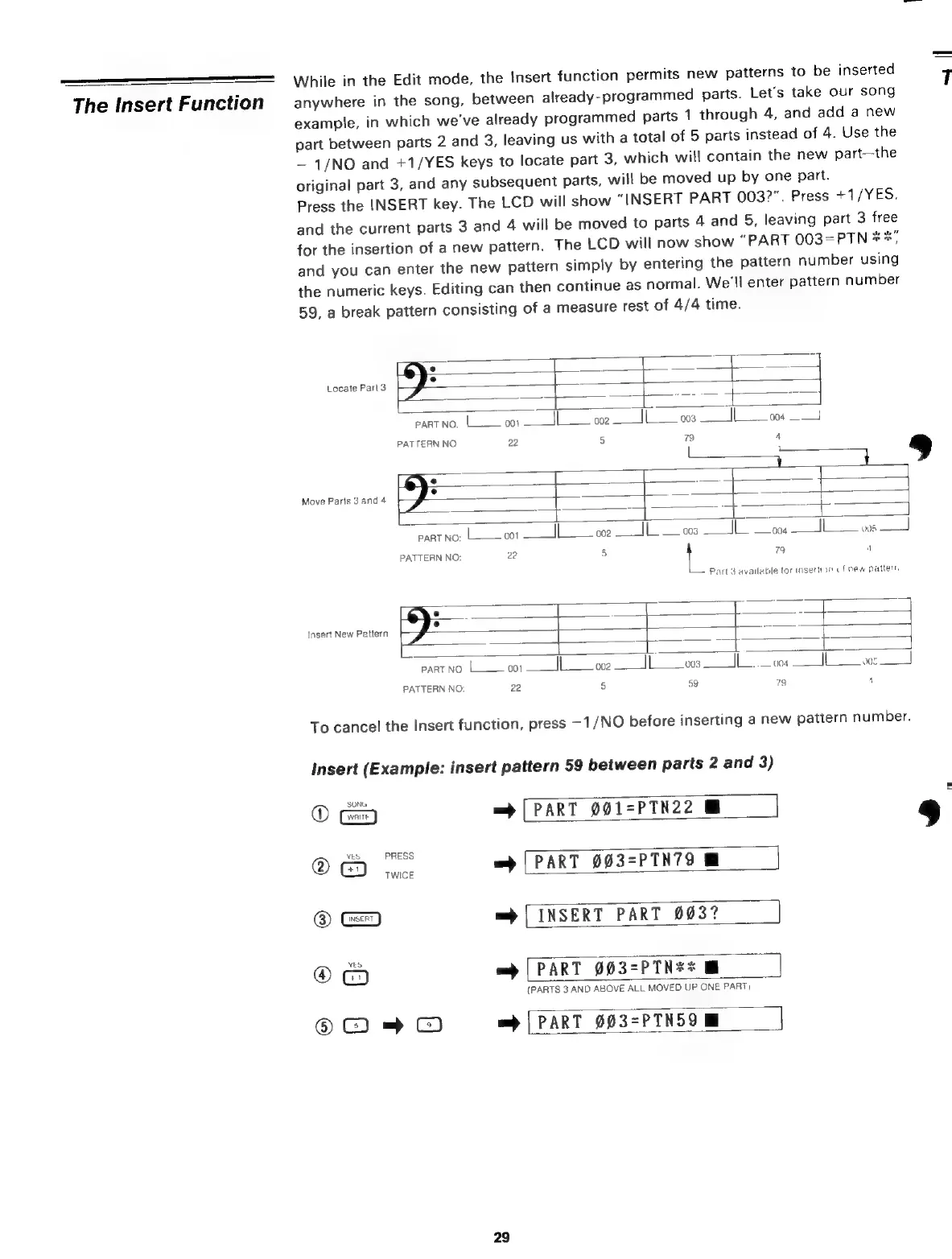
While
in
the
Edit
mode,
the
Insert
function
permits
new
patterns
to
be
inserted
The
Insert
Function
anywhere
in
the
song,
between
already-programmed
parts.
Let's
take
our
song
example,
in
which
we've
already
programmed
parts
1
through
4,
and
add
a
new
part
between
parts
2
and
3,
leaving
us
with
a
total
of
5
parts
instead
of
4.
Use
the
1/NO
and
+1/YES
keys
to
locate
part
3,
which
will
contain
the
new
part—the
original
part
3,
and
any
subsequent
parts,
will
be
moved
up
by
one
part.
Press
the
INSERT
key.
The
LCD
will
show
“INSERT
PART
0032".
Press
+1/YES,
and
the
current
parts
3
and
4
will
be
moved
to
parts
4
and
5,
leaving
part
3
free
for
the
insertion
of
a
new
pattern.
The
LCD
will
now
show
“PART
003=PTN
хх,
and
you
can
enter
the
new
pattern
simply
by
entering
the
pattern
number
using
the
numeric
keys.
Editing
can
then
continue
as
normal.
We'll
enter
pattern
number
59,
a
break
pattern
consisting
of
a
measure
rest
of
4/4
time.
~
&
n
7]
°
=
Locate
Parl
3
|
part
NO:
Í
001
Jl
002
||
003
|
004
PATTERN
NO
22
5
79
4
:
|
1
<
ДЕ
+
Move
Parts
3
and
4
=
Em
а
к
k.
2
PART
NO:
L-
001
_||
002
003
1
3
004
|
005
PATTERN
NO:
22
5
|
79
4
Part
3
available
tor
insertion
of
new
pattern
=
|
|
z
в
"
°
»
*
dv
T
Insert
New
Pattern
-
=
ze
Т
>
PART
NO:
|
o.
—hl
002
ооз
ом
|
005
|
PATTERN
NO:
22
5
59
79
4
To
cancel
the
Insert
function,
press
-1/NO
before
inserting
a
new
pattern
number.
Insert
(Example:
insert
pattern
59
between
parts
2
and
3)
©
=
[PART
001=PTN22
|
@
ох
=>
[PART
993=PTN79
MI
®
=)
|
INSERT
PART
0037
Ф
Ë
=
[PART
003-PTN**
{PARTS
3
AND
ABOVE
ALL
MOVED
UP
ONE
PART)
©
-
С)
=
|
PART
003=РТМ59
29
ЈЕ

Related product manuals