EasyManua.ls Logo

Yamaha RX21 - Editing (Assembling a Song)

Yamaha RX21
59 pages
Print Icon
To Next Page IconTo Next Page
To Previous Page IconTo Previous Page
Loading...
Editing
(Assembling
a
Song)
ON".
If
you
now
press
START
the
song
that
is
already
selected
will
play.
If
you
press
REPEAT,
the
RX21
will
revert
to
the
select
song
mode,
and
you
can
select
another
song.
The
REPEAT
function
will
now
apply
to
playback
of
any
song
programmed
into
the
RX21.
During
repeat
playback,
you
can
of
course
carry
out
all
the
operations
described
in
the
SONG
PLAYBACK
section.
Playback
will
continue
until
you
press
the
STOP/CONTINUE
key.
To
turn
the
REPEAT
function
OFF,
simply
press
the
REPEAT
key
to
call
up
the
function
as
previously
described,
and
press
-1/NO.
The
LCD
will
show
"REPEAT
OFF”.
Then
press
REPEAT
again
to
return
the
LCD
to
its
original
display.
This
operation
can
even
be
carried
out
during
playback,
in
which
case
the
song
will
play
through
to
the
end,
then
stop.
You
can
also
turn
ON
the
repeat
function
during
normal
playback
of
a
song,
in
which
case
the
song
will
then
continue
playing
until
you
press
STOP/CONTINUE
or
turn
OFF
the
repeat
function.
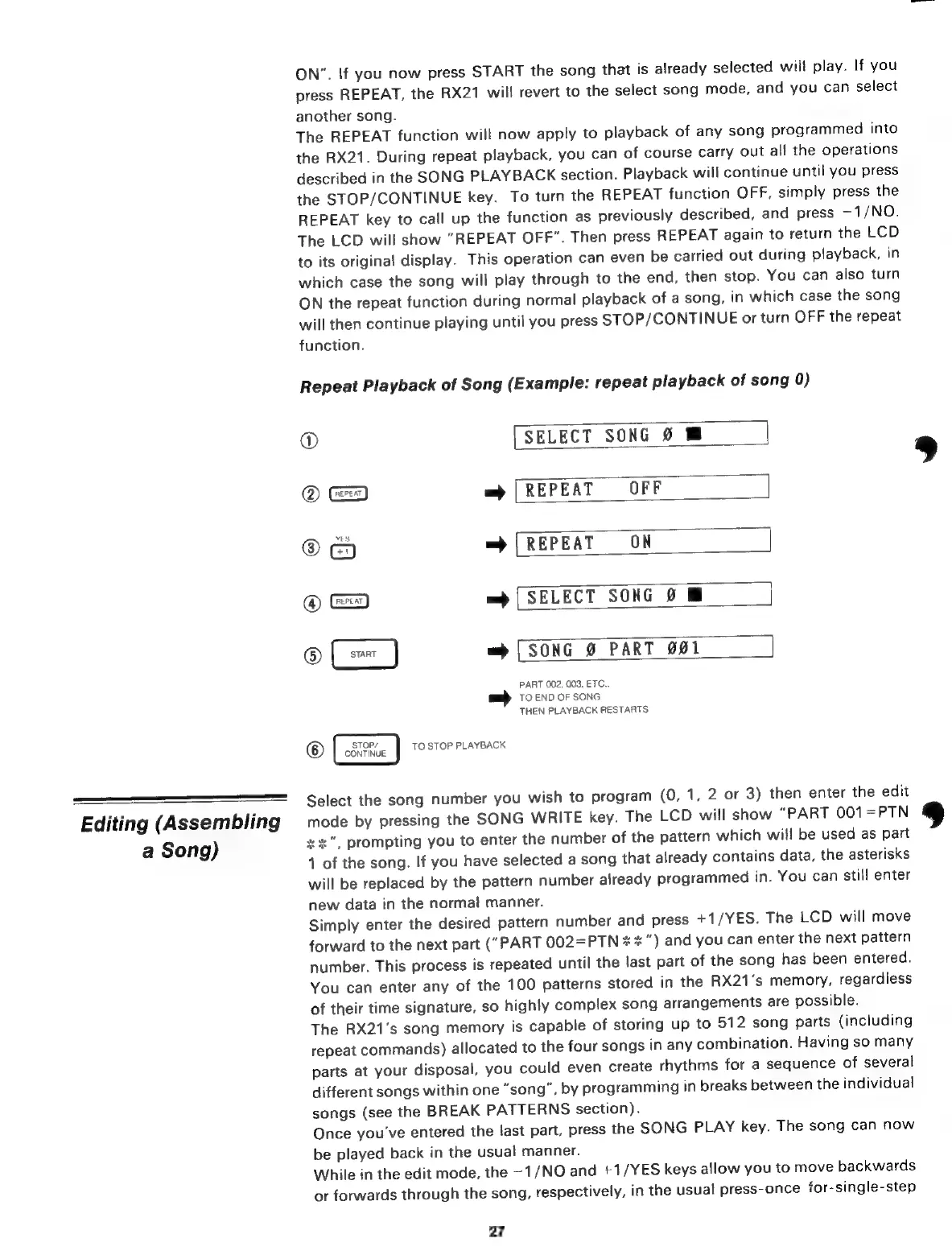
Repeat
Playback
of
Song
(Example:
repeat
playback
of
song
0)
@
[SELECT
SONG
9
@
=
[REPEAT
OFF
@
=
(REPEAT
ON
©
==
=>
[SELECT
SONG
0
@
=
[SONG
Ø
PART
001
PART
002,
003.
ETC.
TO
END
OF
SONG
THEN
PLAYBACK
RESTARTS
STOP/
@
SOHNE
TO
STOP
PLAYBACK
Select
the
song
number
you
wish
to
program
(0,
1,
2
or
3)
then
enter
the
edit
mode
by
pressing
the
SONG
WRITE
key.
The
LCD
will
show
“PART
001=PTN
жж”,
prompting
you
to
enter
the
number
of
the
pattern
which
will
be
used
as
part
1
of
the
song.
If
you
have
selected
a
song
that
already
contains
data,
the
asterisks
will
be
replaced
by
the
pattern
number
already
programmed
in.
You
can
still
enter
new
data
in
the
normal
manner.
Simply
enter
the
desired
pattern
number
and
press
+1/YES.
The
LCD
will
move
forward
to
the
next
part
("PART
002=PTN
x
x
")
and
you
can
enter
the
next
pattern
number.
This
process
is
repeated
until
the
last
part
of
the
song
has
been
entered.
You
can
enter
any
of
the
100
patterns
stored
in
the
RX21's
memory,
regardless
of
their
time
signature,
so
highly
complex
song
arrangements
are
possible.
The
RX21's
song
memory
is
capable
of
storing
up
to
512
song
parts
(including
repeat
commands)
allocated
to
the
four
songs
in
any
combination.
Having
so
many
parts
at
your
disposal,
you
could
even
create
rhythms
for
a
sequence
of
several
different
songs
within
one
“song”,
by
programming
in
breaks
between
the
individual
songs
(see
the
BREAK
PATTERNS
section).
Once
you've
entered
the
last
part,
press
the
SONG
PLAY
key.
The
song
can
now
be
played
back
in
the
usual
manner.
While
in
the
edit
mode,
the
–1/№О
and
+1/YES
keys
allow
you
to
move
backwards
or
forwards
through
the
song,
respectively,
in
the
usual
press-once-for-single-step
27

Related product manuals