EasyManua.ls Logo

Yamaha RX21 - Song Clear

Yamaha RX21
59 pages
Print Icon
To Next Page IconTo Next Page
To Previous Page IconTo Previous Page
Loading...
|
rtm
Deleting
Repeats
Still
in
the
editing
mode,
you
can
now
use
the
-1/NO
and
+1/YES
keys
and
locate
the
repeats,
which
are
displayed
just
before
the
corresponding
part
(in
the
case
of
Begin
Repeat
signs)
or
just
after
(in
the
case
of
End
Repeat
signs)
and
once
located,
you
can
delete
repeats
in
the
same
way
as
parts
(see
the
DELETING
RE-
PEATS
section).
You
can,
if
you
wish,
repeat
only
one
part.
This
is
quite
common—you
may
often
want
to
repeat
the
same
part,
say,
eight
times,
for
a
verse
section,
for
example.
In
this
case,
having
entered
the
Begin
Repeat
sign,
pressing
the
+1/YES
key
will
move
you
to
the
“other
side”
of
the
part
in
which
you
inserted
a
Begin
Repeat
sign,
and
you
can
enter
an
End
Repeat
sign
as
previously
described.
if
you
try
to
enter
a
Begin
Repeat
sign
at
a
part
that
already
has
one,
you'll
see
the
"ALREADY
EN-
TERED!"
LCD
message,
followed
by
the
normal
editing
display.
The
same
goes
for
an
End
Repeat
sign.
A
number
of
repeats
can
be
programmed
into
one
song,
to
create
complex
song
arrangements.
This
also
minimizes
programming
time,
as
you
can
enter
repeat
signs
instead
of
having
to
program
in
large
numbers
of
individual
patterns.
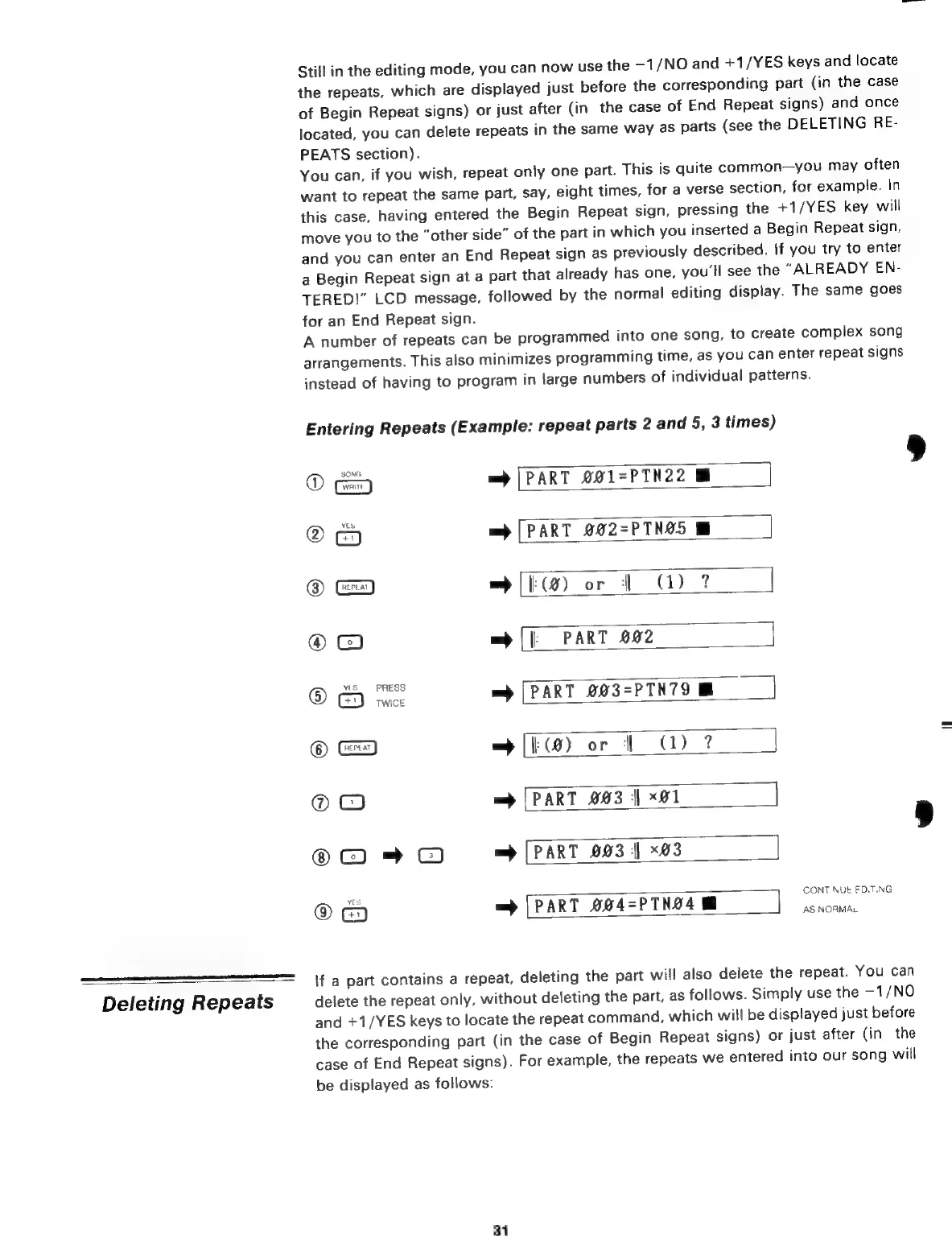
Entering
Repeats
(Example:
repeat
parts
2
and
5,
3
times)
©
=>
[PART
001=PTN22
@
=>
[PART
002=PTN05
©
&
wc
ог
d
G)?
J|
©
со
m
[|
PART
002
]
@
es
=
[PART
203-PTN79
M
©
Ce)
=
100)
ог
|
(D
?
Ф
С
=
[PART
003
|
х01
]
=
=
[PART
093
|
x03
G
e)
[PART
004-PTN24
eit
um
if
a
part
contains
a
repeat,
deleting
the
part
will
also
delete
the
repeat.
You
can
delete
the
repeat
only,
without
deleting
the
part,
as
follows.
Simply
use
the
-1/NO
and
+1/YES
keys
to
locate
the
repeat
command,
which
will
be
displayed
just
before
the
corresponding
part
(in
the
case
of
Begin
Repeat
signs)
or
just
after
(in
the
case
of
End
Repeat
signs).
For
example,
the
repeats
we
entered
into
our
song
will
be
displayed
as
follows:
31

Related product manuals