EasyManua.ls Logo

Yamaha RX21 - Song Clear (All Songs)

Yamaha RX21
59 pages
Print Icon
To Next Page IconTo Next Page
To Previous Page IconTo Previous Page
Loading...
+
00
OD
oe
WD
MD
PART
NO
|
001
002
||
903.
|
|
004
PATTERN
NO:
5
79
4
BEGIN
REPEAT
MESSAGE
[:
PART
002
|
END
REPEAT
MESSAGE
PART
003
{|
x03
М
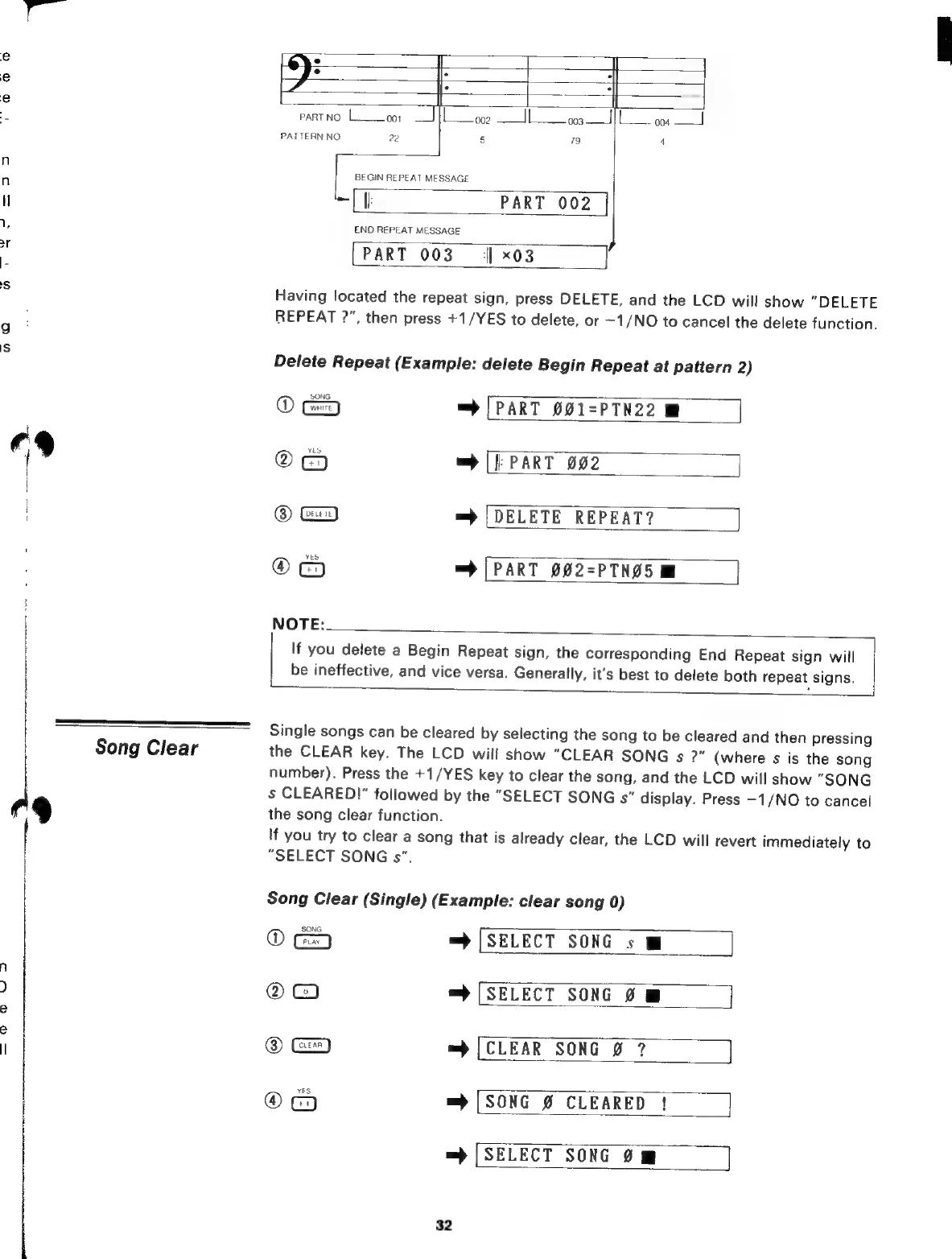
Having
located
the
repeat
sign,
press
DELETE,
and
the
LCD
will
show
“DELETE
REPEAT
2",
then
press
+1/YES
to
delete,
or
-1/NO
to
cancel
the
delete
function.
Delete
Repeat
(Example:
delete
Begin
Repeat
at
pattern
2)
(D
C
=)
[PART
001-PTN22
M
Q
=
[|
PART
002
@
G=
=
[DELETE
REPEAT?
®
=>
(PART
092-PTN25M
|
NOTE:
If
you
delete
a
Begin
Repeat
sign,
the
corresponding
End
Repeat
sign
will
be
ineffective,
and
vice
versa.
Generally,
it's
best
to
delete
both
repeat
signs.
Single
songs
can
be
cleared
by
selecting
the
song
to
be
cleared
and
then
pressing
Song
Clear
the
CLEAR
key.
The
LCD
will
show
"CLEAR
SONG
s
?"
(where
s
is
the
song
number).
Press
the
+1/YES
key
to
clear
the
song,
and
the
LCD
will
show
"SONG
s
CLEARED!”
followed
by
the
"SELECT
SONG
s"
display.
Press
-1/NO
to
cancel
the
song
clear
function.
If
you
try
to
clear
a
song
that
is
already
clear,
the
LCD
will
revert
immediately
to
"SELECT
SONG
s”.
—é
M
Song
Clear
(Single)
(Example:
clear
song
0)
© =
(SELECT
SONG
s
M
©
=
[SELECT
SONG
Ø
@
=
=>
[CLEAR
SONG
Ø
7
®
=)
[SONG
Ø
CLEARED
!
=)
[SELECT
SONG
Om
||
32

Related product manuals