EasyManua.ls Logo

Yamaha RX21 - Step Write Pattern Programming

Yamaha RX21
59 pages
Print Icon
To Next Page IconTo Next Page
To Previous Page IconTo Previous Page
Loading...
4.
Press
BEAT
a
third
time,
to
return
the
RX21
to
the
геа!
time
write
mode.
You
are
now
ready
to
program
your
pattern.
Tap
the
red
START
button,
and
you'll
hear
the
"click
track"
rhythm
accents.
If,
by
mistake,
you
have
selected
a
preset,
there
will
be
no
click
track.
Instead,
the
LCD
will
show
“PRESET
РТМ
AREA",
then
revert
to
the
"SELECT
PTN
pp”
display,
and
you
should
select
another
pattern
and
repeat
the
real
time
write
setting
procedure.
if
you
have
selected
pattern
00,
the
LCD
will
switch
to
"PTN
00
RECORDING",
and
you'll
see
the
cursor
moving
from
left
to
right
once
every
measure.
Regardless
of
the
length
of
the
pattern,
the
click
will
be
heard
at
the
start
of
each
group
of
four
sixteenth
notes.
In
other
words,
on
every
quarter
note
beat.
Also,
the
first
beat
of
each
bar
will
be
accented.
The
RX21
will
continue
cycling
through
the
full
length
of
the
pattern
while
you
record.
You
can
now
set
your
tempo,
as
previously
de-
scribed,
and
start
playing.
In
the
real
time
record
mode,
everything
you
play
will
be
entered
into
the
pattern,
and
you'll
hear
it
replayed
every
time
the
pattern
is
repeated.
There's
no
need
to
try
and
input
all
the
instruments
at
once:
you
can
input
one
instrument
at
a
time,
and
gradually
build
up
a
pattern.
Enter
accented
beats
by
tapping
the
ACCENT
button
(see
"Accents"
in
the
section
entitled
THE
INSTRUMENTS).
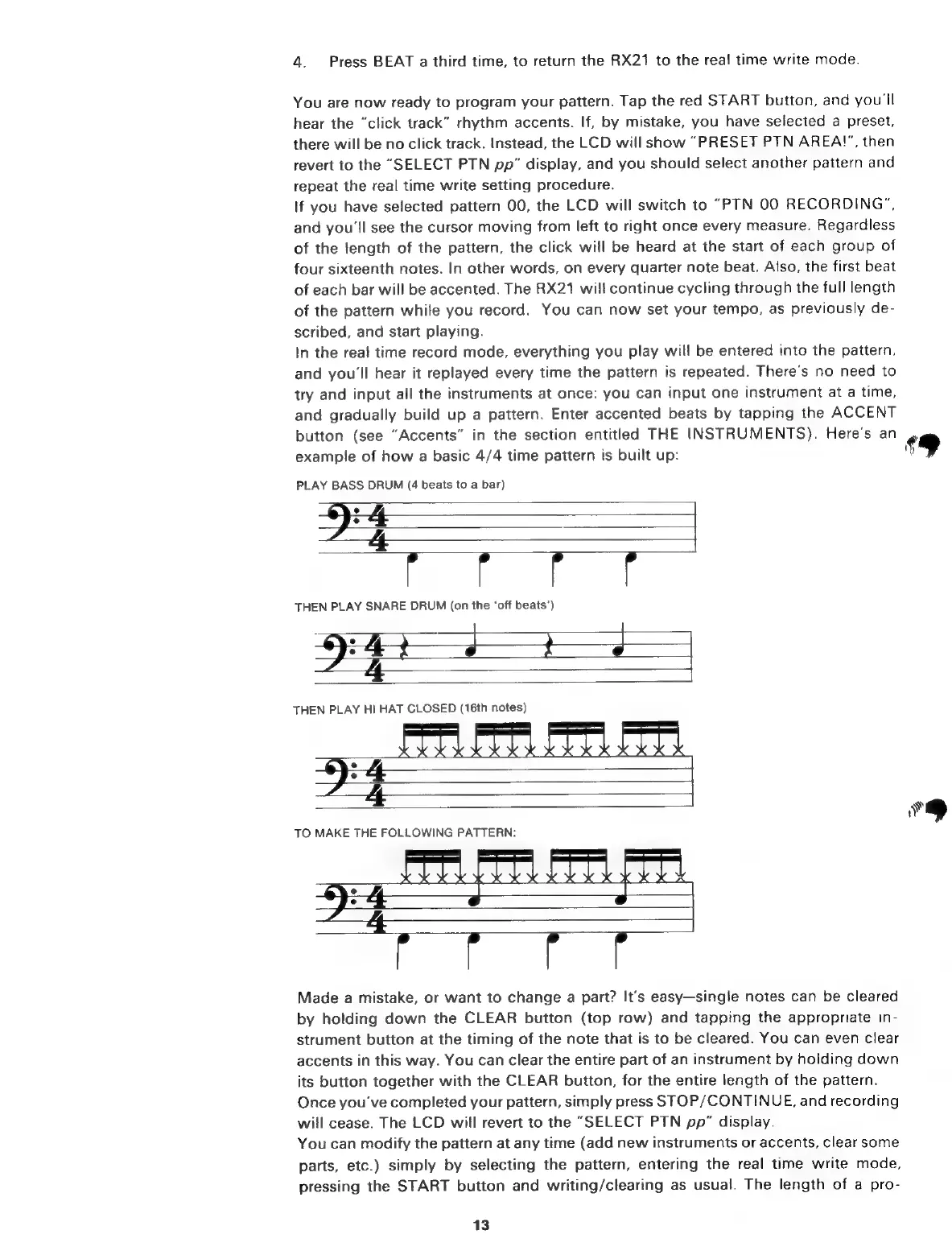
Here's
an
example
of
how
a
basic
4/4
time
pattern
is
built
up:
PLAY
BASS
DRUM
(4
beats
to
a
bar)
9:
4
le
We
E:
THEN
PLAY
SNARE
DRUM
(on
the
‘off
beats’)
PEE
јр
THEN
PLAY
HI
HAT
CLOSED
(16th
notes)
d
|
TO
MAKE
THE
FOLLOWING
PATTERN:
Е
EE
Eur
Made
a
mistake,
or
want
to
change
a
part?
It's
easy—single
notes
can
be
cleared
by
holding
down
the
CLEAR
button
(top
row)
and
tapping
the
appropriate
in-
strument
button
at
the
timing
of
the
note
that
is
to
be
cleared.
You
can
even
clear
accents
in
this
way.
You
can
clear
the
entire
part
of
an
instrument
by
holding
down
its
button
together
with
the
CLEAR
button,
for
the
entire
length
of
the
pattern.
Once
you've
completed
your
pattern,
simply
press
STOP/CONTINUE,
and
recording
will
cease.
The
LCD
will
revert
to
the
"SELECT
PTN
pp"
display.
You
can
modify
the
pattern
at
any
time
(add
new
instruments
or
accents,
clear
some
parts,
etc.)
simply
by
selecting
the
pattern,
entering
the
real
time
write
mode,
pressing
the
START
button
and
writing/clearing
as
usual.
The
length
of
a
pro-
13
#9
79

Related product manuals