EasyManua.ls Logo

Yamaha RX21 - Load Data From Cassette

Yamaha RX21
59 pages
Print Icon
To Next Page IconTo Next Page
To Previous Page IconTo Previous Page
Loading...
Load
the
CASSETTE
button.
The
LCD
will
read
"SAVE
BREAK"
or
"VERIFY
BREAK',
depending
on
which
function
you
have
interrupted.
The
RX21
will
stop
for
about
2
seconds,
then
you
can
return
to
the
cassette
mode
by
pressing
CASSETTE
again.
The
verify
function
can
be
accessed
directly,
without
going
through
the
save
op-
eration
by
pressing
the
VERIFY
button.
The
cassette
control
mode
is
exited
by
pressing
any
main
function
key
(pattern
play,
beat
exchange,
real
time
write,
step
write,
song
play,
song
write,
clear,
MIDI
control).
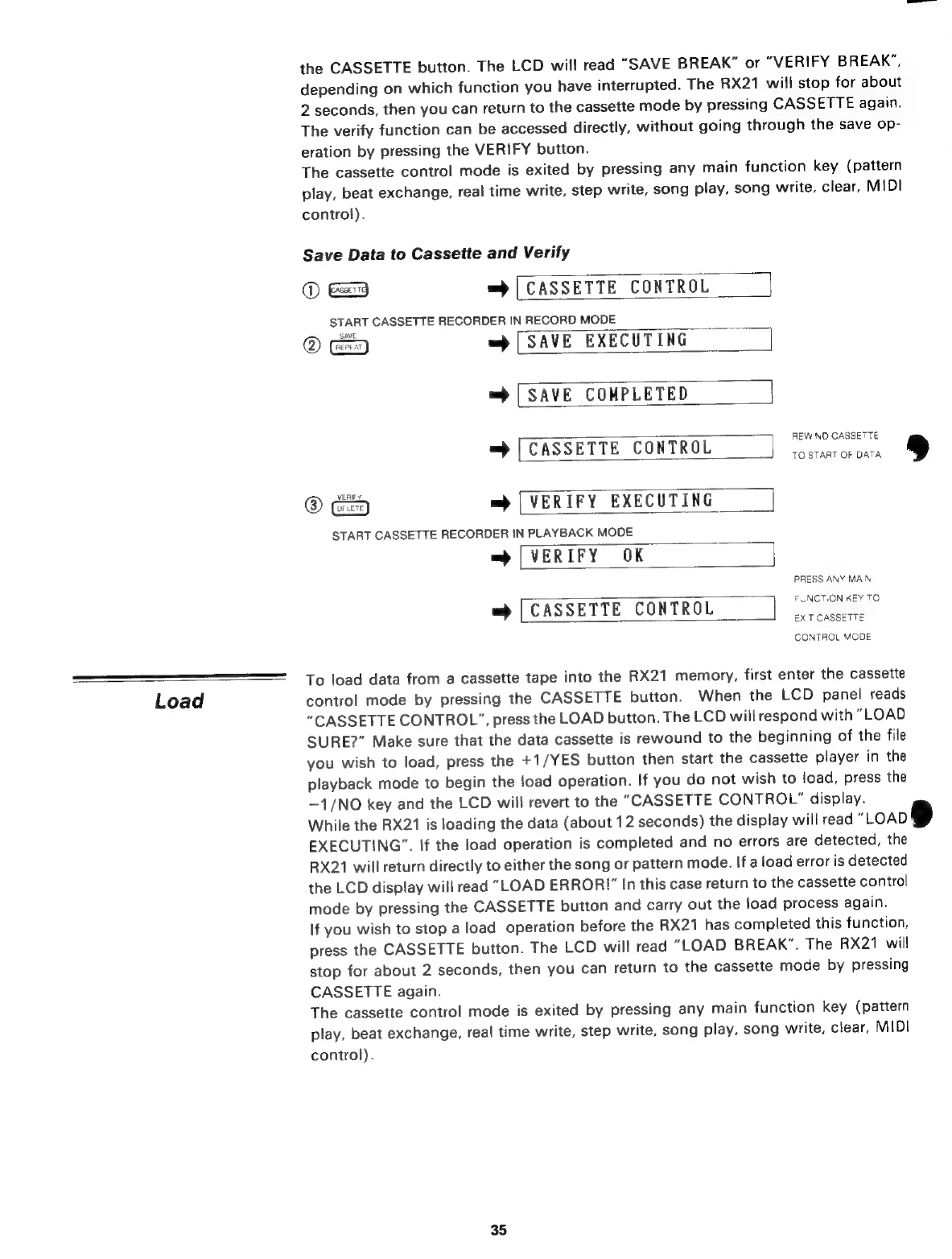
Save
Data
to
Cassette
and
Verify
(D
=
|
CASSETTE
CONTROL
START
CASSETTE
RECORDER
IN
RECORD
MODE
@
=
[SAVE
EXECUTING
=>
[SAVE
COMPLETED
REWIND
CASSETTE
=
|
CASSETTE
CONTROL
TO
START
OF
DATA
®
Gag
m
[VERIFY
EXECUTING
START
CASSETTE
RECORDER
IN
PLAYBACK
MODE
m
[VERIFY
OK
PRESS
ANY
MAIN
FUNCTION
KEY
TO
EXIT
CASSETTE
CONTROL
MODE
[CASSETTE
CONTROL
To
load
data
from
a
cassette
tape
into
the
RX21
memory,
first
enter
the
cassette
control
mode
by
pressing
the
CASSETTE
button.
When
the
LCD
panel
reads
“CASSETTE
CONTROL”,
press
the
LOAD
button.
The
LCD
will
respond
with
“LOAD
SURE?”
Make
sure
that
the
data
cassette
is
rewound
to
the
beginning
of
the
file
you
wish
to
load,
press
the
+1/YES
button
then
start
the
cassette
player
in
the
playback
mode
to
begin
the
load
operation.
If
you
do
not
wish
to
load,
press
the
—1/NO
key
and
the
LCD
will
revert
to
the
"CASSETTE
CONTROL”
display.
While
the
RX21
is
loading
the
data
(about
12
seconds)
the
display
will
read
"LOAD
EXECUTING”.
If
the
load
operation
is
completed
and
no
errors
are
detected,
the
RX21
will
return
directly
to
either
the
song
or
pattern
mode.
If
a
load
error
is
detected
the
LCD
display
will
read
“LOAD
ERROR!"
In
this
case
return
to
the
cassette
control
mode
by
pressing
the
CASSETTE
button
and
carry
out
the
load
process
again.
If
you
wish
to
stop
a
load
operation
before
the
RX21
has
completed
this
function,
press
the
CASSETTE
button.
The
LCD
will
read
"LOAD
BREAK".
The
RX21
will
stop
for
about
2
seconds,
then
you
can
return
to
the
cassette
mode
by
pressing
CASSETTE
again.
The
cassette
control
mode
is
exited
by
pressing
any
main
function
key
(pattern
play,
beat
exchange,
real
time
write,
step
write,
song
play,
song
write,
clear,
MIDI
control).
35

Related product manuals