4.
Press the [START] key to engage the step record mode.
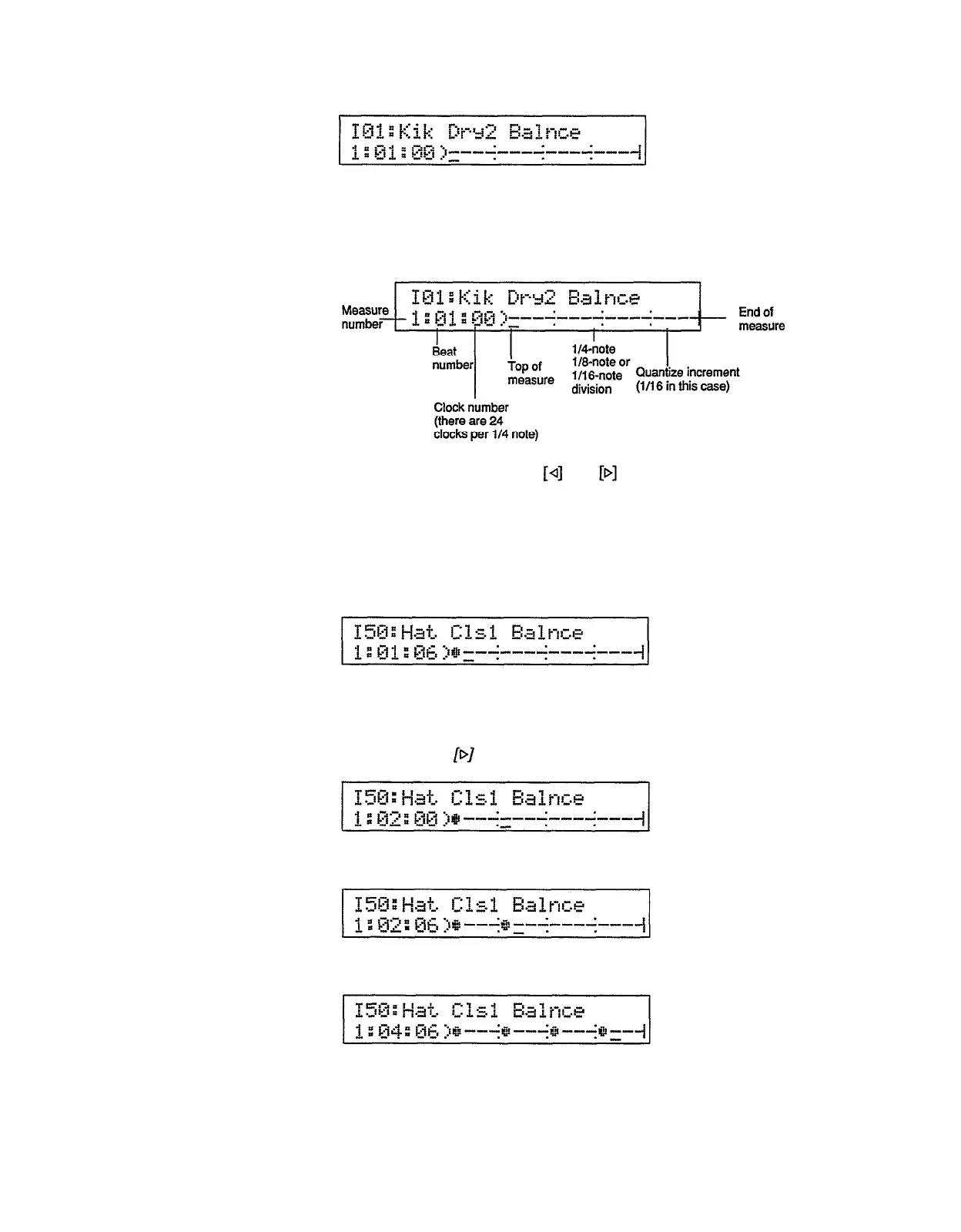
The bottom line of the display shows, from left to right, the measure, beat,
and clock numbers corresponding to the current entry (cursor) location, and a
graphic representation of all or part of the pattern to be entered. The various
elements of the display are as follows:
5. To enter a note, use the
and
keys to move the cursor to the appro-
priate location on the measure display, then press an instrument pad.
Example:
To enter the closed hi-hat on every 1/4 note in the example display shown
above, begin by tapping the hi-hat pad (make sure an appropriate pad bank is
selected) while the cursor is located at the top of the measure.
A dot will appear where the hi-hat was entered, and the cursor will advance to
the next quantize increment (in this case corresponding to the second 1/16th
note in the measure). Now move the cursor ahead to the second 1/4 note by
pressing the
key 3 times.
Press the hi-hat pad again to enter the second hi-hat beat.
Repeat for the remaining two hi-hat beats of the measure.
25


 To Next Page