VOICE EDIT MODE
l
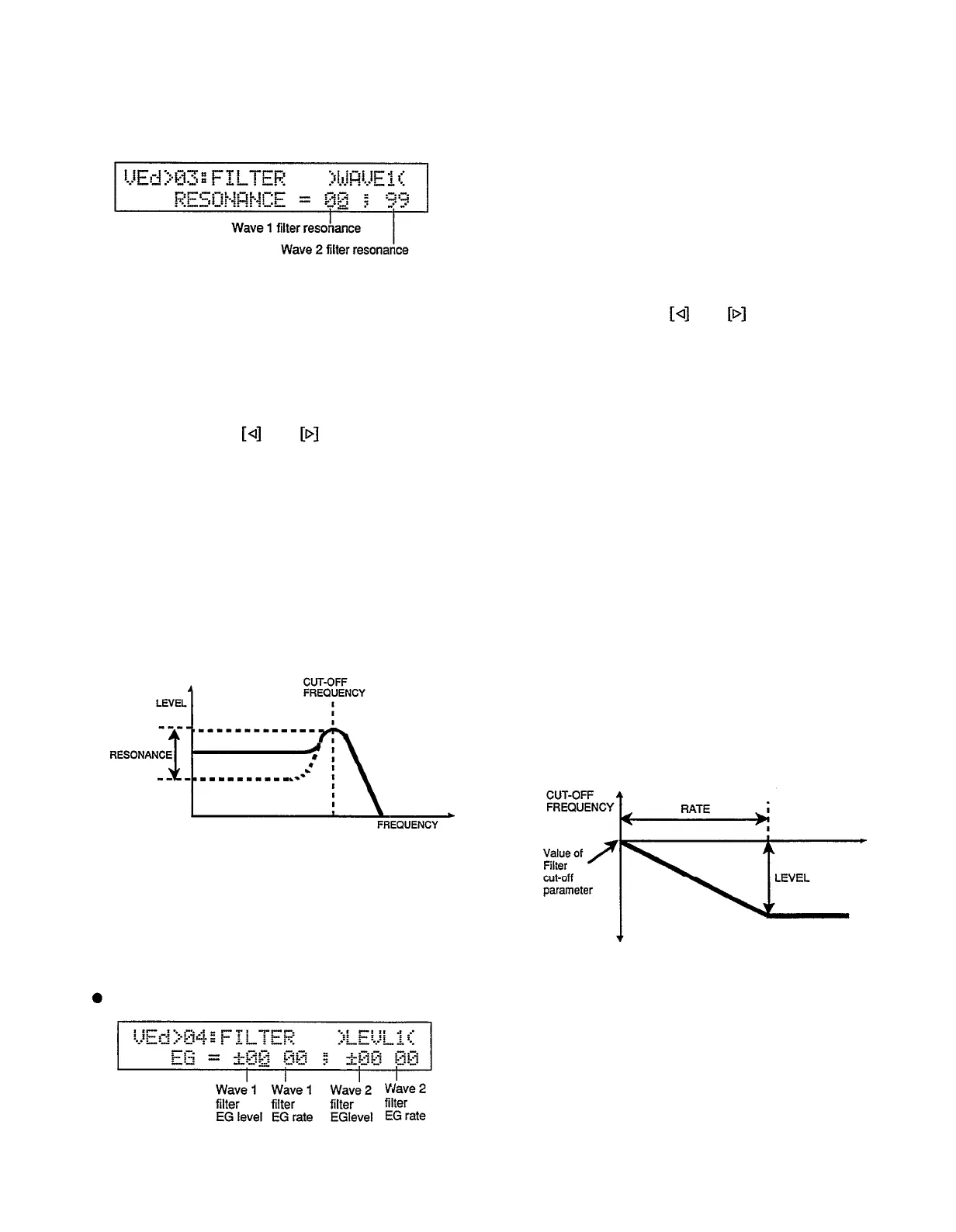
JOB 03: RESONANCE
Summary: Independently sets the degree of filter
resonance for waves 1 and 2 of the current voice
when the “LPF12” or “LPF24” filter type is
selected.
Settings: Wave 1 filter resonance: 00...99
Wave
2 filter resonance: 00 . . .
99
Procedure: Use the and keys to move the
cursor to the wave 1 filter resonance or wave 2
filter resonance parameter, then use the [INC]
and [DEC] keys, the [DATA] slider, or the
numeric keys to set as required.
Notes: This parameter has a similar effect to the
“resonance” settings on traditional analog
synthesizer filters — i.e. it determines the height
of a peak in the filter response at the cutoff
frequency.
RESONANCE
Higher resonance values produce a higher
resonant peak, emphasizing a narrow band of
frequencies at the filter’s cutoff.
Please note that resonance can only be
applied to the
“LPF12” and “LPF24” filter
types.
JOB 04: FILTER EG
86
Summary:
Independently sets the envelope gener-
ator level and rate values for waves 1 and 2 of
the current voice.
Settings:
Wave 1 filter EG level: -63 . . . +63
Wave 1 filter EG rate: 0 . . . 63
Wave 2 filter EG level: -63 . . . +63
Wave 2 filter EG rate: 0 . . . 63
Procedure: Use the and keys to move the
cursor to the desired parameter, then use the
[INC] and [DEC] keys, the [DATA] slider, or
the numeric keys to set as required.
Notes: The filter EG level and rate parameters are
used to shape the filter response at the attack of
the sound.
The level parameters correspond to cutoff
frequency. Plus “+” values produce higher cutoff
frequencies while minus “-” values produce
lower cutoff frequencies. “±100” level values
produce the normal cutoff frequency as deter-
mined by the cutoff parameter (See “CUTOFF”
on page 85).
The “Rate” parameters determine how fast
the jilter sweeps from the normal cutoff fre-
quency to the cutoff frequency determined by the
level parameter. A setting of “00” produces no
change, while the maximum setting of “63”
produces the fastest (almost instantaneous)
sweep.
Filter EG


 To Next Page