VOICE EDIT MODE
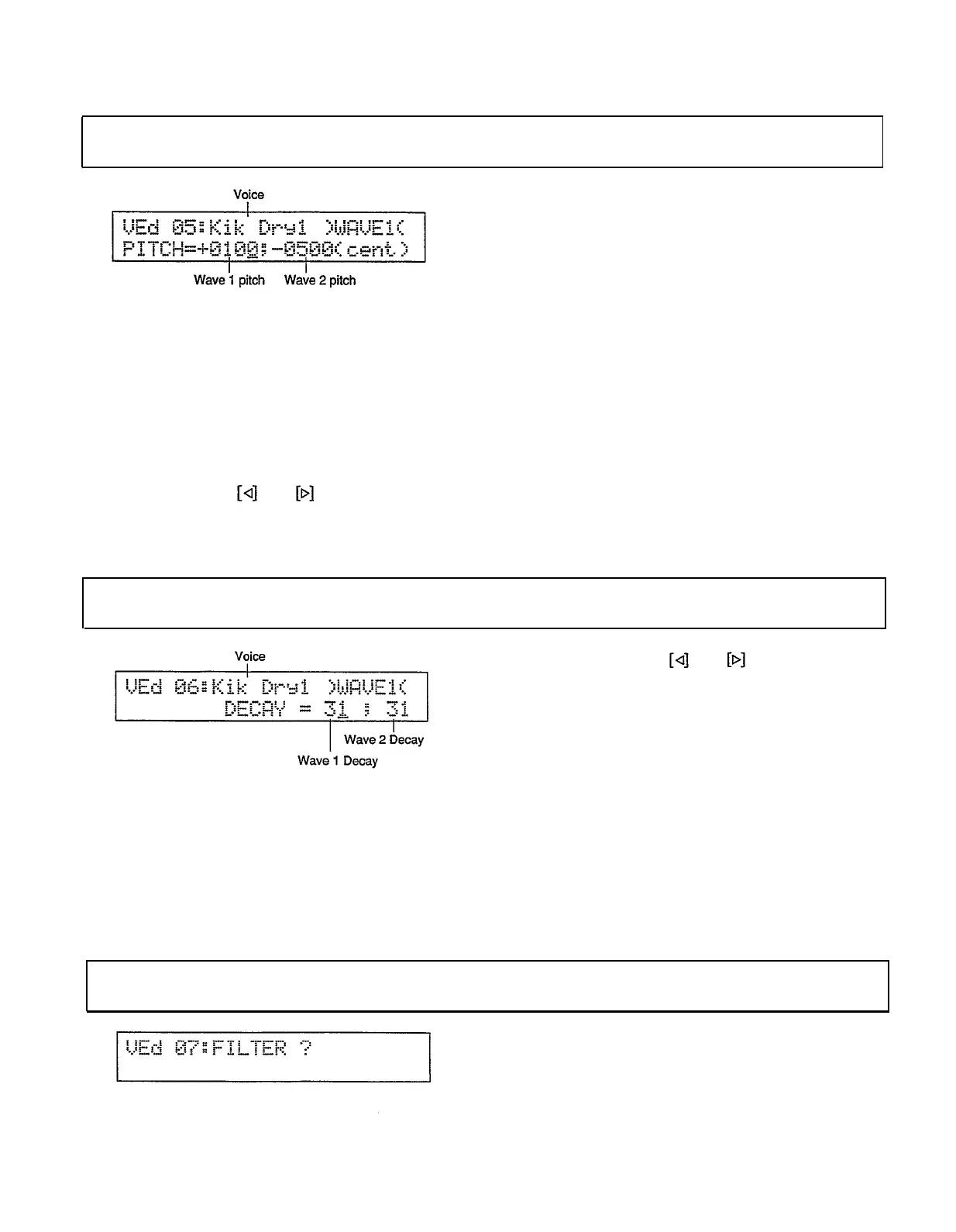
PITCH
Voice edit mode/Page 05
Summary:
Independently sets the pitches of waves
1 and 2 for the selected voice in 1-cent
increments.
Settings:
Voice: I00 . . . I95 (internal), C00 . . . C31
(card)
Wave 1 pitch: -3600...±0000 . . . +3600
Wave 2 pitch: -3600 ...±0000 . . . +3600
Procedure: Use the and keys to move the
cursor to the voice name, wave 1 pitch, or wave
2 pitch parameter. Use the [INC] and [DEC]
keys, the [DATA] slider, or the numeric keys to
set the pitch values. The [INC] and [DEC] keys
adjust the pitch on l-cent increments while the
[DATA] slider adjusts the pitch in 100-cent
increments.
The [INC] and [DEC] keys, the [DATA]
slider, or the instrument pads can be used to
select the voice.
Notes: Negative values lower the pitch of the
selected voice from its “normal” value, while
positive values raise the pitch of the voice. Each
increment equals one “cent” of pitch. A cent is
one-hundredth of a semitone (i.e. 100 cents = 1
semitone). The minimum setting of “-3600”
therefore lowers the pitch by 36 semitones, or 3
octaves (there are 12 semitones to an octave). A
setting of “±0000” produces the normal pitch for
the selected wave.
DECAY
Voice edit mode/Page 06
Procedure:
Use the
and keys to move the
cursor to the voice name, wave 1 decay, or wave
2 decay parameter. Use the [INC] and [DEC]
keys, the [DATA] slider, or the numeric keys to
set the decay values.The [INC] and [DEC]
keys, the [DATA] slider, or the instrument pads
can be used to select the voice.
Summary: Independently sets the decay times of
waves 1 and 2 for the selected voice.
Settings: Voice: I00 . . . I95 (internal), C00 . . . C31
(card)
Wave 1 decay: 00 . . . 63
Wave 2 decay: 00 . . .63
Notes: A setting of “00” produces the shortest de-
cay time while a setting of “63” produces the
longest decay time.
FILTER JOB SELECT
Voice edit mode/Page 07
Summary: Allows any of the four filter jobs de-
scribed below to be selected.
Settings: None
84


 To Next Page