VOICE EDIT MODE
Settings:
Wave 1 EG sensitivity: -7 . . . +7
Wave 2 EG sensitivity: -7 . . . +7
Procedure: Use the
and
keys to move the
cursor to the wave 1 EG sensitivity or wave 2
EG sensitivity parameter, then use the [INC]
and [DEC] keys, the [DATA] slider, or the
numeric keys to set as required.
Notes: Plus “+” settings produce faster attack and
slower decay in response to higher velocity val-
ues — i.e. the harder a pad or key is played, the
faster the attack and the slower the decay. The
maximum setting of “+7” produces the maximum
EG variation in response to velocity changes.
Minus “-” settings produce the opposite effect:
slower attack and faster decay in response to
higher velocity. A setting of “±0”results in no
EC variation.
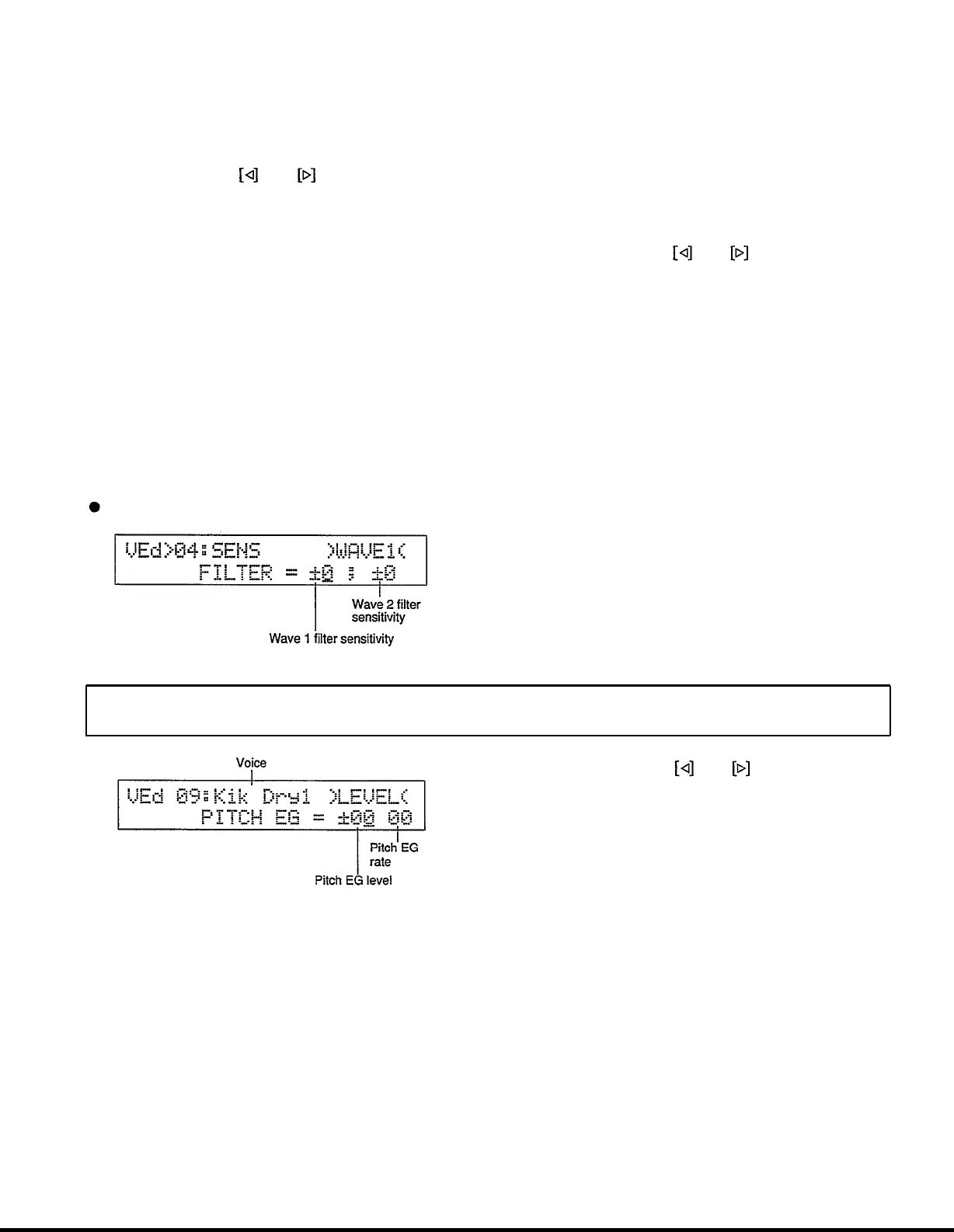
JOB 04: FILTER SENSITIVITY
Summary:
Determines how the wave 1 and wave 2
filter cutoff frequencies change in response to
velocity changes (e.g. keyboard dynamics).
Settings:
Wave 1 filter sensitivity: -7 . . . +7
Wave 2 filter sensitivity: -7 . . . +7
Procedure: Use the
and
keys to move the
cursor to the wave 1 filter sensitivity or wave 2
filter sensitivity parameter, then use the [INC]
and [DEC] keys, the [DATA] slider, or the
numeric keys to set as required.
Notes: Plus “+” settings produce higher cutoff fre-
quencies in response to higher velocity values -
i.e. the harder a key is played, the higher the cut-
off frequency. The maximum setting of “+7”
produces the maximum level variation in
response to velocity changes. Minus “-” settings
produce the opposite effect: lower cutoff in
response to higher velocity. A setting of “+0”
results in no cutoff variation.
PITCH EG
Voice edit mode/Page 09
Procedure: Use the and keys to move the
cursor to the voice name, pitch EG level, or pitch
EG rate parameter. Use the [WC] and [DEC]
keys, the [DATA] slider, or the numeric keys to
set the EG values. The [INC] and [DEC] keys,
the [DATA] slider, or the instrument pads can
be used to select the voice.
Summary: Determines the “shape” of the pitch
envelope generator for the selected voice.
Settings:
Voice: I00 . . . I95 (internal), C00 . . . C31
(card)
Pitch EG level: -72 . . . +72
Pitch EG rate: 00 . . . 63
Notes: The pitch EG level and rate parameters are
used to shape the pitch response at the attack of
the sound.
The level parameters correspond to pitch.
Plus “+” values produce higher pitch while
minus “-”values produce lower pitch. “±00”
level values produce the normal pitch.
88


 To Next Page