PERIODIC MAINTENANCE
TNV IDI Service Manual
5-17
Periodic Maintenance Procedures
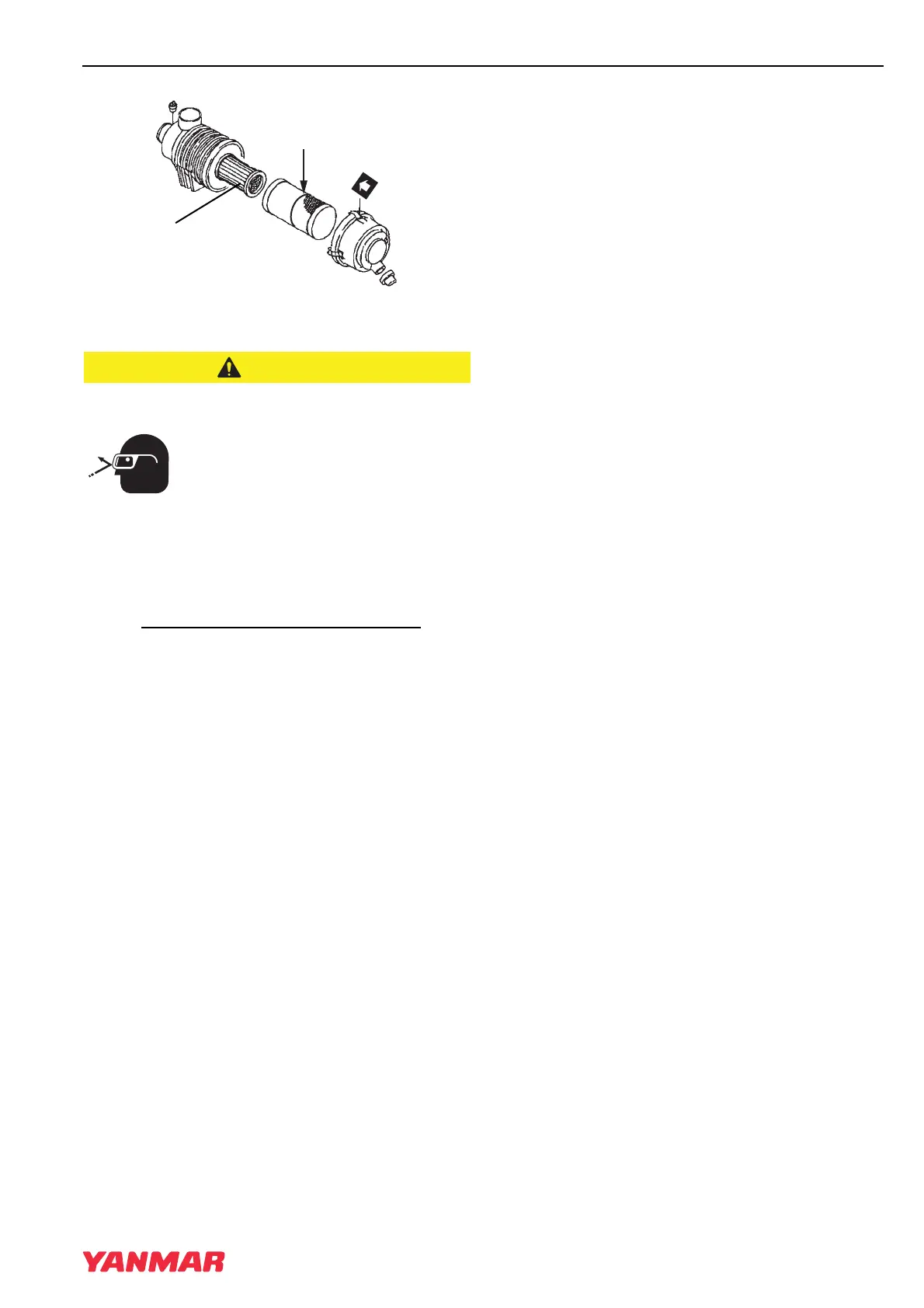
Figure 5-13
FLYING OBJECT HAZARD!
• ALWAYS wear eye protection
when servicing the engine and
when using compressed air or
high-pressure water. Dust, flying
debris, compressed air,
pressurized water or steam may
injure your eyes.
• Failure to comply may result in minor or
moderate injury.
3. Blow air (Figure 5-12, (3)) through the element
from the inside out using 42 - 71 psi
(0.29 - 0.49 MPa; 3.0 - 5.0 kgf/cm2)
compressed air to remove the particulates. Use
the lowest possible air pressure to remove the
dust without damaging the element.
If the air cleaner is equipped with a double
element, only remove and replace the inner
element (Figure 5-13, (1)) if the engine lacks
power or the dust indicator actuates (if
equipped).
The inner element should not be removed when
cleaning or replacing the outer element. The
inner element is used to prevent dust from
entering the engine while servicing the outer
element.
4. Replace the element with a new one if the
element is damaged, excessively dirty or oily.
5. Clean inside of the air cleaner cover.
6. Install the element into the air cleaner case
(Figure 5-12, (4)).
Note: If there is a red line (Figure 5-13, (2)) in
the outer element, reinsert the element
until the overlap position of red line and
end face of the air cleaner case.
7. Install the air cleaner cover making sure you
match the arrow (Figure 5-12, (5)) on the cover
with the arrow on the case (Figure 5-12, (6)).
8. Latch the air cleaner cover to the case.
TNV_IDI_ServiceManual_A4.book 17 ページ 2012年2月24日 金曜日 午前10時24分



 To Next Page