4.3 The Drive and Programming Modes
YASKAWA EUROPE SIEP YASKAWA AC Drive L1000V Technical Manual 73
Start-Up Programming
& Operation
4
u Verifying Parameter Changes: Verify Menu
The Verify Menu lists edited parameters from the Programming Mode or as a result of Auto-Tuning. The Verify Menu
helps determine which settings have been changed, and is particularly useful when troubleshooting or replacing a drive.
If no settings have been changed, the Verify Menu will read “None”. The Verify Menu also allows users to quickly access
and re-edit any parameter settings that have been changed.
Note: The Verify Menu will not display parameters from the A1 group (except for A1-02) even if those parameters have been changed
from their default settings.
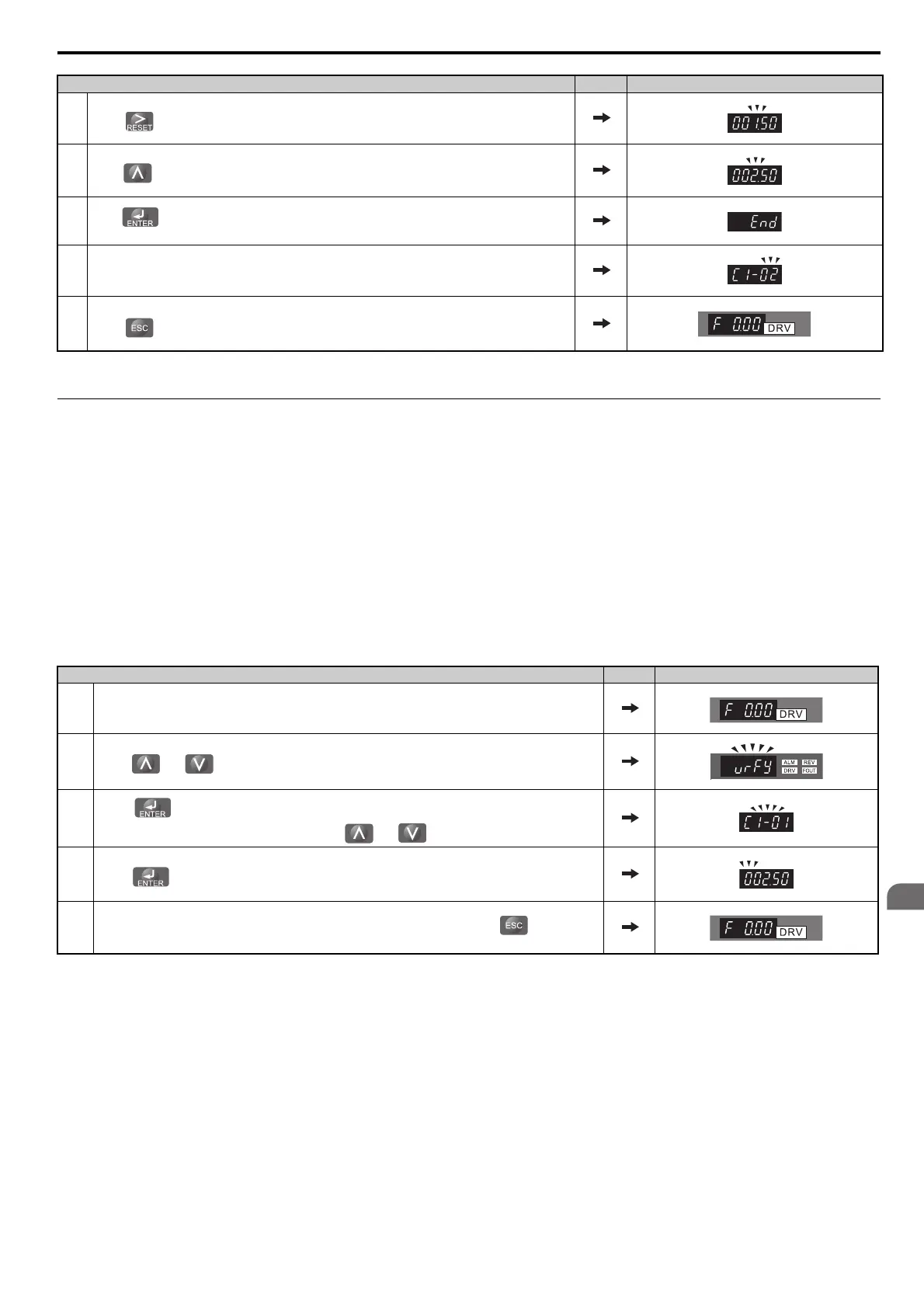
The following example is a continuation of the steps above. Here, parameter C1-01 is accessed using the Verify Menu,
and is changed again from 1.50 s to 2.50 s.
The steps below are an example of how to check the list of edited parameters:
8.
Press until the desired digit is selected. In this case, “1” flashes.
9.
Press to increase the value of the selected digit. In this case, “002.50” should appear.
10.
Press to confirm the change. If it is accepted, “End” should appear. If it is out of range, the parameter
will flash twice and return to its previous value.
11.
The display automatically returns to the screen shown in Step 6. If needed, repeat steps 5 through 10 to modify
other parameters.
12.
Press as many times as necessary to return to the frequency reference display.
Step Display/Result
1. Turn on the power to the drive. The initial display appears.
2.
Press or until the display shows the top of the Verify Menu.
3.
Press to view the list of parameters that have been edited from their original default settings.
If parameters other than C1-01 have been changed, use or to scroll and view them.
4.
Press to access the setting value. Left digit flashes.
5.
Repeat steps 8 through 10 of the previous table to change the value of the parameter. Press as many times
as necessary to return to the frequency reference display.
Step Display/Result



 To Next Page