4.5 Auto-Tuning
YASKAWA EUROPE SIEP YASKAWA AC Drive L1000V Technical Manual 83
Start-Up Programming
& Operation
4
n Starting Auto-Tuning
WARNING! Sudden Movement Hazard. The drive and motor may start unexpectedly during Auto-Tuning, which could result in death
or serious injury. Ensure the areas surrounding the drive, motor and load are clear before proceeding with Auto-Tuning.
WARNING! Electrical Shock Hazard. High voltage will be supplied to the motor when Stationary Auto-Tuning is performed even with
the motor stopped, which could result in death or serious injury. Do not touch the motor until Auto-Tuning has been completed.
WARNING! When performing Rotational Auto-Tuning, always uncouple the motor from the mechanical system (remove ropes from
traction sheave). Performing Rotational Auto-Tuning with the mechanical system connected to the motor can cause hazardous
situations, injury to personnel, and damage to the equipment.
NOTICE: Rotational Auto-Tuning will not function properly if a holding brake is applied on the load. Ensure the motor can freely spin
before beginning Auto-Tuning. Failure to comply could result in improper operation of the drive.
Enter the required information from the motor nameplate. Press to proceed to the Auto-Tuning start display.
Note: These instructions continue from Step 6 in “Enter Data from the Motor Nameplate”.
u Input Data for Motor Auto-Tuning: T1
The T1- parameters are used to set the Auto-Tuning input data.
Note: 1. Cycling drive power after setting the T1 parameters will reset these parameters to default values.
2. For motors operating in the field weakening range, first perform the Auto-Tuning with the base data. After Auto-Tuning is complete,
change E1-04, Maximum Output Frequency, to the desired value.
n T1-01: Auto-Tuning Mode Selection
Sets the type of Auto-Tuning to be used. Refer to Types of Auto-Tuning on page 80 for details on the different types of
Auto-Tuning.
Setting 0: Rotational Auto-Tuning
Setting 2: Stationary Auto-Tuning for Line-to-Line Resistance
n T1-02: Motor Rated Power
Sets the motor rated power according to the motor nameplate value.
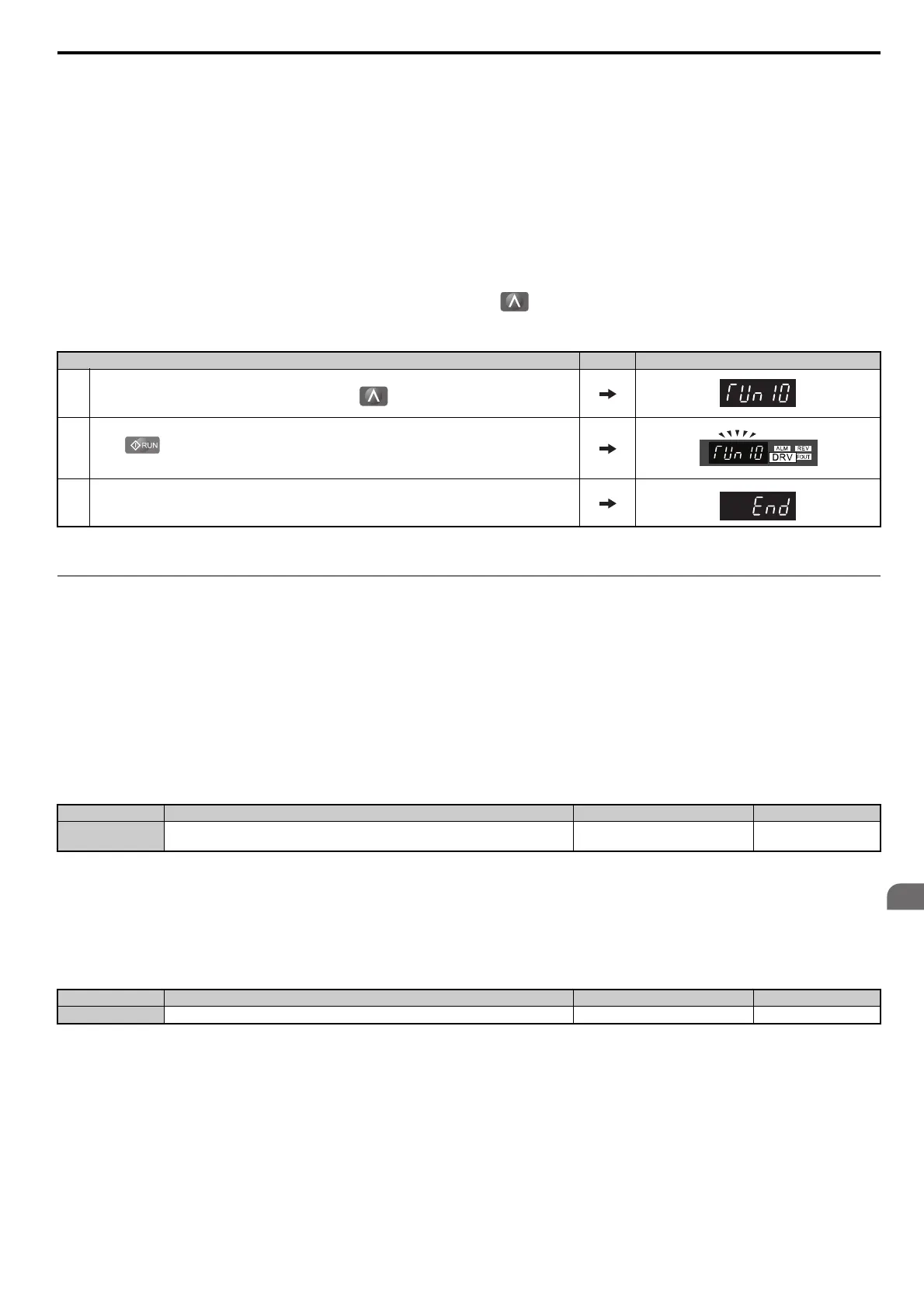
Step Display/Result
1.
After entering the data listed on the motor nameplate, press to confirm.
2.
Press to activate Auto-Tuning. The drive begins by injecting current into the motor for about 1 min,
and then starts to rotate the motor.
3. Auto-Tuning finishes in approximately one to two minutes if no errors occur.
No. Name Setting Range Default
T1-01 Auto-Tuning Mode Selection
2 (V/f)
0 to 2 (OLV)
2 (V/f)
0 (OLV)
No. Name Setting Range Default
T1-02 Motor Rated Power 0.00 to 650.00 kW Determined by o2-04



 To Next Page