4.3 The Drive and Programming Modes
72 YASKAWA EUROPE SIEP YASKAWA AC Drive L1000V Technical Manual
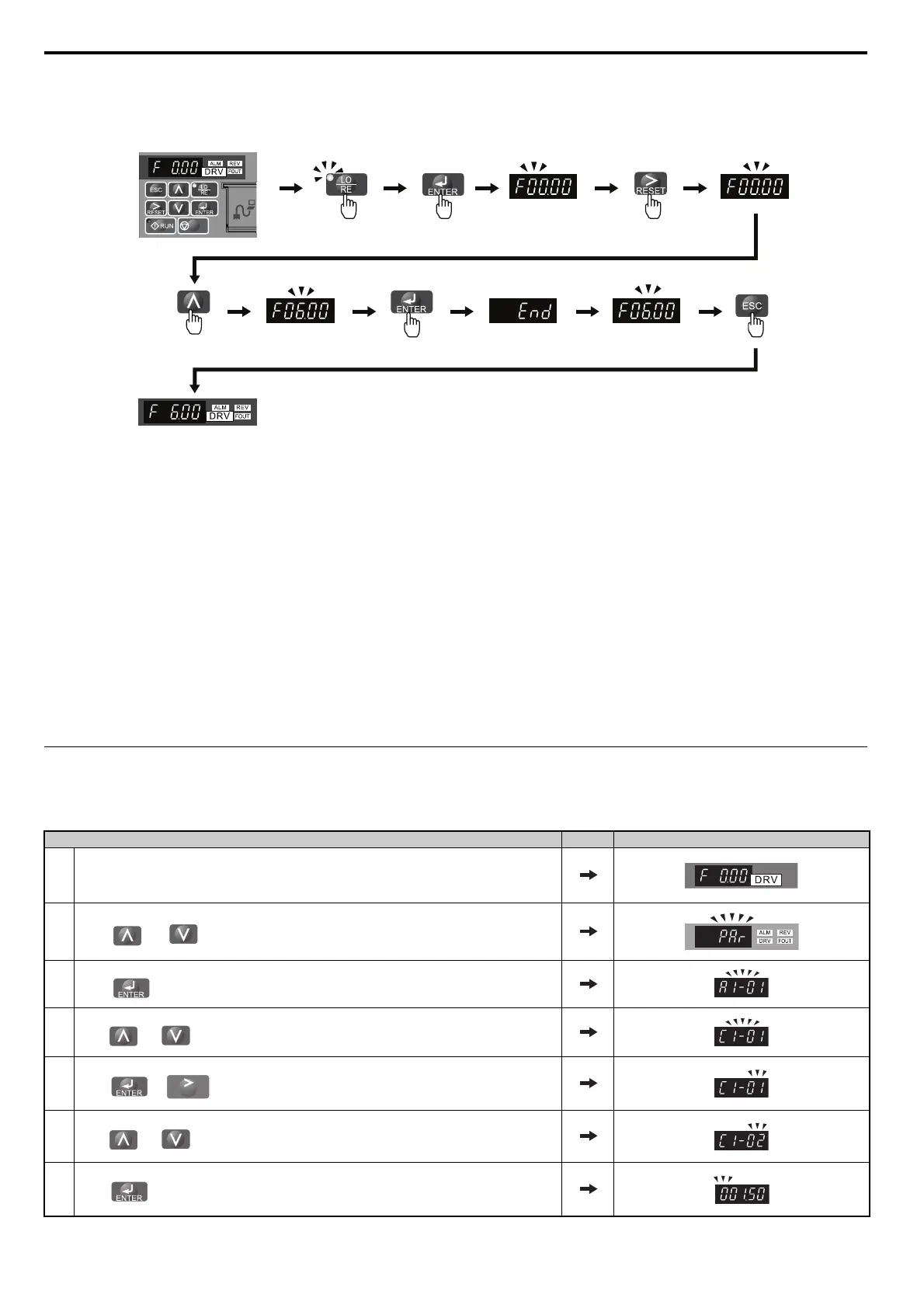
Figure 4. 5
Figure 4.5 Setting the Speed Reference while in the Drive Mode
Note: 1. The drive will not accept a change to the speed reference until the ENTER key is pressed after the speed reference is entered. This
feature prevents accidental setting of the speed reference. To have the drive accept changes to the speed reference as soon as changes
are made without requiring the ENTER key, set o2-05 to 1.
2. The LO/RE (Local/Remote) key’s functionality is disabled by default, to prevent inadvertent switching to LOCAL mode while the
elevator is in operation. To enable the LO/RE key set the o2-01 parameter to 1.
n Programming Mode Details
The following actions are possible in the Programming Mode:
• Verify Function: Verify paramter setting changes from original default values.
• Setup Group: Access a list of commonly used parameters to simplify setup.
• Parameter Setting Mode: Access and edit all parameter settings.
• Auto-Tuning Mode: Automatically calculate and set motor parameters to optimize drive performance.
u Changing Parameter Settings or Values
This example explains changing C1-01 (Acceleration Ramp 1) from 1.50 seconds (default) to 2.50 seconds.
Step Display/Result
1. Turn on the power to the drive. The initial display appears.
2.
Press or until the Parameter Setting Mode screen appears.
3.
Press to enter the parameter menu tree.
4.
Press or to select the C parameter group.
5.
Press or until the “01” flashes.
6.
Press or to select the parameter C1-02.
7.
Press to view the current setting value (1.50 s). The left most digit flashes.
STOP
Frequency reference
display at power up
Press to select LOCAL
Press until the frequency
reference becomes 6 Hz
Press to select the
digit to the right
RESET



 To Next Page