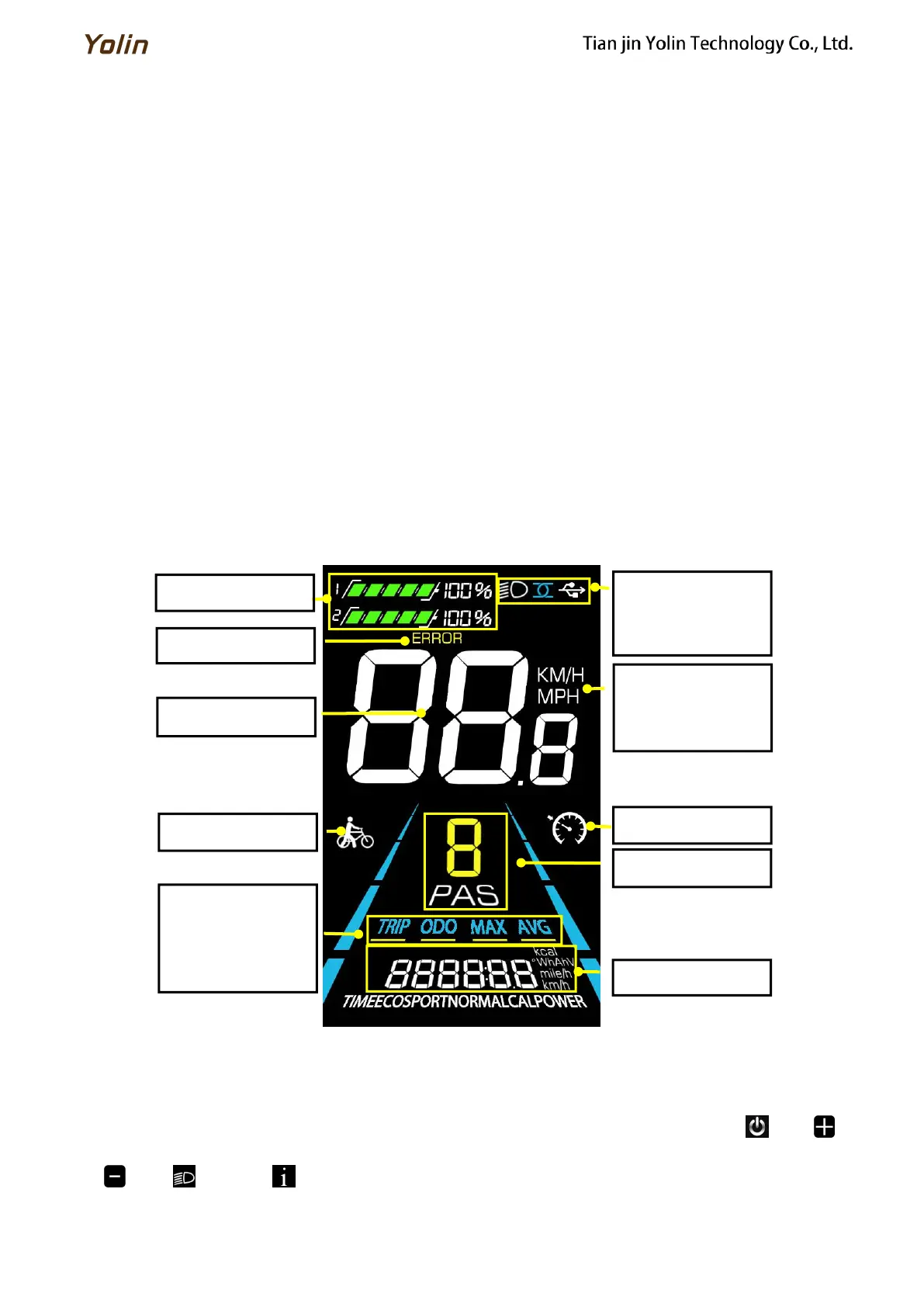
4. Function Overview and Functional Areas
4.1 Functional overview
The YL81F display offers a variety of features to suit your riding needs, including:
● Battery level indicator
● Pedal assist (PAS) level indicator
● Speed (current speed, maximum speed, average speed)
● Mileage display (single and total mileage)
● Walk boost mode
● Light ON/OFF
● Error code indicator
● Motor power indicator (optional)
● USB connection indicator (optional)
● Cruise control indicator (optional)
● Bluetooth connection indicator (optional)
● Personalized parameter settings (e.g. wheel diameter, speed limit, rated voltage, PAS parameter, password, and
controller current limit setting, etc.).
● Factory default parameter recovery function
4.2 Functional areas
Figure 4-1 YL90T-V functional area distribution interface
4.3 Button definitions
The YL81F display is equipped with five buttons on the corresponding operating unit: power on/off , plus ,
minus , light and toggle .
Trip odometer
Odometer
Max speed
Average speed



 To Next Page