Setup Screens
Program
Setting Test pressure (Electronic Regulator)
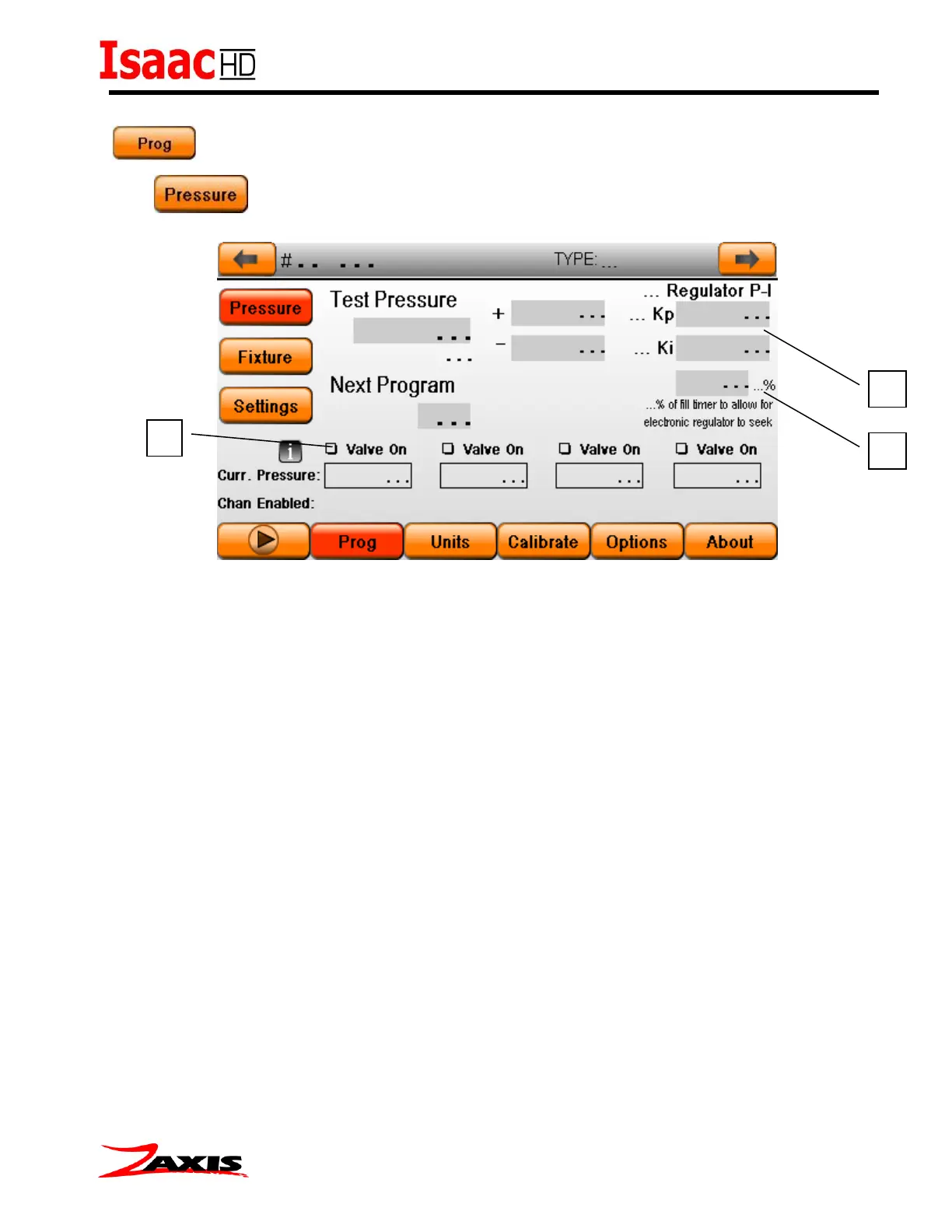
To set the test pressure, place a master part or plug onto the test port. Set the desired pressure
in the ‘test pressure’ value box as well as the plus+ and minus– tolerance, then check the “Valve
On” box. (1) A seek and tune algorithm will activate to achieve the set test pressure. The
algorithm could take 7-10 seconds to reach the target value. The closer the value gets to the set
test pressure, the slower the feedback will operate. When the desired pressure is reached,
uncheck the box to save the value as the regulator output start value.
A secondary feature of the electronic regulator is the feedback loop. During the fill step the
processor will use the pressure transducer to adjust the output of the regulator to reach the test
pressure. The percentage change (2) is the amount of time the regulator will be ‘fine tuned’. A
50% regulator seek time (default) will adjust the regulator output in the last 50% of the fill timer.
Setting the amount of feedback to high can cause oscillation. Setting the %value to ‘0’ will enable
the (3) Kp and Ki controls. These controls can be used similar to a PID tuning algorithm. The Kp
is the amount of drive for the regulator. The Ki is the amount of correction the regulator will
receive as it gets closer to the target set point. The Kp and Ki controls allow the fill curve to be
customized to fit the application parameters.



 To Next Page