10
if surface time is less than 10 minutes, the mode moves to dive log mode .)
• C: EL back light is on from 4-5 seconds.
• D: When water is detected, the mode moves to dive mode.
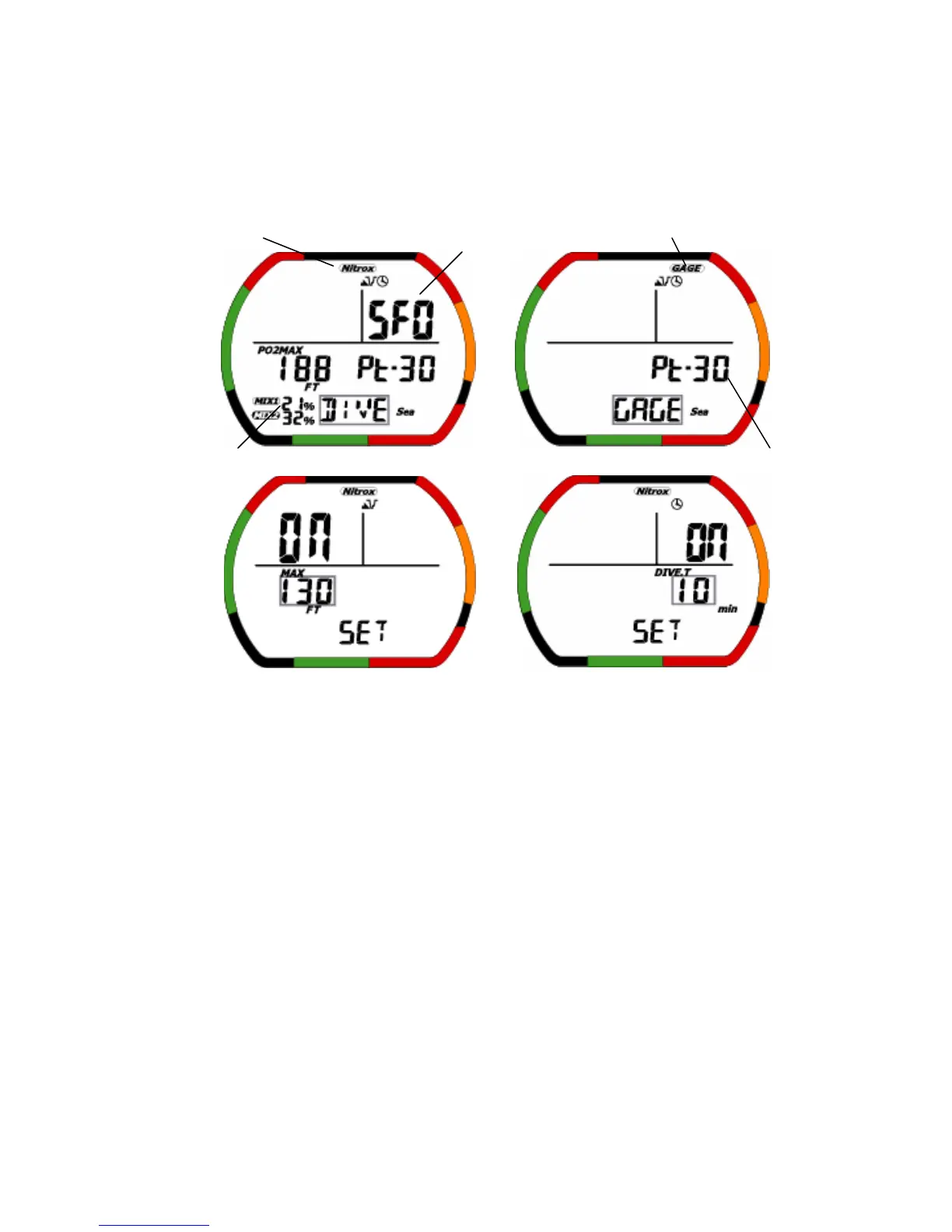
1-3-2.Dive set mode (Gage dive set mode)
If surface time is less than 10 minutes after dive, it cannot enter this mode.
・The gray square shows a blinking part.
(1)Description of Functions
• Fraction of oxygen(=FO
2
): This displays the current setting.
MIX1 setting range: Fraction of oxygen 21-50%、’--’%.
MIX2 setting range: Fraction of oxygen 21-99%、’--’%.
• Maximum depth of PO
2
: Based on the fraction of oxygen, this indicates the water depth where PO
2
(=pressure of oxygen) maximum reaches 1.4 (MIX1)or 1.6(MIX2).
In the water depth rank which exceeded the maximum water depth, non-decompression limit become
displayed ‘---’.
• User Safety Factor(=USF): When the level is "0" the usual algorithm is used for calculations. When the
level is “1” and “2”the next higher altitude rank is used for calculations. The default setting is “0”.
• Profiling time: It is the setting of sampling time.The setting range: either 15 or 30 seconds.
• Battery indicator Icon: This displays the current battery voltage.
• Maximum depth Alarm: The alarm generates to sound when it reaches setting depth.
The setting range: 9-99meters(30-320ft),resolution:1 meter(10 feet).
Maximum depth of PO2
User Safety Factor
Fraction of oxygen
Sea/Fresh Icon
Mode
Gage Icon
Profiling time
NITROX Icon
Dive time alarm
Maximum depth
Alarm


 To Next Page