6
1-3.Function Specifications
1-3-1.Time mode
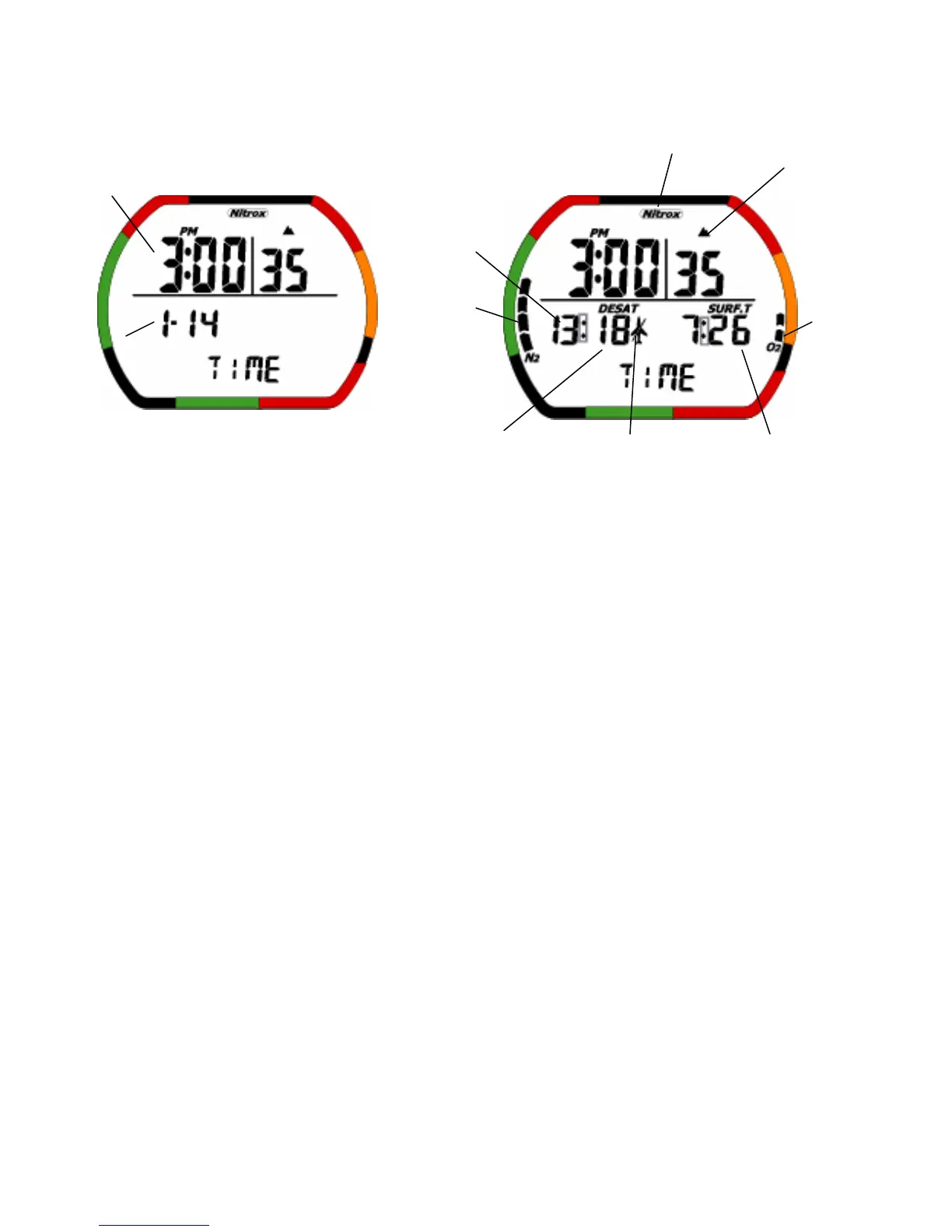
<Normal> < After a dive >
・The gray square shows a blinking part.
(1)Description of Functions: This mode is usually shown.
• Current time: This is the current time.
• Current date: This is the current date.
• Battery indicator Icon: This displays the current battery voltage.
• PGT (Pressure Gas in Tissue) graph: This indicates the level of Nitrogen with nine level indicators.
• OLI (Oxygen Limited Indicator) graph: This indicates the level of Oxygen limit with eight level
indicators.
• Nitrox Icon: This Icon is ON when NITROX has been set for MIX1 or MIX2.It blinks if the MIX1 and
MIX2 setting is the default setting.
• Desaturation time(DESAT): This indicates the time remaining of nitrogen until the body’s internal
nitrogen is desaturated. The time is counted down to 0:00, it turns off after 1 minute.
• Surface time(SURF.T): This is interval time after dive. Surface time is counted starting from when the
depth shown in Dive mode reaches 1.5 meters (5 feet) or less. If the depth changes back to 1.5 meters
(5 feet) or more in less than 10 minutes, the previous dive mode is continued. Surface time is
continued for 48 hours. After that, surface time is turned off after 1 minute.
• Mode: This is the display, which shows Time mode.
• Don’t Fly Icon: While computer calculates desaturation time,this icon turned on at Time Mode.When
the computer has finished calculating desaturation time and Time Mode is over 12 hours,this Icon is
turned off.
• Gage mode Icon: In gage mode,the Icon is on.
Current time
Current date
Mode
Altitude rank
PGT graph
NITROX Icon
OLI graph
Desaturation time Surface time
Battery indicator
Don’t Fly Icon


 To Next Page