EasyManua.ls Logo

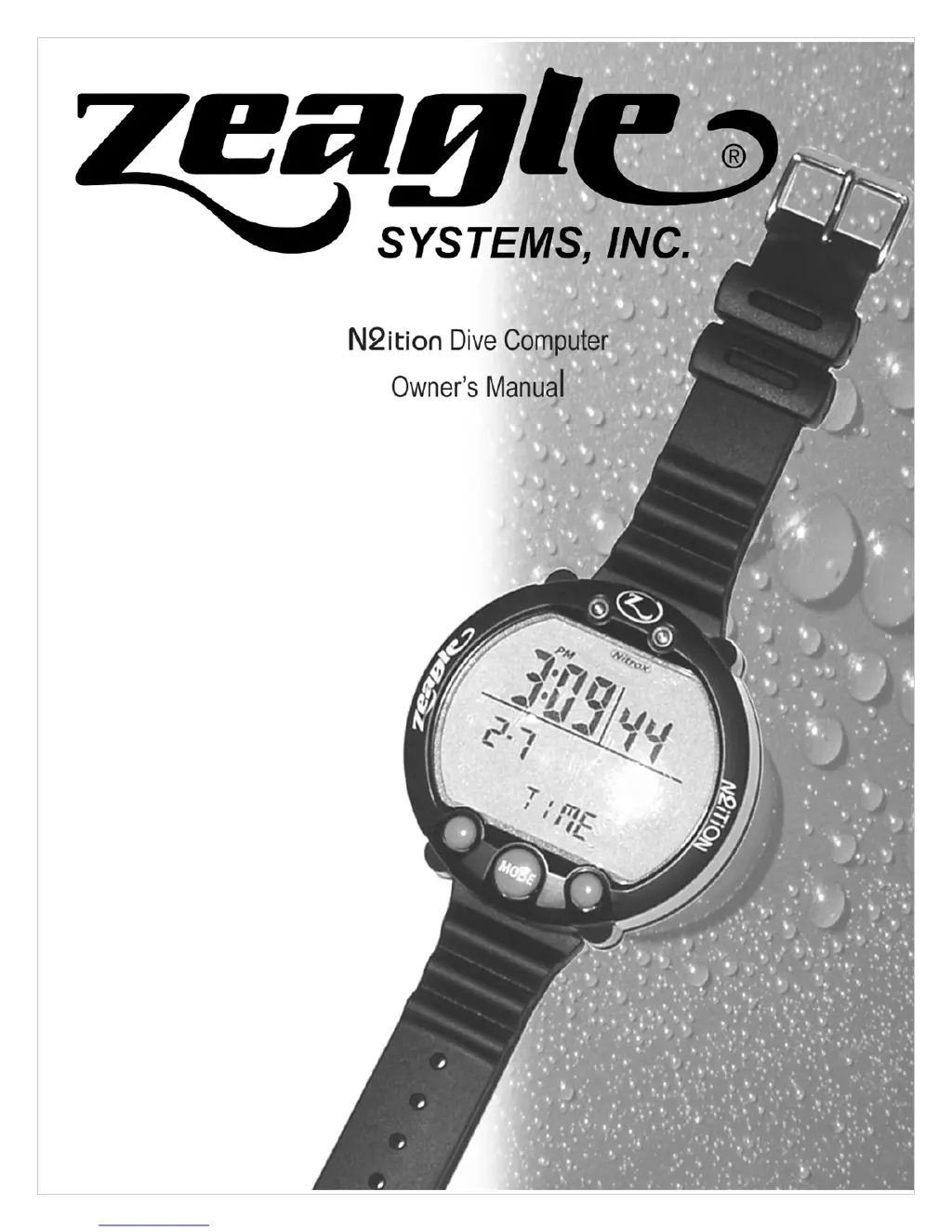
Zeagle N2ition - User Manual

Zeagle N2ition
48 pages
Print Icon
To Next Page IconTo Next Page
Loading...
p/n 370-9001 ©Copyright 2008 Zeagle Systems, Inc 1/08
Rev. A

Questions and Answers

Summary

Zeagle N2 ition Dive Computer Specifications

General Product Overview

Overview of the N2ition model, its features, and functions like time, alarms, GAGE mode, and dive data logging.

Dive Computer Background and Usage

Explains the N2ition's decompression calculations, intended user base, NITROX usage guidelines, and safety assumptions.

Function Specifications and Modes

Time Mode Display and Functions

Explains the functions displayed in Time mode, including current time, date, battery indicator, PGT/OLI graphs, and various icons.

Battery Indicator and Altitude Rank

Details the battery indicator icon states and the altitude rank levels and their corresponding altitude ranges and display behavior.

Dive Computer Controls and Operations

Dive Computer Switch Functions

Identifies and describes the function of switches A, B, C, and D on the Zeagle N2ition dive computer.

Switch Operations and Cautions

Explains switch operations in normal and post-dive conditions, and provides important cautions regarding altitude rank and battery indicators.

Dive Setup and Planning Modes

Dive Set Mode Features

Details the functions available in Dive Set mode, including fraction of oxygen, PO2, user safety factor, and dive time alarms.

Dive Plan Mode Description

Explains the Dive Plan mode, including depth rank, NDL, battery indicator, PGT/OLI graphs, and various icons like Nitrox and Don't Fly.

Dive Logging and Profile Data

Dive Log Mode Data and Functions

Details the Dive Log mode, including dive date, entry/exit times, log number, PGT/OLI graphs, and altitude rank.

Dive Log Mode Details and Warnings

Explains functions within Dive Log mode, such as log number, dive date/times, PGT/OLI graphs, altitude rank, Nitrox, fraction of oxygen, and dive time.

Dive Log Data and Dive Warnings

Describes water temperature, user safety factor, average/maximum depth, ascent rate indicator, and various warnings that can occur during a dive.

Gage Mode and Data Transfer

Gage Dive Log Mode Operations

Explains the Gage Dive Log mode and switch operations for changing log numbers and navigating between modes.

Dive Profile Mode Description

Details the Dive Profile mode, including dive date, dive time, log number, fraction of oxygen, Sea/Fresh icon, and profile depth.

Data Transfer and Time Settings

PC Transfer Mode Functions

Explains the PC Transfer mode, its description of functions, and switch operations for moving between modes.

Time Set Mode Description

Details the Time Set mode, including setting 12/24 tense, current time, date, and year, along with switch operations.

Dive Mode Operations

Dive Mode Overview

Introduces the different dive modes: Non-decompression, Gage dive, Safety Stop, and Decompression, with visual examples.

Dive Mode Descriptions and Cautions

Provides detailed descriptions of Non-decompression, Gage, Decompression, and Safety Stop dive modes, including switch operations.

Dive Mode Warnings and Data

Dive Mode Warnings and Operations

Explains out-of-measurement range conditions, warnings, and switch operations for mix gas changes and display information.

Dive Mode Data and Warnings

Details dive time, maximum depth, PO2, PGT/OLI graphs, various icons, safety stop time, and decompression stop information.

Dive Mode Warning Indicators

Describes Ascent rate warning, Decompression dive warning, Decompression stop violation warning, and OLI warnings.

Dive Mode Warning Details

OLI, PO2, and Default Warnings

Explains OLI graph warnings (values 7 and 8) and PO2 warnings (values 1.4 and 1.6), including default warnings.

Dive Mode Switch Operations and Locks

Details switch operations for Non-decompression, Decompression/Violation modes, and explains decompression stop violation lock.

Measurement Range and Gage Mode

Measurement Range Locks and Gage Mode

Explains out-of-measurement range conditions, locks, and Gage dive mode operations.

Gage Mode Functions

Details the functions available in Gage Mode, including depth, temperature, and dive time measurements, and data logging.

Display and Operation Modes

Dive Mode Displays

Shows displays for Time Mode, Dive Set Mode, Dive Mode, and Hold Switch C, illustrating different dive computer states.

Switch Operation Overview

Describes the general switch operation for mode selection, highlighting differences from usual modes and cautions.

Technical Specifications

Accuracy and Measurement Ranges

Details accuracy specifications for time, depth, and temperature, along with measurement ranges for depth, dive time, altitude, and temperature.

Operating Temperature and NITROX Settings

Covers operating temperature ranges and specific settings for NITROX MIX1 and MIX2, including setting steps.

Water Resistance and Battery Life

Specifies waterproof ability to 99.9m and battery life estimates for the CR2032 battery, including usage conditions.

Sound Patterns and Alarms

Sound Patterns for Warnings

Illustrates sound patterns for warnings and alarms, including EL backlight timing and frequency variations for depth and dive time alarms.

Dive Time Alarm Patterns

Displays detailed frequency and timing patterns for dive time alarms, showing EL backlight activation and sound sequences.

Units, Safety, and Maintenance

Units of Measurement and Cautions

Explains how to change units for water depth and temperature, including operating methods and cautions.

Product Handling and Safety Cautions

Provides crucial advice on handling the product, including storage, avoiding overheating, exposure to pressure, and not disassembling.

Diving Safety and Care

Battery Management and Dive Readiness

Covers battery replacement, checking power before diving, setting FO2/FHe, safety stops, and using backup instruments.

Care and Maintenance Procedures

Details how to clean the dive computer, avoid damaging solvents, and store it properly to maintain its functionality and waterproofing.

Troubleshooting Guide

Common Status and Solutions

Lists common issues like blinking DECO marks, blinking displays, and altitude rank issues, with their causes and solutions.

Troubleshooting Display and Mode Issues

Addresses issues like dim displays, inability to enter dive mode, and computers not returning to surface mode, along with potential causes and fixes.

Troubleshooting Battery and Display Problems

Covers battery life issues, computers going into dive mode unexpectedly, and display showing nothing, with solutions and repair advice.

Dimensional and Specification Details

External Dimensions and Materials

Provides detailed external dimensions, materials used, and illustrations of the dive computer's physical layout.

Switch Types and Serial Number Format

Identifies the types of switches used and explains the format and generation of the serial number.

Reliability Testing Procedures

Reliability Test Items

Lists the various reliability tests performed on the product, including temperature, humidity, vibration, and water pressure resistance.

Temperature and Cycle Test Methods

Details the test methods for low/high temperature operation and temperature cycle tests, including graphical representations of test conditions.

Environmental Resistance Tests

Humidity, Vibration, Drop, and Static Tests

Describes test methods for humidity resistance, vibration, drop tests, and static electricity resistance.

Light, Weather, Corrosion, and Water Tests

Details test methods for light resistance, weather resistance, corrosion resistance, and water pressure resistance.

Quality Assurance and Defect Management

Quality Assurance Inspection Methods

Explains the acceptable quality levels and the sampling inspection method used based on MILSTD-105D standards.

Attribute Assurance Levels and Defect Definitions

Defines attribute assurance levels for appearance, functions, and dimensions, and provides definitions for major and minor defects.

Product Defects and Packaging

Product Defect Handling

Outlines the process for returning defective products within 12 months of delivery for replacement or corrective measures.

Lot Configuration and Labels

Describes lot configuration, including the contents of a lot, and details the types of labels used on inner and outer packaging boxes.

Packaging and Storage Guidelines

Packaging Method Details

Explains the packaging method, specifically how the display area is protected with an anti-static air gap sheet.

Storage and Shipping Conditions

Details the method for storing products in slip cases with separation frames and defines temperature ranges for shipment and storage.

Operation Flow Chart

Dive Computer Mode Transitions

Visually illustrates the flow between different modes like Time Mode, Dive Set Mode, Log Mode, Dive Mode, and various warning states.

Warranty and Product Registration

Limited Warranty Terms

Details the limited warranty period, coverage for defects, conditions for voiding the warranty, and the process for returns and repairs.

Summary

Zeagle N2 ition Dive Computer Specifications

General Product Overview

Overview of the N2ition model, its features, and functions like time, alarms, GAGE mode, and dive data logging.

Dive Computer Background and Usage

Explains the N2ition's decompression calculations, intended user base, NITROX usage guidelines, and safety assumptions.

Function Specifications and Modes

Time Mode Display and Functions

Explains the functions displayed in Time mode, including current time, date, battery indicator, PGT/OLI graphs, and various icons.

Battery Indicator and Altitude Rank

Details the battery indicator icon states and the altitude rank levels and their corresponding altitude ranges and display behavior.

Dive Computer Controls and Operations

Dive Computer Switch Functions

Identifies and describes the function of switches A, B, C, and D on the Zeagle N2ition dive computer.

Switch Operations and Cautions

Explains switch operations in normal and post-dive conditions, and provides important cautions regarding altitude rank and battery indicators.

Dive Setup and Planning Modes

Dive Set Mode Features

Details the functions available in Dive Set mode, including fraction of oxygen, PO2, user safety factor, and dive time alarms.

Dive Plan Mode Description

Explains the Dive Plan mode, including depth rank, NDL, battery indicator, PGT/OLI graphs, and various icons like Nitrox and Don't Fly.

Dive Logging and Profile Data

Dive Log Mode Data and Functions

Details the Dive Log mode, including dive date, entry/exit times, log number, PGT/OLI graphs, and altitude rank.

Dive Log Mode Details and Warnings

Explains functions within Dive Log mode, such as log number, dive date/times, PGT/OLI graphs, altitude rank, Nitrox, fraction of oxygen, and dive time.

Dive Log Data and Dive Warnings

Describes water temperature, user safety factor, average/maximum depth, ascent rate indicator, and various warnings that can occur during a dive.

Gage Mode and Data Transfer

Gage Dive Log Mode Operations

Explains the Gage Dive Log mode and switch operations for changing log numbers and navigating between modes.

Dive Profile Mode Description

Details the Dive Profile mode, including dive date, dive time, log number, fraction of oxygen, Sea/Fresh icon, and profile depth.

Data Transfer and Time Settings

PC Transfer Mode Functions

Explains the PC Transfer mode, its description of functions, and switch operations for moving between modes.

Time Set Mode Description

Details the Time Set mode, including setting 12/24 tense, current time, date, and year, along with switch operations.

Dive Mode Operations

Dive Mode Overview

Introduces the different dive modes: Non-decompression, Gage dive, Safety Stop, and Decompression, with visual examples.

Dive Mode Descriptions and Cautions

Provides detailed descriptions of Non-decompression, Gage, Decompression, and Safety Stop dive modes, including switch operations.

Dive Mode Warnings and Data

Dive Mode Warnings and Operations

Explains out-of-measurement range conditions, warnings, and switch operations for mix gas changes and display information.

Dive Mode Data and Warnings

Details dive time, maximum depth, PO2, PGT/OLI graphs, various icons, safety stop time, and decompression stop information.

Dive Mode Warning Indicators

Describes Ascent rate warning, Decompression dive warning, Decompression stop violation warning, and OLI warnings.

Dive Mode Warning Details

OLI, PO2, and Default Warnings

Explains OLI graph warnings (values 7 and 8) and PO2 warnings (values 1.4 and 1.6), including default warnings.

Dive Mode Switch Operations and Locks

Details switch operations for Non-decompression, Decompression/Violation modes, and explains decompression stop violation lock.

Measurement Range and Gage Mode

Measurement Range Locks and Gage Mode

Explains out-of-measurement range conditions, locks, and Gage dive mode operations.

Gage Mode Functions

Details the functions available in Gage Mode, including depth, temperature, and dive time measurements, and data logging.

Display and Operation Modes

Dive Mode Displays

Shows displays for Time Mode, Dive Set Mode, Dive Mode, and Hold Switch C, illustrating different dive computer states.

Switch Operation Overview

Describes the general switch operation for mode selection, highlighting differences from usual modes and cautions.

Technical Specifications

Accuracy and Measurement Ranges

Details accuracy specifications for time, depth, and temperature, along with measurement ranges for depth, dive time, altitude, and temperature.

Operating Temperature and NITROX Settings

Covers operating temperature ranges and specific settings for NITROX MIX1 and MIX2, including setting steps.

Water Resistance and Battery Life

Specifies waterproof ability to 99.9m and battery life estimates for the CR2032 battery, including usage conditions.

Sound Patterns and Alarms

Sound Patterns for Warnings

Illustrates sound patterns for warnings and alarms, including EL backlight timing and frequency variations for depth and dive time alarms.

Dive Time Alarm Patterns

Displays detailed frequency and timing patterns for dive time alarms, showing EL backlight activation and sound sequences.

Units, Safety, and Maintenance

Units of Measurement and Cautions

Explains how to change units for water depth and temperature, including operating methods and cautions.

Product Handling and Safety Cautions

Provides crucial advice on handling the product, including storage, avoiding overheating, exposure to pressure, and not disassembling.

Diving Safety and Care

Battery Management and Dive Readiness

Covers battery replacement, checking power before diving, setting FO2/FHe, safety stops, and using backup instruments.

Care and Maintenance Procedures

Details how to clean the dive computer, avoid damaging solvents, and store it properly to maintain its functionality and waterproofing.

Troubleshooting Guide

Common Status and Solutions

Lists common issues like blinking DECO marks, blinking displays, and altitude rank issues, with their causes and solutions.

Troubleshooting Display and Mode Issues

Addresses issues like dim displays, inability to enter dive mode, and computers not returning to surface mode, along with potential causes and fixes.

Troubleshooting Battery and Display Problems

Covers battery life issues, computers going into dive mode unexpectedly, and display showing nothing, with solutions and repair advice.

Dimensional and Specification Details

External Dimensions and Materials

Provides detailed external dimensions, materials used, and illustrations of the dive computer's physical layout.

Switch Types and Serial Number Format

Identifies the types of switches used and explains the format and generation of the serial number.

Reliability Testing Procedures

Reliability Test Items

Lists the various reliability tests performed on the product, including temperature, humidity, vibration, and water pressure resistance.

Temperature and Cycle Test Methods

Details the test methods for low/high temperature operation and temperature cycle tests, including graphical representations of test conditions.

Environmental Resistance Tests

Humidity, Vibration, Drop, and Static Tests

Describes test methods for humidity resistance, vibration, drop tests, and static electricity resistance.

Light, Weather, Corrosion, and Water Tests

Details test methods for light resistance, weather resistance, corrosion resistance, and water pressure resistance.

Quality Assurance and Defect Management

Quality Assurance Inspection Methods

Explains the acceptable quality levels and the sampling inspection method used based on MILSTD-105D standards.

Attribute Assurance Levels and Defect Definitions

Defines attribute assurance levels for appearance, functions, and dimensions, and provides definitions for major and minor defects.

Product Defects and Packaging

Product Defect Handling

Outlines the process for returning defective products within 12 months of delivery for replacement or corrective measures.

Lot Configuration and Labels

Describes lot configuration, including the contents of a lot, and details the types of labels used on inner and outer packaging boxes.

Packaging and Storage Guidelines

Packaging Method Details

Explains the packaging method, specifically how the display area is protected with an anti-static air gap sheet.

Storage and Shipping Conditions

Details the method for storing products in slip cases with separation frames and defines temperature ranges for shipment and storage.

Operation Flow Chart

Dive Computer Mode Transitions

Visually illustrates the flow between different modes like Time Mode, Dive Set Mode, Log Mode, Dive Mode, and various warning states.

Warranty and Product Registration

Limited Warranty Terms

Details the limited warranty period, coverage for defects, conditions for voiding the warranty, and the process for returns and repairs.

Zeagle N2ition Specifications

General IconGeneral
DisplayLCD
BacklightYes
Water Resistance330 ft (100 m)
Nitrox SupportYes
ModesGauge
Max Depth120 meters
BatteryUser Replaceable
LogbookYes

Related product manuals