34
Do not leave it in the direct sun or on a car dashboard, which could cause the unit to overheat. Also
avoid putting the dive computer in extremely cold places. If for some reason the dive computer is
exposed to hot or cold temperatures, leave it in water that is close to ordinary temperature until the
product returns to normal temperature. Exposure to extreme heat or cold can not only cause the
computer to measure water depth, altitude rank and water temperature less precisely, but could also
cause it to be damaged, so avoid these conditions.
・If you believe the watch has sustained damage, do not use it but rather bring it promptly to the
manufacturer for repair.
1-7. Troubleshooting
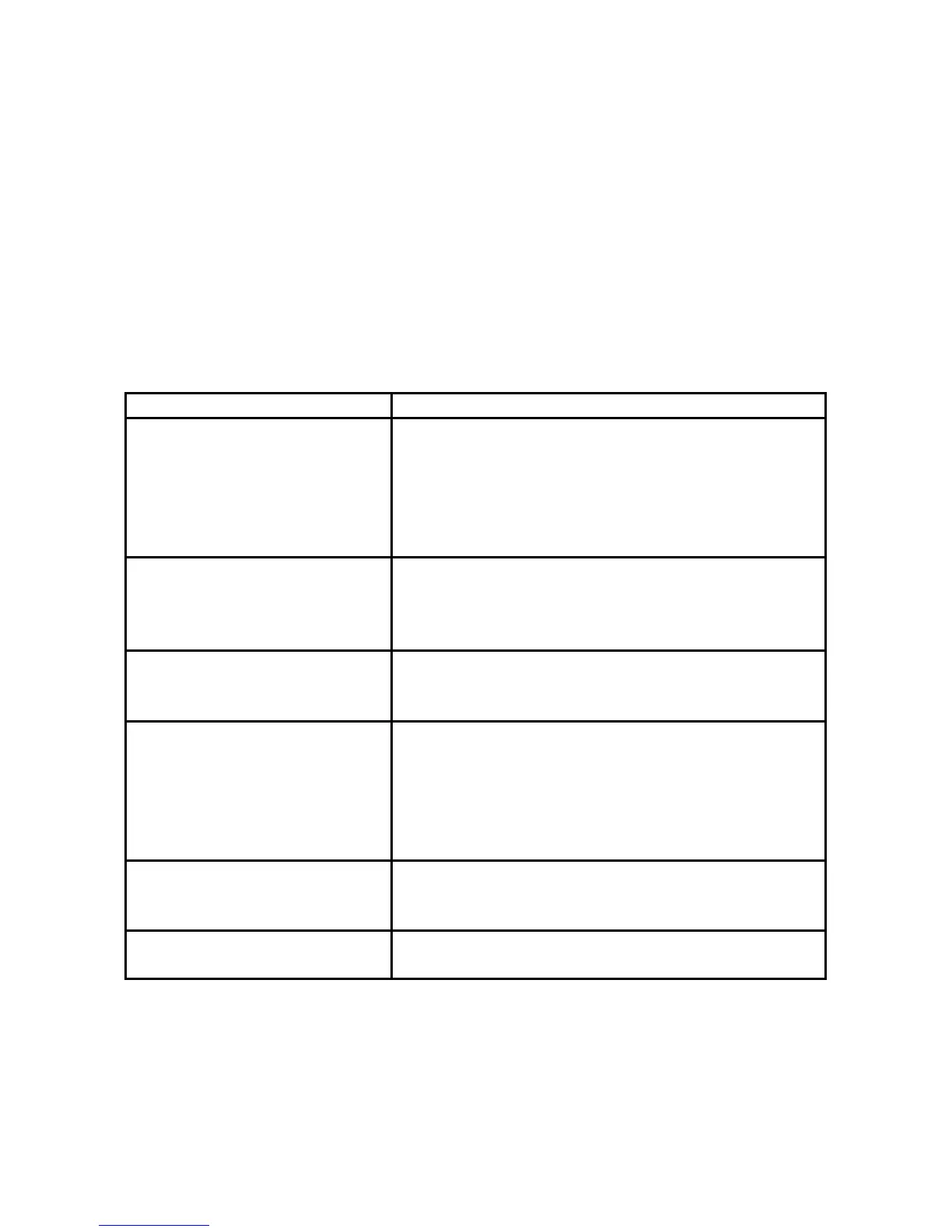
The following list will help you make the proper diagnosis when you believe the product is working
abnormally. Consult with the manufacturer if any problems occur that are not on this list.
Status Cause, prevention, response
The DECO mark, the
decompression stop depth and
decompression stop time are
blinking while at the surface
・There has been a decompression stop direction
violation. If it has been less than 10 minutes have,
return to the indicated depth.
・If more than 10 minu
es have elapsed, the dive
computer will not work for 48 hours and then will
recover automatically.
Entire display is blinking while
a surface.
・The dive computer has gone beyond measurement
range.
・The dive computer will not work for 48 hours and
then will recover automatically.
The altitude rank mark is
blinking while at an altitude
that should allow usage.
・The product is damaged. Return to manufacturer
for repair.
The altitude rank is shift. ・This can occur when you are close to the altitude
rank boundary. It is not a problem in this case.
・This can occur under very hot conditions. Cool the
unit down, such as by putting it in water.
・In other cases, this could indicate damage. Return
to manufacturer for repair.
There is data in the Dive Log
mode when you begin using
the dive computer.
・The manufacturer inspects quality at the time of
factory shipping by conducting chamber tests. The
data is left over from the test.
You can see a rainbow on the
display.
・This is caused by tension of the glass from
temperature differences. It is not a problem.


 To Next Page