ZEISS Start-Up and Operation Primovert
24 415510-7244-001 12/2014
Legend to Fig. 12:
1 Transmitted-light illuminator (built-in)
2 Filter slider
3 Slider with phase stops
4 Handle (rear)
5 Specimen stage
6 Fine focusing drive (right side)
7 Coarse focusing drive (right side)
8 Rotary knob for adjusting the illumination intensity
9 USB socket (5 V / 2 A) for iPad charging
10 On/off switch for illumination; active with rotary knob in AUTO position
11 Control elements
12 Holder for iPad
13 Lever for adjusting the aperture diaphragm of the condenser
14 Rotary knob for switching the microscope on and off, with ON, OFF and AUTO positions
15 Ring for adjusting the torque of the coarse focusing drive
16 Coarse focusing drive (left side)
17 Fine focusing drive (left side)
18 SD card slot
19 Nosepiece
20 Plug-in power unit
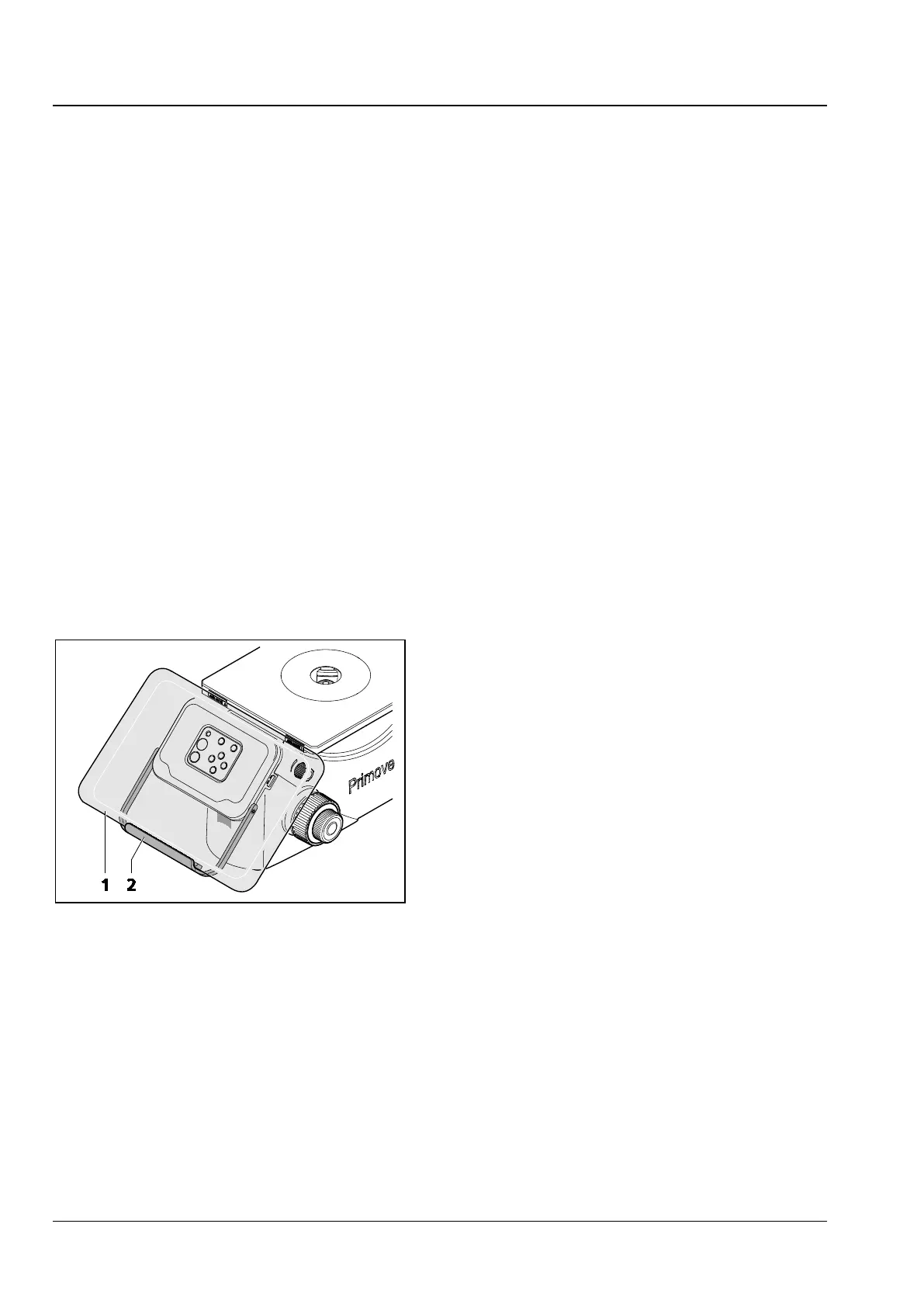
Operating of Primovert HDcam with integrated camera with iPad
• Swivel down the holder (Fig. 13/2) and insert
the iPad (Fig. 13/1).
1 iPad
2 Holder
Fig. 13 Usage of Primovert HDcam with











 To Next Page