PAGE 2G I OPERATION
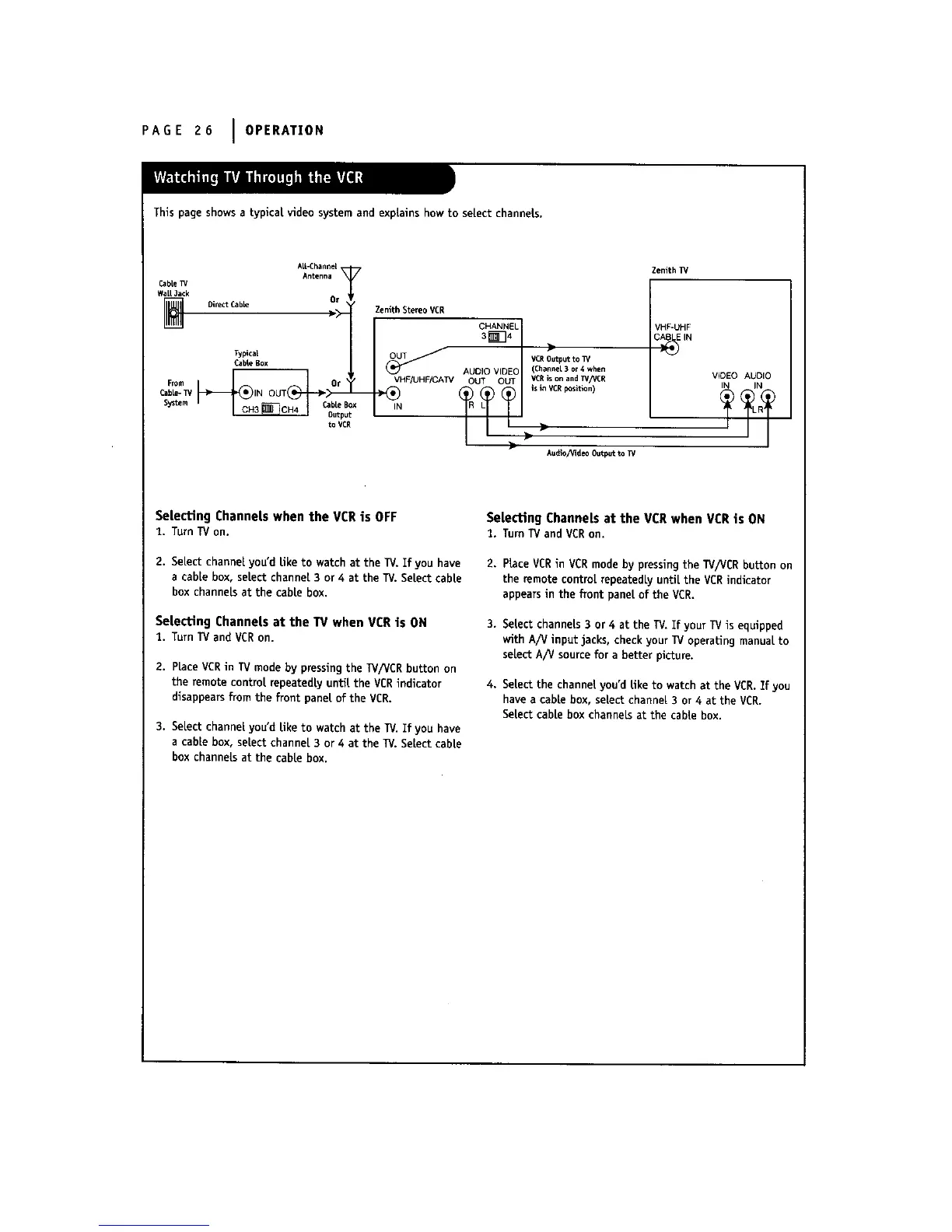
This page shows a typical video system and explains how to select channels.
Cable_/
WaLlJack
AE-Chann_
Antenna
Direct Cable OT
)__ Zenith Stereo VCR
CabLeBox AUDIO VIDEO
From Or _ VHF/UHF/CATV OUT OUT
Cabl_ TV IN OUT _ --
System, _ C_bulepBu;x
to VCR
Zenith]_*
VHF-UHF
C_E IN
>
VCROutput to _/
(Channel 3 or 4 when
VCR is on and T_'/VCR
is in VCR position)
Au_o_id_ Out_t_W
V_DEO AUDIO
IN IN
Selecting Channels when the VCR is OFF
t. TurnTVon.
2. Select channel you'd Eke to watch at the TV. If you have
a cable box, select channel 3 or 4 at the TV. Select cable
box channels at the cable box.
Selecting Channels at the TV when VCR is ON
1. TurnTVandVCRon.
2. place VCRin TV mode by pressing the W/VCR button on
the remote control repeatedly until the VCR indicator
disappears from the front pane[ of the VCR.
3. Select channel you'd like to watch at the TV. If you have
a cable box, select channel 3 or 4 at the 13/. Select cable
box channeLsat the cable box.
Selecting Channels at the VCR when VCRis ON
1. TurnTVandVCRon.
2. Place VCRin VCRmode by pressing the TV/VCR button on
the remote control repeatedly untiLthe VCR indicator
appearsin the front panel of the VCR.
3. Select channels 3 or 4 at the 13/.If your TV is equipped
with A/V input jacks, check your TV operating manual to
select A/V source for a better picture.
4. Select the channel you'd like to watch at the VCR.Ifyou
have a cable box, select channel 3 or 4 at the VCR.
Select cable box channels at the cable box.



 To Next Page