CONTROL NAMES AND LOCATIONS (Cont’d)
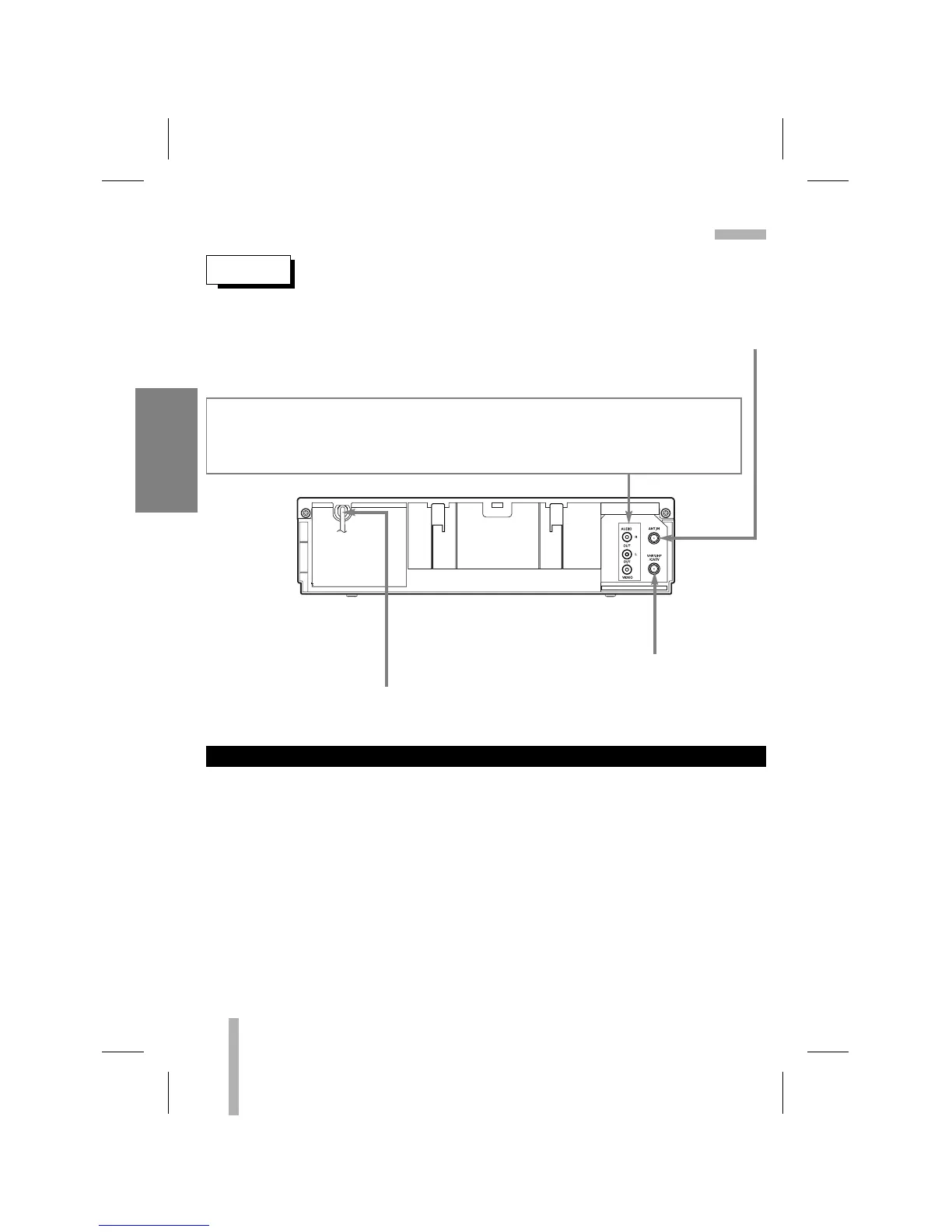
REAR
ANTENNA INPUT CONNECTOR
Connect the VHF/UHF/CATV antenna to this terminal.
AUDIO OUT (L/R) JACKS; Connect these output jacks to the audio input on an external
unit (Audio System, TV/Monitor, Another VCR).
VIDEO OUT JACK; Connect this output jack to the video input terminal on an external unit
(TV/Monitor, Another VCR).
POWER CORD
Connect only to an AC 120V, 60Hz outlet.
VHF/UHF/CATV ANTENNA OUTPUT CONNECTOR
Connect this terminal to the VHF or UHF
antenna terminals on the back of a TV.
10
VCR SETUP
1. While the VCR is turned off, press and hold CH (
DD
/
EE
) on the front panel for about five sec-
onds. The VCR will turn itself on and off “RF03” or “RF04” appears in the display window.
2. Use CH (
DD
/
EE
) on the front panel or CH/TRK (
DD
/
EE
) on the remote control the RF output
channel (RF03 or RF04).
3. Turn off and on the VCR.
SET THE VCR’s RF output channel



 To Next Page