VCR Menu Settings
On-Screen Menus
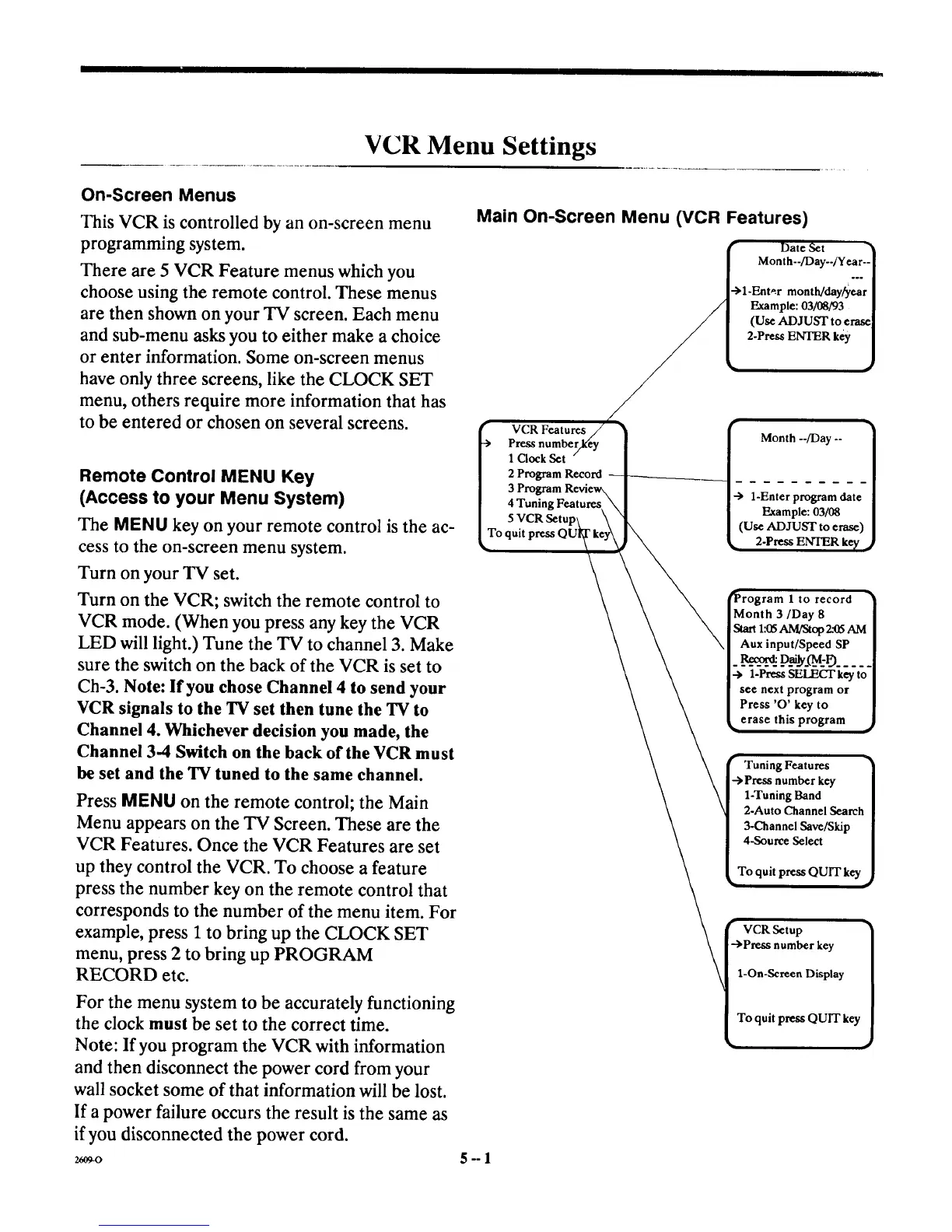
This VCR is controlled by an on-screen menu
programming system.
There are 5 VCR Feature menus which you
choose using the remote control. These menus
are then shown on your TV screen. Each menu
and sub-menu asks you to either make a choice
or enter information. Some on-screen menus
have only three screens, like the CLOCK SET
menu, others require more information that has
to be entered or chosen on several screens.
Remote Control MENU Key
(Access to your Menu System)
The MENU key on your remote control is the ac-
cess to the on-screen menu system.
Turn on your TV set.
Turn on the VCR; switch the remote control to
VCR mode. (When you press any key the VCR
LED will light.) Tune the TV to channel 3. Make
sure the switch on the back of the VCR is set to
Ch-3. Note: If you chose Channel 4 to send your
VCR signals to the 'IN set then tune the 'IN to
Channel 4. Whichever decision you made, the
Channel 3-4 Switch on the back of the VCR must
be set and the TV tuned to the same channel.
Press MENU on the remote control; the Main
Menu appears on the TV Screen. These are the
VCR Features. Once the VCR Features are set
up they control the VCR. To choose a feature
press the number key on the remote control that
corresponds to the number of the menu item. For
example, press 1 to bring up the CLOCK SET
menu, press 2 to bring up PROGRAM
RECORD etc.
For the menu system to be accurately functioning
the clock must be set to the correct time.
Note: If you program the VCR with information
and then disconnect the power cord from your
wall socket some of that information will be lost.
If a power failure occurs the result is the same as
if you disconnected the power cord.
2609-O
Main On-Screen Menu (VCR Features)
(Use
2-Press ENTER key
r
-.>
VCR
Press numbe
1 Clock Set
2 Program Record
3 Program
4 Tuning Features
-> 1-Enter program date
Example:03/08
(Use ADJUST to erase)
2-Press ENTER ke_, ,_
ram 1 to record
Month 3/Day 8
Start 1:_ AM/Stop 2.'(15AM
Aux input/Speed SP
__R___.p_____:r9.....
.-> 1-Press SELECT key to
see next program or
Press 'O' key to
erase this program ._
Tuning Features
number key
1-Tuning Band
2-Auto Channel Search
3-Channel Save/Skip
4-Source Select
To quit press QUIT key
VCR Setup
-->Press number key
1-On-Screen Display
To quit press QUIT key
5-°]



 To Next Page