llmllllll lull I IFI II I I IIII
Service Information
Before Calling for Service
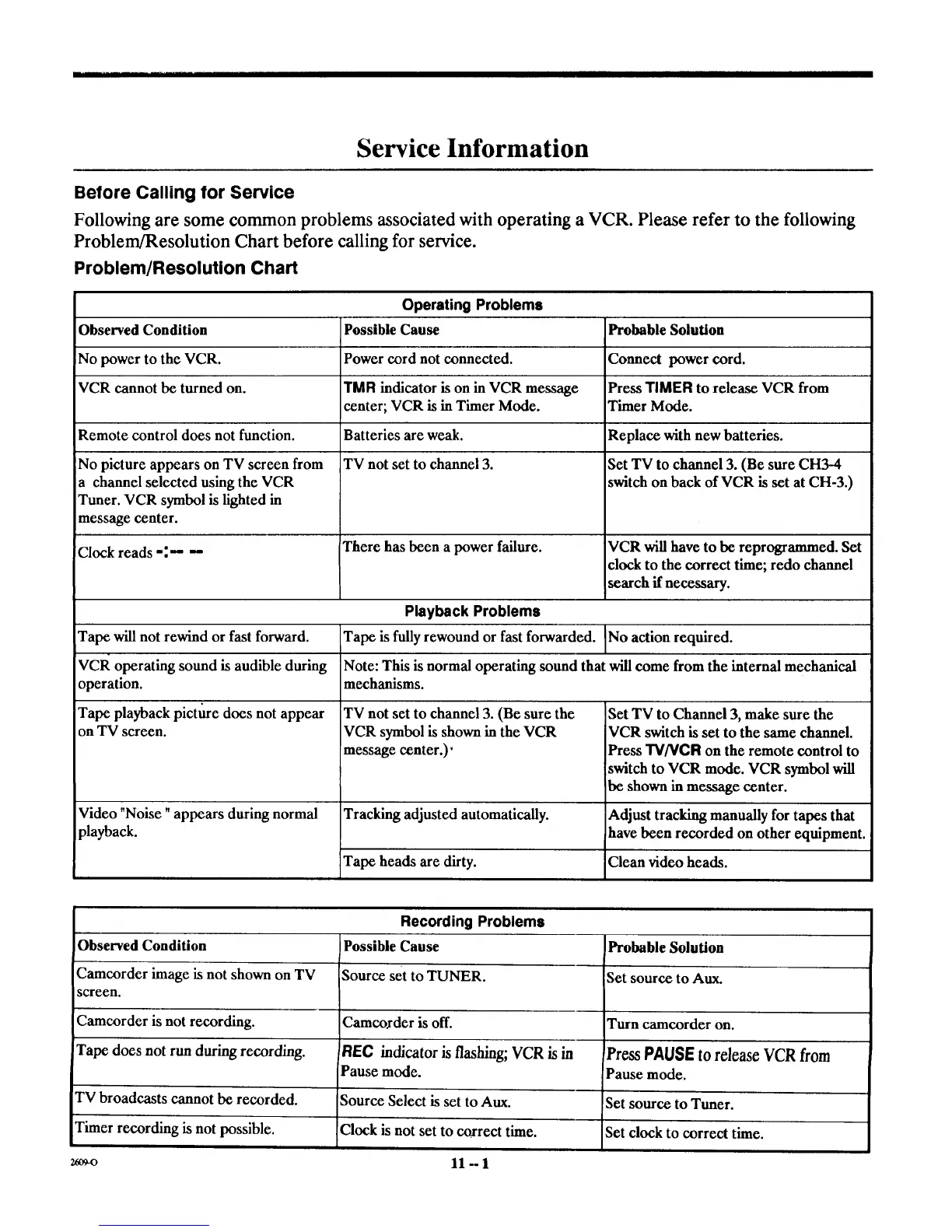
Following are some common problems associated with operating a VCR. Please refer to the following
Problem/Resolution Chart before calling for service.
Problem/Resolution Chart
Operating Problems
Observed Condition Possible Cause
No power to the VCR. Power cord not connected.
VCR cannot be turned on. TMR indicator is on in VCR message
center; VCR is in Timer Mode.
Remote control does not function. Batteries are weak.
TV not set to channel 3.
No picture appears on TV screen from
a channel selected using the VCR
Tuner. VCR symbol is lighted in
message center.
Probable Solution
Connect power cord.
Press TIMER to release VCR from
Timer Mode.
Replace with new batteries.
Set TV to channel 3. (Be sure CH3-4
switch on back of VCR is set at CH-3.)
Clock reads -:'- -- There has been a power failure. VCR will have to be reprogrammed. Set
clock to the correct time; redo channel
search if necessary.
Playback Problems
Tape will not rewind or fast forward. Tape is fully rewound or fast forwarded. ]No action required.
Note: This is normal operating sound that will come from the internal mechanical
mechanisms.
VCR operating sound is audible during
operation.
Tape playback picture does not appear
on TV screen.
Video "Noise" appears during normal
playback.
TV not set to channel 3. (Be sure the
VCR symbol is shown in the VCR
message center.)'
Tracking adjusted automatically.
Set TV to Channel 3, make sure the
VCR switch is set to the same channel.
Press "I3/NCFI on the remote control to
switch to VCR mode. VCR symbol will
be shown in message center.
Adjust tracking manually for tapes that
have been recorded on other equipment.
Tape heads are dirty. Clean video heads.
Recording Problems
Observed Condition Possible Cause IProbable Solution
Camcorder image is not shown on TV Source set to TUNER. Set source to Aux.
screen.
Camcorder is not recording. Camcoxder is off. Turn camcorder on.
Tape does not run duringrecording. Rl=C indicator is flashing;VCR is in Press PAUSE to release VCR from
Pause mode. Pause mode.
TV broadcasts cannot be recorded. Source Select is set to Aux. Set source to Tuner.
Timer recording is not possible. Clock is not set to correct time. Set clock to correct time.
uo+o 11-1



 To Next Page