Jl I I I ][_ .....
Additional Playback Features
/
IN_VEIt
IJ-oo
VRL.4110.4HI[ADS(DA0.ON SCREEN PROGRAMMING.HQ $P.UP.EP O
t AM J CHA 1_4_L
\
f-
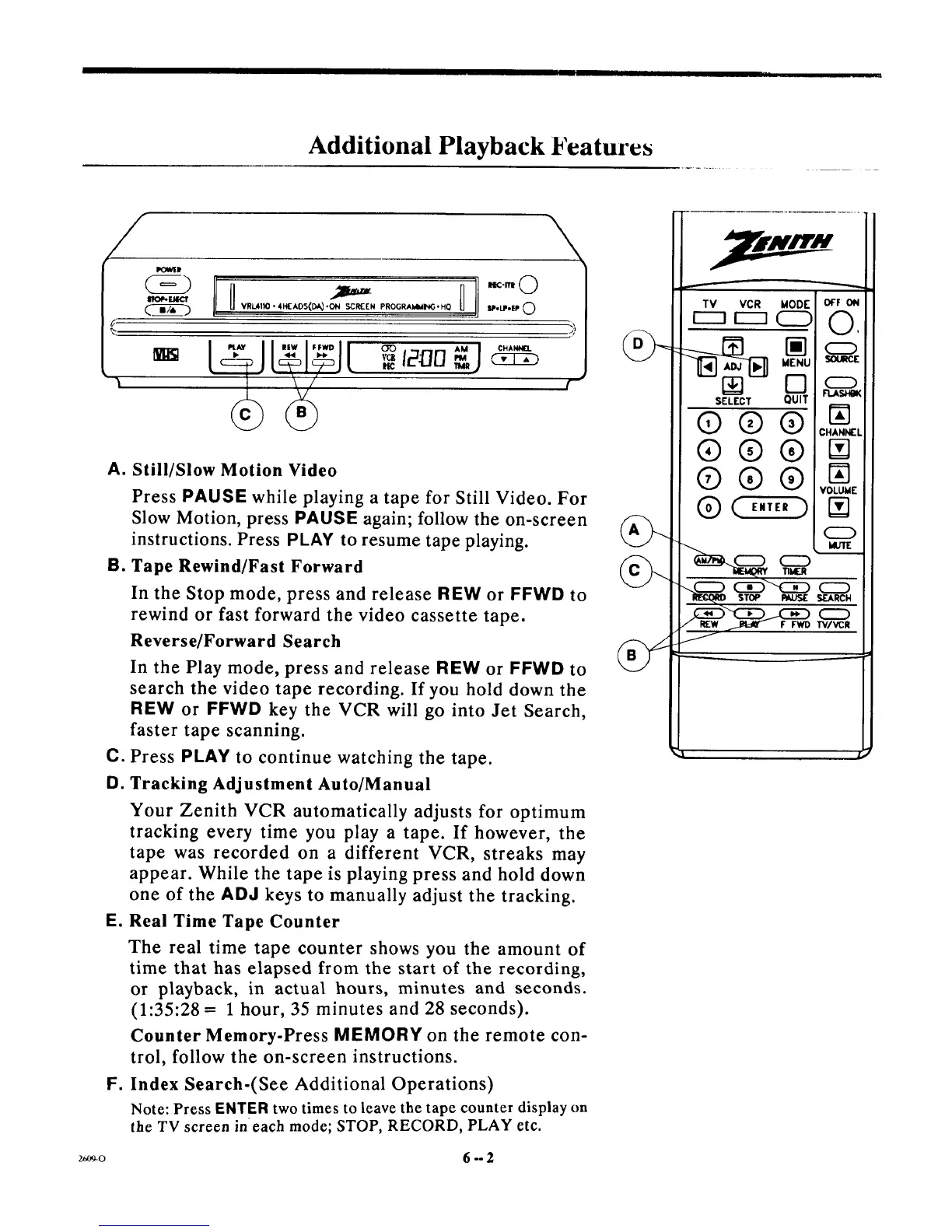
A. Still/Slow Motion Video
B=
Press PAUSE while playing a tape for Still Video. For
Slow Motion, press PAUSE again; follow the on-screen
instructions. Press PLAY to resume tape playing.
Tape Rewind/Fast Forward
In the Stop mode, press and release REW or FFWD to
rewind or fast forward the video cassette tape.
Reverse/Forward Search
In the Play mode, press and release REW or FFWD to
search the video tape recording. If you hold down the
REW or FFWD key the VCR will go into Jet Search,
faster tape scanning.
C. Press PLAY to continue watching the tape.
D. Tracking Adjustment Auto/Manual
E.
F=
Your Zenith VCR automatically adjusts for optimum
tracking every time you play a tape. If however, the
tape was recorded on a different VCR, streaks may
appear. While the tape is playing press and hold down
one of the ADd keys to manually adjust the tracking.
Real Time Tape Counter
The real time tape counter shows you the amount of
time that has elapsed from the start of the recording,
or playback, in actual hours, minutes and seconds.
(1:35:28 = 1 hour, 35 minutes and 28 seconds).
Counter Memory-Press MEMORY on the remote con-
trol, follow the on-screen instructions.
Index Search-(See Additional Operations)
Note: Press ENTER two times to leave the tape counter display on
the TV screen in each mode; STOP, RECORD, PLAY etc.
STOP PAUS[
F FWD
OFF ON
O,
0
FLASHBK
CHANN[L
N
N]
VOLUME
N
CZD
CZD
Srt.ARCH
"W/_R
z_9-o 6 -- 2



 To Next Page