VCR Back Panel Connection Jacks
VHFAJHF/GA_/
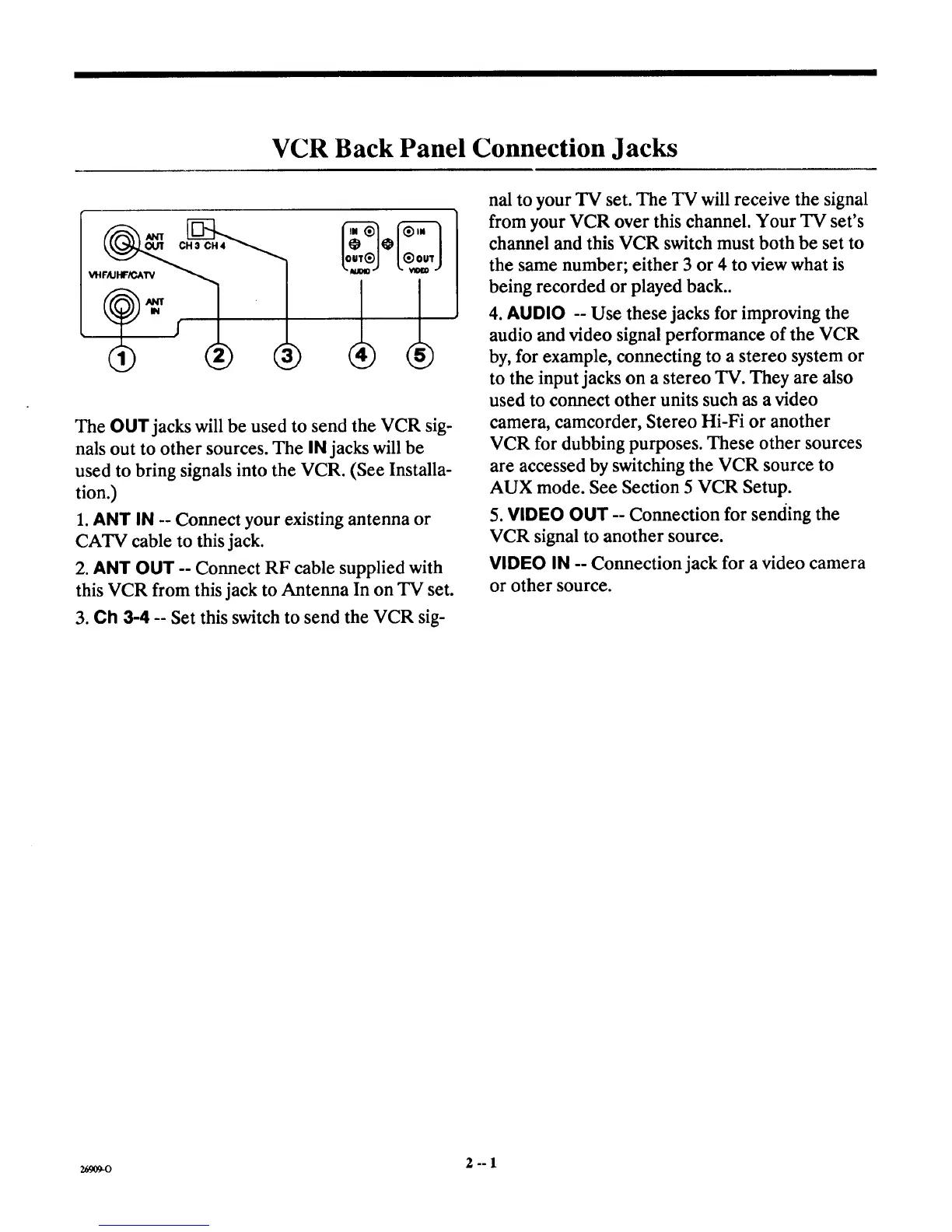
The OUT jacks will be used to send the VCR sig-
nals out to other sources. The IN jacks will be
used to bring signals into the VCR. (See Installa-
tion.)
1. ANT IN -- Connect your existing antenna or
CATV cable to this jack.
2. ANT OUT -- Connect RF cable supplied with
this VCR from this jack to Antenna In on TV set.
3. Ch 3-4 -- Set this switch to send the VCR sig-
nal to your TV set. The TV will receive the signal
from your VCR over this channel. Your TV set's
channel and this VCR switch must both be set to
the same number; either 3 or 4 to view what is
being recorded or played back..
4. AUDIO -- Use these jacks for improving the
audio and video signal performance of the VCR
by, for example, connecting to a stereo system or
to the input jacks on a stereo TV. They are also
used to connect other units such as a video
camera, camcorder, Stereo Hi-Fi or another
VCR for dubbing purposes. These other sources
are accessed by switching the VCR source to
AUX mode. See Section 5 VCR Setup.
5. VIDEO OUT -- Connection for sending the
VCR signal to another source.
VIDEO IN -- Connection jack for a video camera
or other source.
2_09-o 2--1



 To Next Page