I__ 111lTl...... I
Additional Operations
Recording Speed Selection
Your video recorder can record in three speeds:
Standard Play (SP), Long Play (LP), and Ex-
tended Play (EP). SP provides better picture
quality. EP provides longer recording time.
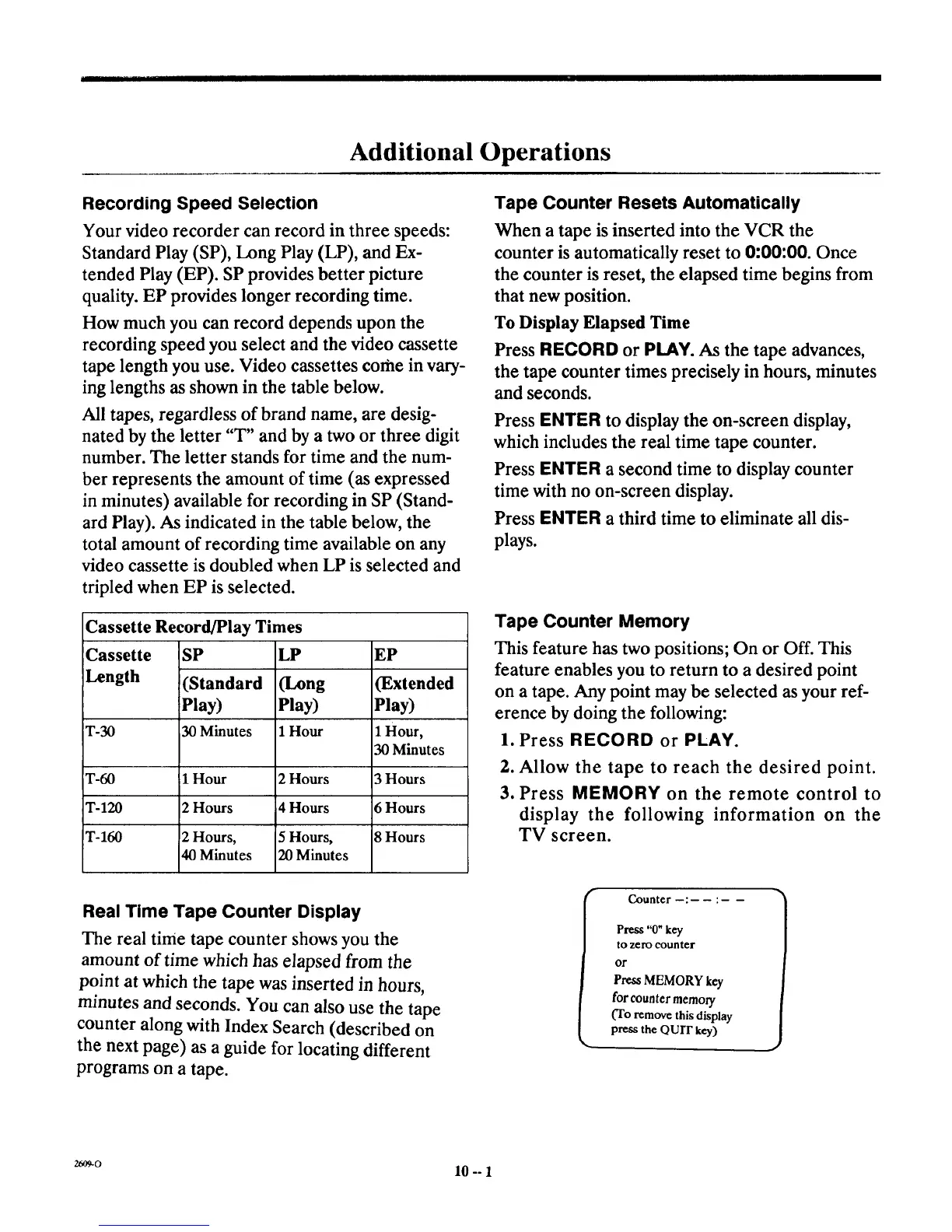
How much you can record depends upon the
recording speed you select and the video cassette
tape length you use. Video cassettes corhe in vary-
ing lengths as shown in the table below.
All tapes, regardless of brand name, are desig-
nated by the letter "T" and by a two or three digit
number. The letter stands for time and the num-
ber represents the amount of time (as expressed
in minutes) available for recording in SP (Stand-
ard Play). As indicated in the table below, the
total amount of recording time available on any
video cassette is doubled when LP is selected and
tripled when EP is selected.
Cassette Record/Play Times
Cassette
Length
SP
(Standard
Play)
30 Minutes
LP
(Long
Play)
1 HourT-30
T-60 1 Hour 2 Hours
T-120 2 Hours 4 Hours
T-160 2 Hours, 5 Hours,
40 Minutes 20 Minutes
EP
(Extended
Play)
1 Hour,
30 Minutes
3 Hours
6 Hours
8 Hours
Tape Counter Resets Automatically
When a tape isinserted into the VCR the
counter is automatically reset to 0:00:00. Once
the counter is reset, the elapsed time begins from
that new position.
To Display Elapsed Time
Press RECORD or PLAY. As the tape advances,
the tape counter times precisely in hours, minutes
and seconds.
Press ENTER to display the on-screen display,
which includes the real time tape counter.
Press ENTER a second time to display counter
time with no on-screen display.
Press ENTER a third time to eliminate all dis-
plays.
Tape Counter Memory
This feature has two positions; On or Off. This
feature enables you to return to a desired point
on a tape. Any point may be selected as your ref-
erence by doing the following:
1. Press RECORD or PLAY.
2. Allow the tape to reach the desired point.
3. Press MEMORY on the remote control to
display the following information on the
TV screen.
Real Time Tape Counter Display
The real time tape counter shows you the
amount of time which has elapsed from the
point at which the tape was inserted in hours,
minutes and seconds. You can also use the tape
counter along with Index Search (described on
the next page) as a guide for locating different
programs on a tape.
Counter : :
Press "0"key
to zero counter
Ol"
Press MEMORY key
for counter memory
(To remove this display
press the QUIT key)
J
2609-0 10 -- 1



 To Next Page