VCR Front Panel Controls
VRL4110 • 4HEADS(DA).ON SCREEN PROGRAMMINGoHQ SP-LP.EP
I ,,- Jl CHANNEL
• I . // V,_R ;HI IL_"_M
(r" i ( / f-
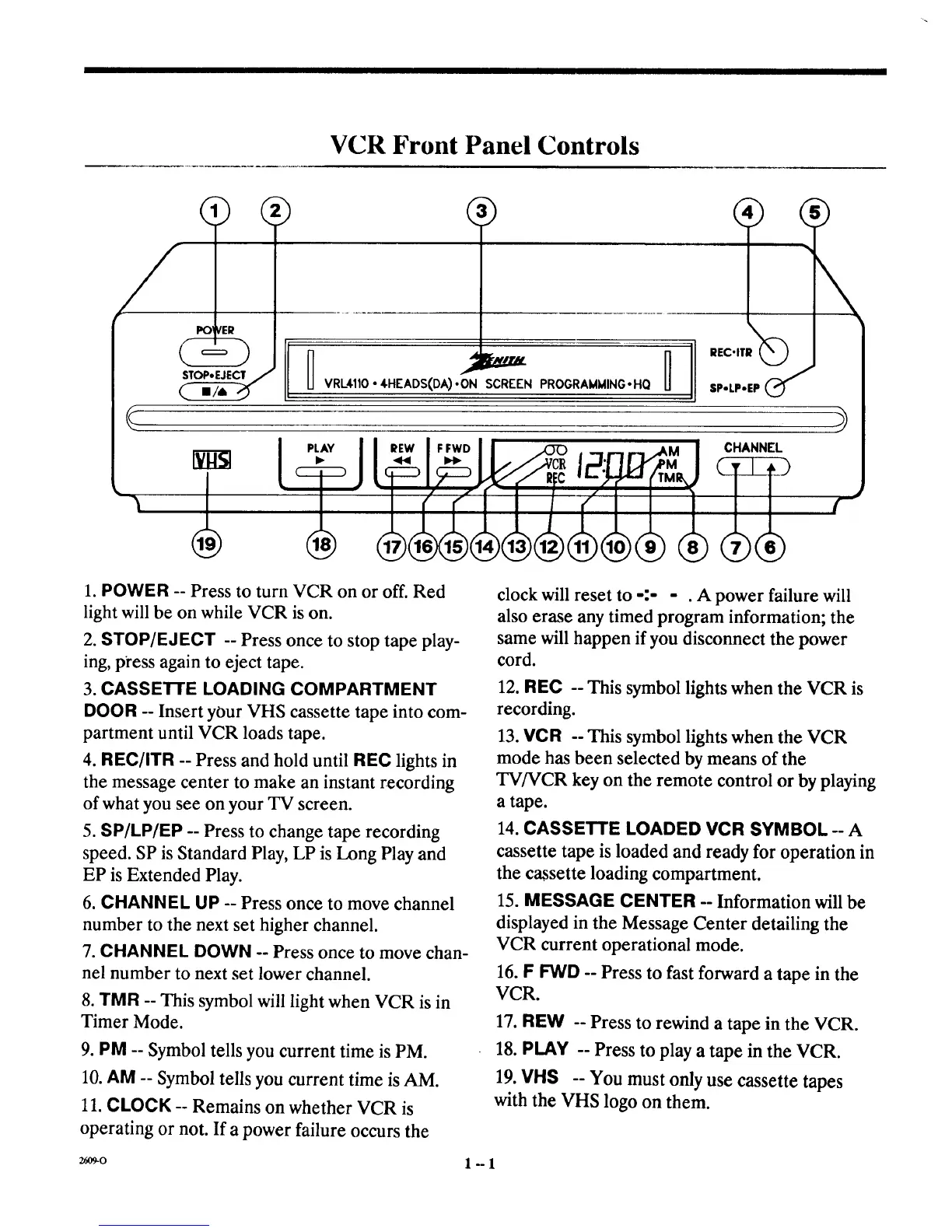
1. POWER -- Press to turn VCR on or off. Red
light will be on while VCR is on.
2. STOP/EJECT -- Press once to stop tape play-
ing, p_'ess again to eject tape.
3. CASSETTE LOADING COMPARTMENT
DOOR -- Insert your VHS cassette tape into com-
partment until VCR loads tape.
4. REC/ITR -- Press and hold until REC lights in
the message center to make an instant recording
of what you see on your TV screen.
5. SP/LP/EP -- Press to change tape recording
speed. SP is Standard Play, LP is Long Play and
EP is Extended Play.
6. CHANNEL UP -- Press once to move channel
number to the next set higher channel.
7. CHANNEL DOWN -- Press once to move chan-
nel number to next set lower channel.
8. TMR -- This symbol will light when VCR is in
Timer Mode.
9. PM -- Symbol tells you current time is PM.
10. AM -- Symbol tells you current time is AM.
11. CLOCK -- Remains on whether VCR is
operating or not. If a power failure occurs the
26O9-0
clock will reset to -:- - . A power failure will
also erase any timed program information; the
same will happen if you disconnect the power
cord.
12. REC -- This symbol lights when the VCR is
recording.
13. VCR -- This symbol lights when the VCR
mode has been selected by means of the
TV/VCR key on the remote control or by playing
a tape.
14 CASSETTE LOADED VCR SYMBOL A
cassette tape is loaded and ready for operation in
the cassette loading compartment.
15. MESSAGE CENTER -- Information will be
displayed in the Message Center detailing the
VCR current operational mode.
16. F FWD -- Press to fast forward a tape in the
VCR.
17. REW -- Press to rewind a tape in the VCR.
18. PLAY -- Press to play a tape in the VCR.
19. VHS -- You must only use cassette tapes
with the VHS logo on them.
1"-1



 To Next Page