Recording
/
P_OWll
MO_ENC[
PROGRAMMING. HQ U
120D
tiC 1MR
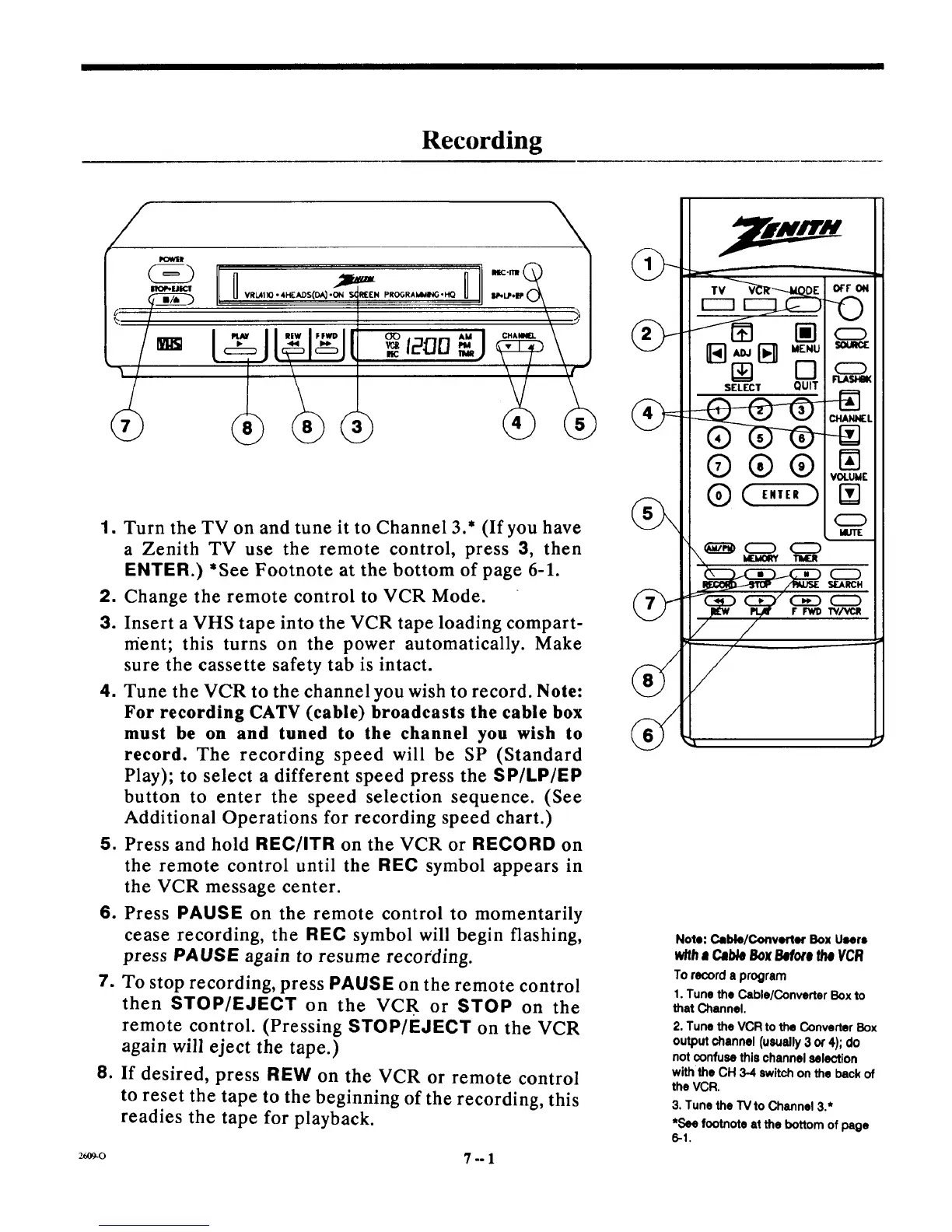
1. Turn the TV on and tune it to Channel 3.* (If you have
a Zenith TV use the remote control, press 3, then
ENTER.) *See Footnote at the bottom of page 6-1.
2. Change the remote control to VCR Mode.
3. Insert a VHS tape into the VCR tape loading compart-
ment; this turns on the power automatically. Make
sure the cassette safety tab is intact.
4. Tune the VCR to the channel you wish to record. Note:
For recording CATV (cable) broadcasts the cable box
must be on and tuned to the channel you wish to
record. The recording speed will be SP (Standard
Play); to select a different speed press the SP/LP/EP
button to enter the speed selection sequence. (See
Additional Operations for recording speed chart.)
5. Press and hold REC/ITR on the VCR or RECORD on
the remote control until the REC symbol appears in
the VCR message center.
6. Press PAUSE on the remote control to momentarily
cease recording, the REC symbol will begin flashing,
press PAUSE again to resume recording.
7. To stop recording, press PAUSE on the remote control
then STOP/EJECT on the VCR or STOP on the
remote control. (Pressing STOP/EJECT on the VCR
again will eject the tape.)
8. If desired, press REW on the VCR or remote control
to reset the tape to the beginning of the recording, this
readies the tape for playback.
r------]
MENU SOURCE
SELECT QUIT
®
0
MUTE
-- SEARCH
o
ir IrwD TV/Val!
/
Note: CJble/Convetler Box Users
with• CableBoxBeforetheVCR
To recorda program
1. Tune the Cable/Converter Box to
that Channel.
2. Tune the VCR to the Converter Box
outputchannel (usually3 or4); do
notconfusethischannelselection
with the CH 3-4 switch on the back of
the VCR.
3. Tunethe TVto Channel 3.*
*See footnote at the bottom of page
6-1.
26o9-0 7 -- 1



 To Next Page