Remote Control
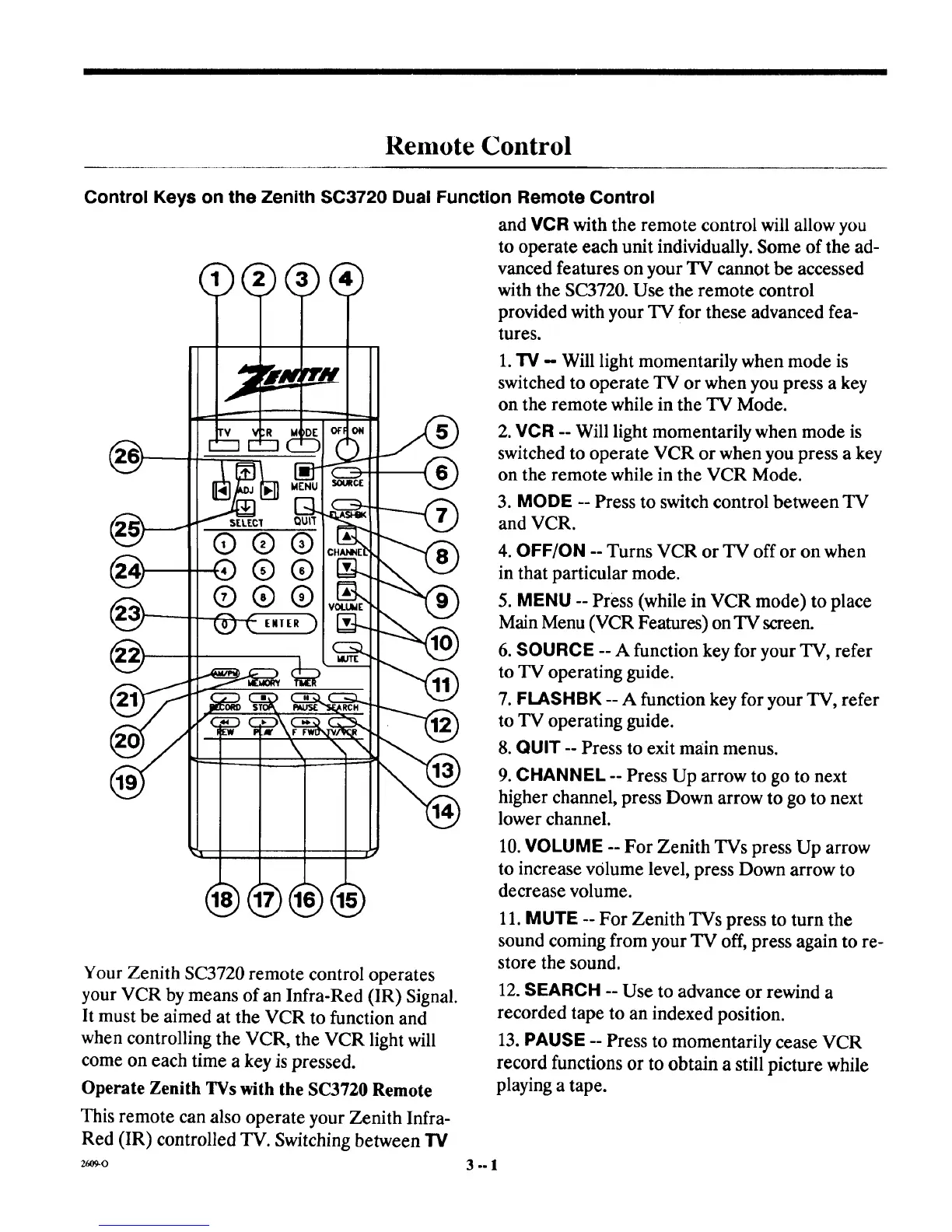
Control Keys on the Zenith SC3720 Dual Function Remote Control
and VCR with the remote control will allow you
to operate each unit individually. Some of the ad-
vanced features on your TV cannot be accessed
with the SC3720. Use the remote control
provided with your TV for these advanced fea-
tures.
1.TV - Will light momentarily when mode is
switched to operate TV or when you press a key
on the remote while in the TV Mode.
2. VCR -- Will light momentarily when mode is
switched to operate VCR or when you press a key
on the remote while in the VCR Mode.
3. MODE -- Press to switch control between TV
and VCR.
4. OFF/ON -- Turns VCR or TV off or on when
in that particular mode.
5. MENU -- Press (while in VCR mode) to place
Main Menu (VCR Features) on TV screen.
6. SOURCE -- A function key for your TV, refer
to TV operating guide.
7. FLASHBK -- A function key for your TV, refer
to TV operating guide.
8. QUIT -- Press to exit main menus.
9. CHANNEL -- Press Up arrow to go to next
higher channel, press Down arrow to go to next
lower channel.
10. VOLUME -- For Zenith TVs press Up arrow
to increase volume level, press Down arrow to
decrease volume.
Your Zenith SC3720 remote control operates
your VCR by means of an Infra-Red (IR) Signal.
It must be aimed at the VCR to function and
when controlling the VCR, the VCR light will
come on each time a key is pressed.
Operate Zenith TVs with the SC3720 Remote
This remote can also operate your Zenith Infra-
Red (IR) controlled TV. Switching between TV
26O9-0
11. MUTE -- For Zenith TVs press to turn the
sound coming from your TV off, press again to re-
store the sound.
12. SEARCH -- Use to advance or rewind a
recorded tape to an indexed position.
13. PAUSE -- Press to momentarily cease VCR
record functions or to obtain a still picture while
playing a tape.
3°=1



 To Next Page