3-143
5. Optical Power Setting
When replacing Travers ass’y including Pick-up or Loader PCB, Optical Power Setting should be performed for Pick-up
and Loading PCB’s matching.
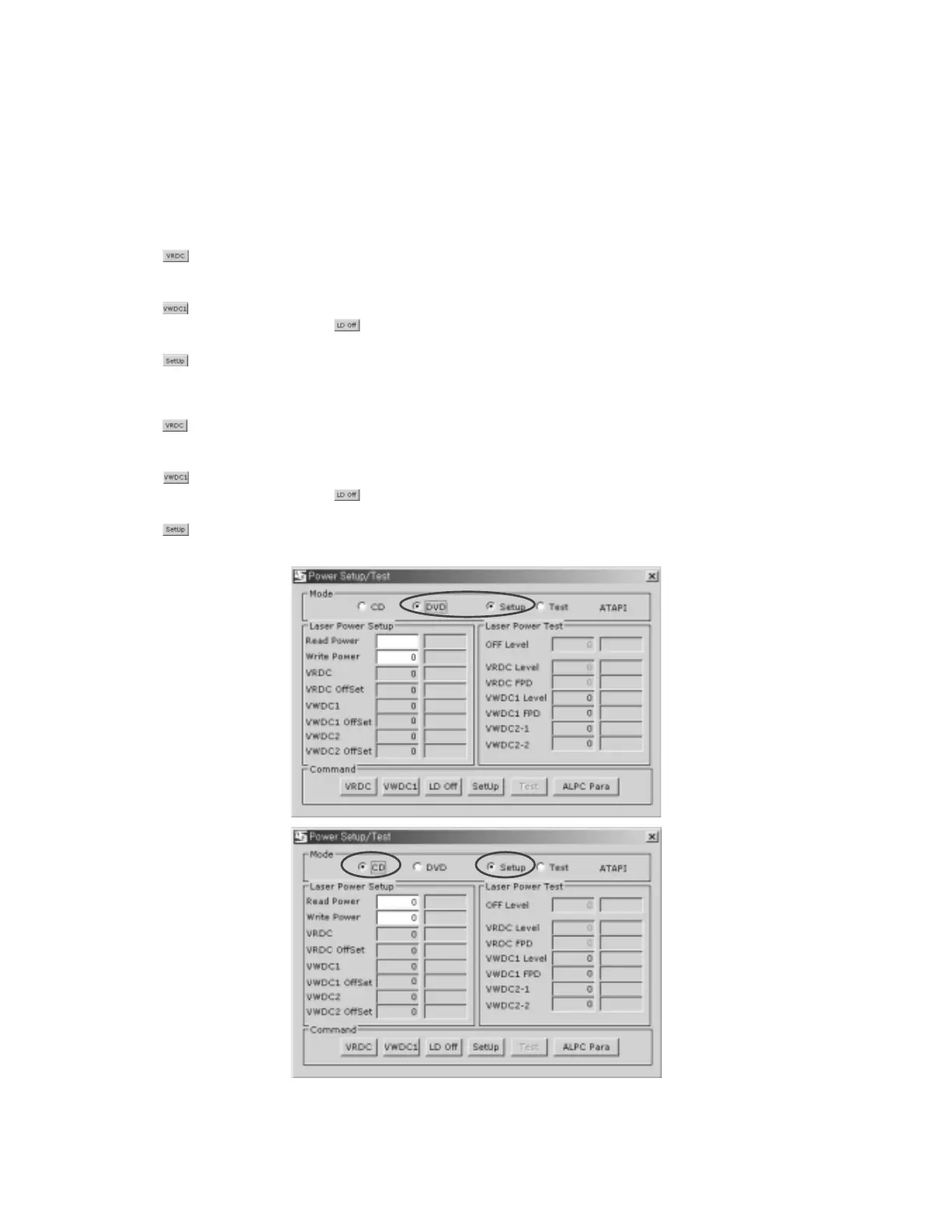
➀ DVD LD optocal Power Setting
• Select DVD and Setup
• Push . (Read Power On. Strong Red light can be seen.)
• Measure optical power.
• Write measurement value in Read Power.
• Push . (Write power On.) (Caution) Light is very strong. Never look at the light directly.
• Measure optical power and push . (LCD off)
• Write measurement value in Read Power.
• Push . (Measurement value is inputted to EEPROM)
➁ DVD LD optocal Power Setting
• Select CD and Setup
• Push . (Read Power On. Weak Red light can be seen.)
• Measure optical power.
• Write measurement value in Read Power.
• Push . (Write power On. Weak Red light can be seen.)
• Measure optical power and push . (LCD off)
• Write measurement value in Read Power.
• Push . (Measurement value is inputted to EEPROM)


 To Next Page