DALIBOX Interface 64/32
http://www.zennio.com Technical Support: http://support.zennio.com
2.4.1.1 EMERGENCY TESTS
When “Converter” is selected as ECG Type, the following objects turn visible:
[ECG N] Converter Test Control: Controls a test of a DALI converter.
Furthermore, it allows to stop running test and to reset test flags. These object
follows the following coding:
0: Reserved.
1: Start function test.
2: Start duration test.
3: Start partial duration test.
4: Stop test.
5: Reset function test done flag.
6: Reset duration test done flag
7 – 255: Reserved.
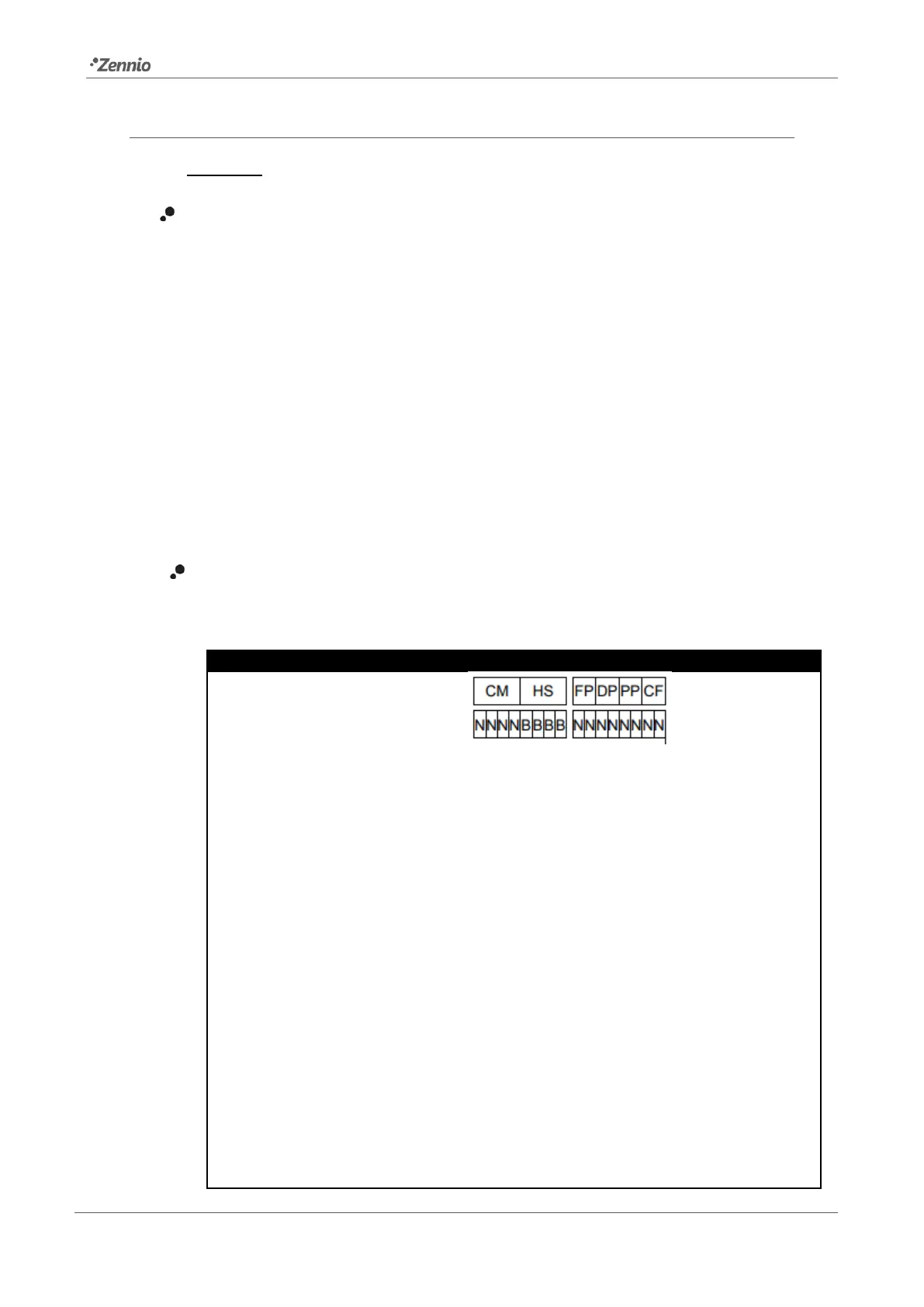
[ECG N] Converter Status: Returns the status of a converter with the following
coding:
CM: Converter Mode. Indicates converter status:
0: Unknown.
1: Normal mode active.
2: Inhibit mode active: for 15 minutes the converter will not switch the
emergency lighting on when a power failure occurring.
3: Hardwired inhibit mode active: digital input that the converter can have to
activate the inhibit mode.
4: Rest mode active: forced off emergency lighting during emergency mode.
5: Emergency mode active.
6: Extended emergency mode active.
7: FT in progress.
8: DT in progress.
9: PDT in progress.
10 - 15: Reserved.



 To Next Page