SpeedFace M4 User Manual
Page | 73 Copyright©2021ZKTECO CO., LTD. All rights reserved.
13.2 Add Device on the Software
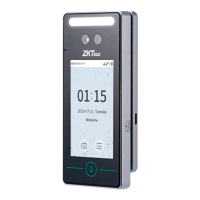
Add the device by searching. The process is as follows:
1) Click Access Control > Device > Search Device, to open the Search interface in the software.
2) Click Search, and it will prompt [Searching……].
3) After searching, the list and total number of access controllers will be displayed.
4) Click [Add] in operation column, a new window will pop-up. Select Icon type, Area, and Add to
Level from each dropdown and click [OK] to add the device.
13.3 Add Personnel on the Software
1. Click Personnel > Person > New:



 To Next Page